
Typeerror: 'type' Object Is Not Subscriptable
Okay, picture this: it's Friday evening. I've finally wrestled myself away from Zoom meetings. I'm ready to dive into that sweet, sweet data science project I've been itching to work on all week. I fire up my Jupyter Notebook, feeling all cool and collected. Then, BAM! A big, angry red error message screams at me from the screen: TypeError: 'type' object is not subscriptable. My initial reaction? A primal scream only dogs can hear. Sound familiar? I’m sure you've been there.
It's like Python is personally mocking my attempts to be productive. But fear not, dear reader, because this error, while initially intimidating, is actually quite understandable – and even fixable! So let's decode this annoying little message and learn how to banish it from our coding lives. Think of me as your error-banishing fairy godmother… except less glittery and more likely to spill coffee.
What Does 'TypeError: 'type' Object Is Not Subscriptable' Really Mean?
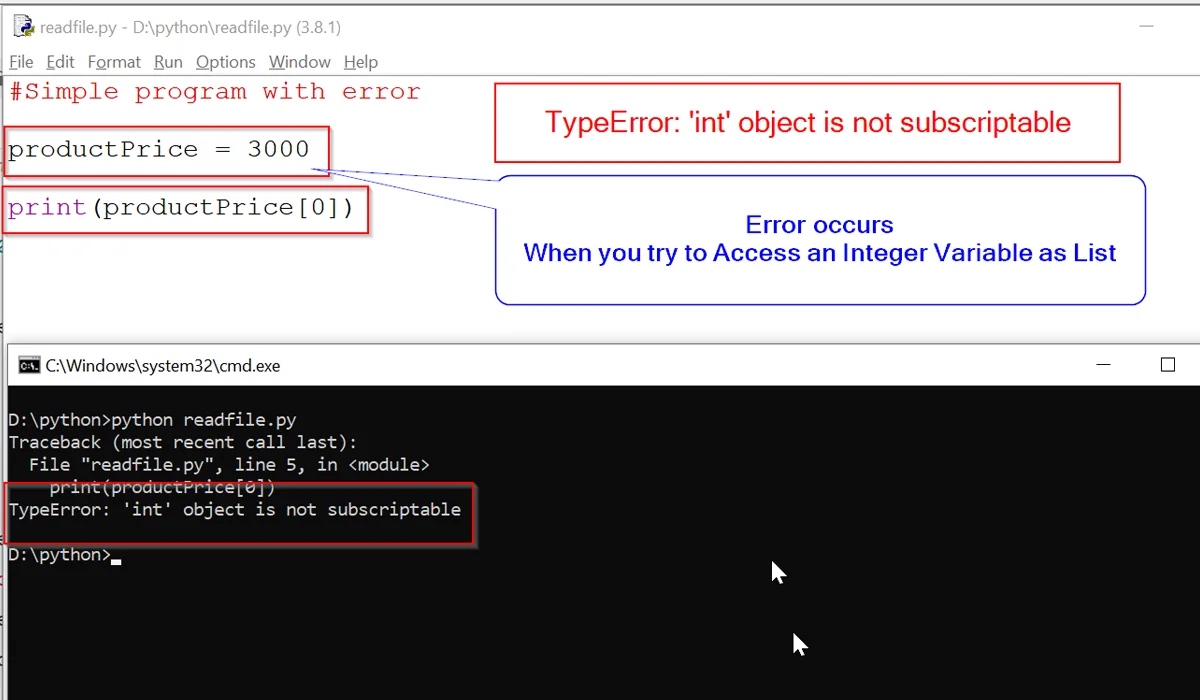
Alright, let's break it down. "Subscriptable" basically means something you can access using square brackets [] and an index or key. Think of it like accessing an element in a list (like my_list[0]) or a value in a dictionary (like my_dict['name']). Lists and dictionaries are subscriptable.
Must Read
The error "TypeError: 'type' object is not subscriptable" means you're trying to use those square brackets [] on a type object (like int, str, list, or even your own custom classes) when you shouldn't be. You're treating the type itself like a list or dictionary, which Python just can't compute. It's like trying to ask the concept of "car" where it's parked. Make sense? (Hopefully!)
You’re probably thinking: “But I didn't mean to treat it that way!” And that’s perfectly reasonable. These things can happen! Usually it's a small typo, a misunderstanding of variable types, or a sneaky little bug in your code.
Common Culprits: The Usual Suspects
So, where do these errors typically hide? Let's look at some common situations where you might encounter this TypeError.
- Misusing Type Annotations: If you're using type hints (like
def my_function(x: int) -> str:) make sure you aren’t accidentally trying to access an element of the type itself. Type hints are declarations about what a variable should be, not the variable itself. For example:
def my_function(x: int):
    return int[x] #This will cause the error!!
The correct way is to simply operate on the `x` variable itself: return x + 1 (or whatever you intended to do).
![[Solved] TypeError: ‘NoneType’ Object is Not Subscriptable - Python Pool](https://www.pythonpool.com/wp-content/uploads/2022/04/TypeError-str-object-is-not-callable-1.webp)
list type) and an actual list object (like [1, 2, 3]). You can only use square brackets on the object, not the type.
my_list = list #This assigns the type list to the my_list variable

print(my_list[0]) #BOOM! TypeError: 'type' object is not subscriptable
Instead, you want to create a new instance of the list type: my_list = [] or my_list = [1, 2, 3].
Int instead of my_int, or something similar. Python is case-sensitive, so int is different from Int, and both are different from my_int. Double-check those variable names! You'd be surprised how often this fixes things.Debugging Tips: Hunting Down the Error
So, how do you track down the specific line of code causing the TypeError? Here are a few tips:
- Read the Error Message Carefully: Python's error messages are actually pretty helpful (sometimes!). Pay attention to the line number and the specific object that's causing the problem.
- Use a Debugger: Python's built-in debugger (
pdb) or your IDE's debugger can be incredibly useful for stepping through your code line by line and inspecting variables. - Print Statements: Old-school, but effective! Add
print()statements to your code to check the types and values of your variables at different points. This can help you pinpoint where the unexpected type is occurring. - Rubber Duck Debugging: Explain your code to a rubber duck (or a friend, or even just yourself). Sometimes, the act of verbalizing the problem can help you spot the error. It sounds crazy, but it works!
Conquering the TypeError: A Victory Lap
The TypeError: 'type' object is not subscriptable might seem daunting at first, but with a little understanding and careful debugging, you can conquer it. Remember to double-check your variable names, pay attention to the difference between types and instances, and use those debugging tools! Soon, you'll be banishing those pesky error messages like a pro, and enjoying that sweet, sweet data science project (or whatever coding adventure you're on). You've got this! And remember, even the best programmers make mistakes. The key is to learn from them (and maybe laugh about them later).

![Typeerror: 'nonetype' object is not subscriptable [SOLVED]](https://itsourcecode.com/wp-content/uploads/2023/04/python-typeerror-nonetype-object-is-not-subscriptable.png)