
How Can You Tell If A Battery Is Dead
The Great Battery Mystery: Solved!
Ever grab a remote, eager to flip channels, only to find... nothing? Or perhaps you're setting up a new toy, and it just sits there, stubbornly silent. The culprit? A dead battery, of course! But how do you really know it's dead?
It's a little puzzle, a miniature detective story playing out in your everyday life. And honestly, solving it can be quite satisfying. Think of yourself as a modern-day Sherlock Holmes, unraveling the secret lives of tiny power cells.
There's a curious thrill in determining a battery's fate. Is it merely sleeping, or has it truly joined the great beyond? Let's uncover some of the fun, simple ways to figure it out, turning a moment of frustration into a little game of discovery.
Must Read
The Obvious Clues: Listening to Your Gadgets
Sometimes, the battery practically screams its demise. If your flashlight beam looks like a tired firefly, barely glowing, that's a pretty strong hint. Or if your clock radio digits are flickering like a haunted house light show, it's time for new power.
These are the gentle nudges, the soft warnings. Your device might slow down, sound funny, or just be incredibly dim. It's like a friend yawning repeatedly – you know they're ready for a nap.
Always trust your senses when a device isn't performing as it should. Often, the performance dip is the first, most common sign that a battery is losing its oomph.
The Famous Drop Test: A Little Bounce Goes a Long Way
Now, here's where it gets really entertaining for those common AA and AAA alkaline batteries. You can actually test their remaining life with a simple drop! Hold the battery about an inch or two above a hard surface, like a counter or table.
Let it go and watch what happens. If the battery is full of life, it will hit the surface with a bit of a thud and stay standing or fall over with minimal bounce. It's quite a solid landing, almost like a confident gymnast.

But if it's dead, or nearly dead, prepare for a bouncy surprise! A depleted battery will often bounce noticeably, sometimes several times, before settling. It's almost like it's trying to escape its fate, full of airy nothingness.
This "bounce test" is due to chemical changes inside the battery as it discharges. A fresh battery has a thick, gel-like electrolyte. As it depletes, gas builds up, making it springier and more inclined to hop around.
Try it out next time you have a questionable battery. It's a surprisingly reliable trick and a little magic show you can perform for yourself or curious friends. Plus, who doesn't love a bit of scientific spectacle?
The High-Tech Approach: Enter the Multimeter
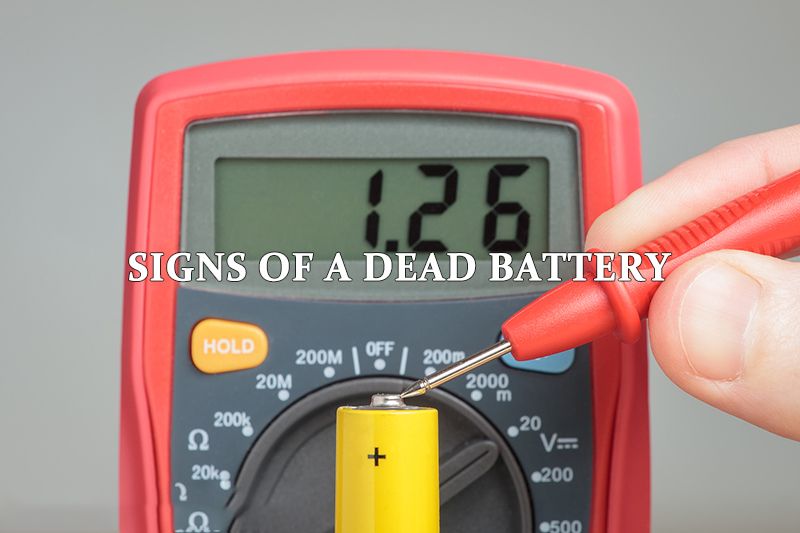
For the aspiring scientist or gadget enthusiast, a multimeter is your best friend. This neat little device looks a bit intimidating with its wires and display, but it's incredibly straightforward to use. It measures voltage, which is basically a battery's power level.
You set it to measure DC voltage, touch the red probe to the positive end and the black probe to the negative end. Then, you simply read the numbers! A fresh AA battery, for example, should show around 1.5 volts.
If your multimeter reads significantly lower, say 0.8 volts, then congratulations, you've officially declared that battery dead. It's like taking a battery's temperature, but for its electrical health.

There's a real sense of accomplishment when you use a tool like this. You're not guessing; you're confirming with precise data. It makes you feel like a pro, expertly diagnosing the situation with proper equipment.
The Visual Inspection: What's Leaking?
Sometimes, a battery doesn't just die; it stages a messy exit. Take a look at the battery itself and the device it's in. Do you see any crusty, white, or greenish buildup around the ends?
That's battery acid, or more accurately, potassium hydroxide from alkaline batteries, doing its thing. It's not pretty, and it's a definite sign that the battery is well past its prime. It's also bad for your device, so clean it up carefully!
A swollen battery, especially common with rechargeable batteries in devices like laptops or phones, is another serious visual cue. This means the internal components are deteriorating and building up gas.
If you see swelling, remove the battery carefully and dispose of it properly. It's a clear signal of failure and a potential safety hazard. Your eyes can tell you a lot about a battery's health, often before other methods.

The Easy Swap: The Simplest Test of All
Sometimes, the easiest way to tell if a battery is dead is to simply swap it out. Have a device that's acting up? Grab a fresh battery – one you know for sure is good – and pop it in. Instant results!
If the device springs back to life, then you've confirmed your suspicion about the old battery. If it still doesn't work, then you've successfully ruled out the battery, and the problem lies elsewhere with your gadget.
This method is quick, no-fuss, and requires no special tools. It's the go-to for remote controls, small toys, and anything that takes standard batteries. It’s practical problem-solving at its finest.
Special Cases: Car Batteries and Device Batteries
Car batteries operate on a different scale, but the principle is similar. If your car just makes a clicking sound when you turn the key, or if the lights dim when you try to start it, that's a classic dead battery symptom.
You might need a jump start to confirm, but these are strong indicators. The car battery version of the multimeter is a car battery tester, which gives you more detailed insights into its charge and health.
For your smartphone or laptop, you usually don't have to guess. The operating system provides clear indicators of battery percentage. If your phone goes from 100% to 20% in an hour, or your laptop dies suddenly, that battery is on its last legs.

These modern devices often have software that tells you directly about battery health. It removes some of the mystery, but it doesn't diminish the satisfaction of knowing what's going on inside your tech.
Why It's So Engaging to Know
Figuring out if a battery is dead might seem trivial, but it's actually a mini-adventure. It's about empowering yourself with knowledge. No more guessing games or blaming the device when it's just a simple power issue.
There's a certain satisfaction in diagnosing the problem yourself. You become the go-to person for troubleshooting, the one who knows the secrets of the tiny power source. It feels good to be prepared.
Imagine the heroics: saving a remote control from permanent retirement, bringing a child's favorite toy back to life, or making sure your flashlight works during a power outage. These small acts make a difference.
So, next time a gadget goes silent, don't just toss it aside. Embrace the challenge! Try the bounce test, pull out a multimeter, or simply swap it out. You might just find a new, engaging little hobby in the world of batteries.
Knowing these tricks makes you feel a bit like a magician, turning guesswork into certainty. It’s a wonderful feeling to understand the simple mechanics that power so much of our daily lives.