
How Can You Boost Your Internet Signal
Ever felt that familiar pang of frustration when your favorite show suddenly starts buffering? Or when your online game lags out at the worst possible moment? We've all been there. It's like your internet connection is playing hide-and-seek, but you're never the one finding it! What if I told you that boosting your internet signal doesn't have to be a tech-guru's secret mission? Instead, it can be a surprisingly fun, rewarding adventure right from your couch.
Think of it as solving a little mystery. You're the detective, and your slow internet is the puzzle. And honestly, isn't it satisfying to fix something yourself? This isn't about diving into complicated settings or buying expensive gear right away. Often, it's about trying simple, smart moves that can make a huge difference. Let's uncover some playful ways to make your internet sing!
Finding Your Router's Happy Place
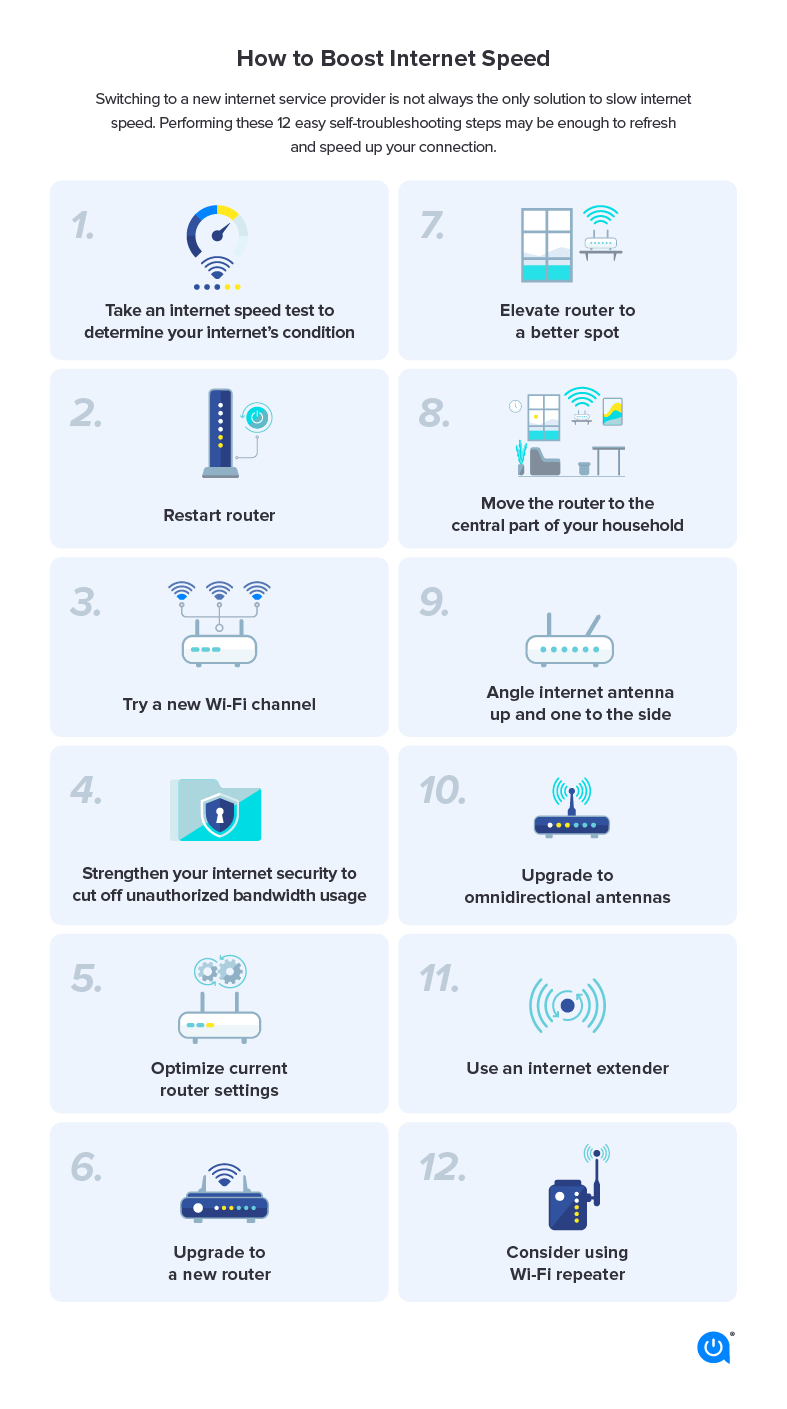
One of the easiest, and perhaps most entertaining, first steps is playing a little game called "Where's My Router's Sweet Spot?" Your router isn't just a boring box; it's the heart of your home's Wi-Fi. And just like us, it performs best when it's in a good mood, which usually means a good location. Tucked away in a cupboard or hidden behind a bookshelf? That's like asking it to whisper through a thick wall! Your Wi-Fi signal struggles to get out.
Must Read
Try moving your router to a more central location in your home. Get it out in the open, maybe on a shelf or a desk, away from other electronics that might cause interference.
It’s a bit like a treasure hunt. Move it a little, then check your signal. Move it again, check again. You might find that one specific spot suddenly unlocks a world of smooth streaming and speedy downloads. The pure joy when you stumble upon that perfect position, seeing those full bars light up, is incredibly satisfying. It's a small victory, but hey, smooth internet is a big win!

The Great Digital Declutter
Picture this: your internet connection is a super-fast highway. Now imagine that highway suddenly has hundreds of cars, all trying to get through the same lane at the same time. That's what happens when too many devices are hogging your bandwidth. Every phone, tablet, smart TV, game console, and even smart lightbulb can be taking a piece of the pie.
This is where the "Great Digital Declutter" comes in. It’s a chance to be a digital minimalist for a moment. Are there devices connected to your Wi-Fi that aren't actually being used? Maybe an old tablet in a drawer, or a smart speaker in a room no one's in? Disconnecting them, even temporarily, can free up precious bandwidth. You might feel like a superhero, silently optimizing your home network without anyone even noticing. It's about being smart with your resources, and it feels surprisingly powerful to be in control.
Signal Stretchers: Banishing Dead Zones
Every home has them: those dreaded "dead zones." The bathroom where your podcast cuts out, the upstairs bedroom where video calls freeze, or the garden patio where you just want to stream some music. These spots can feel like internet black holes. But fear not, because there are heroes ready to save your signal!
Enter the Wi-Fi extender or, for a really slick solution, a mesh Wi-Fi system. These gadgets are like cheerleaders for your internet, catching your Wi-Fi signal and boosting it to those far-flung corners of your home.
Setting them up can feel like deploying a secret weapon. Suddenly, that dead zone is alive with connectivity! The sheer delight of being able to smoothly browse recipes in the kitchen or watch a movie in the attic is truly special. It transforms previously frustrating areas into usable, enjoyable spaces. It's like expanding your digital playground, and who doesn't love more space to play?

The Magic of a Simple Reboot
Sometimes, the simplest solutions are the most magical. Our electronic devices, including your faithful router, can get a bit overwhelmed. They work tirelessly, day in and day out, handling all your digital demands. Just like us, they sometimes just need a moment to breathe and reset.
This is where the famous "unplug it and plug it back in" trick comes in. Yes, it sounds almost too simple to work, but it often does wonders! Giving your router a quick restart can clear out any digital cobwebs, resolve minor glitches, and get it back to its peak performance. It’s an instant gratification moment, a quick fix that often yields surprisingly fast results. There’s a quiet satisfaction in performing this tiny act of digital resuscitation and seeing your internet spring back to life.
Tweaking the Dials: A Little Extra Oomph
Feeling a bit more adventurous? There are a couple of other small adjustments that can add extra oomph to your signal. Think of it like fine-tuning a radio. You can often hop into your router's settings (don't worry, it's not as scary as it sounds!) and explore options like changing your Wi-Fi channel. Imagine your Wi-Fi as a radio station; if too many neighbors are on the same channel, things get crowded. Switching to a less congested channel can often clear things up beautifully.
Also, keeping your router's firmware (its internal software) updated is like giving it a fresh set of instructions and improvements. These aren't daily tasks, but knowing these little tweaks exist can give you a sense of empowerment. It’s like discovering hidden buttons that make your tech work even better for you.
So, next time your internet starts to sputter, don't just sigh in defeat. Embrace the challenge! Try these simple, engaging steps. You might just discover a new appreciation for your home network and the satisfying feeling of being your own internet hero. It's a small project, but the reward of a smooth, speedy connection is truly fantastic. Happy boosting!