
What Type Of Security Does My Wifi Have

Ever found yourself breezily connecting to your home Wi-Fi, maybe while making a cup of tea or settling in for a movie, and just thinking, "Yep, it works!"? It's something we do countless times a day without a second thought. But have you ever paused to wonder about the secret sauce that keeps your digital world cozy and safe? We're talking about your Wi-Fi's security type!
It might sound a bit techy, but trust me, it’s actually pretty cool when you peel back the layers. Think of it like this: your Wi-Fi network is your own personal digital living room, a space where your data, your online chats, and your streaming binges all hang out. And just like your actual living room, you probably don’t want to leave the front door wide open for just anyone to wander in, right?
The Early Days: WEP – A Flimsy Lock
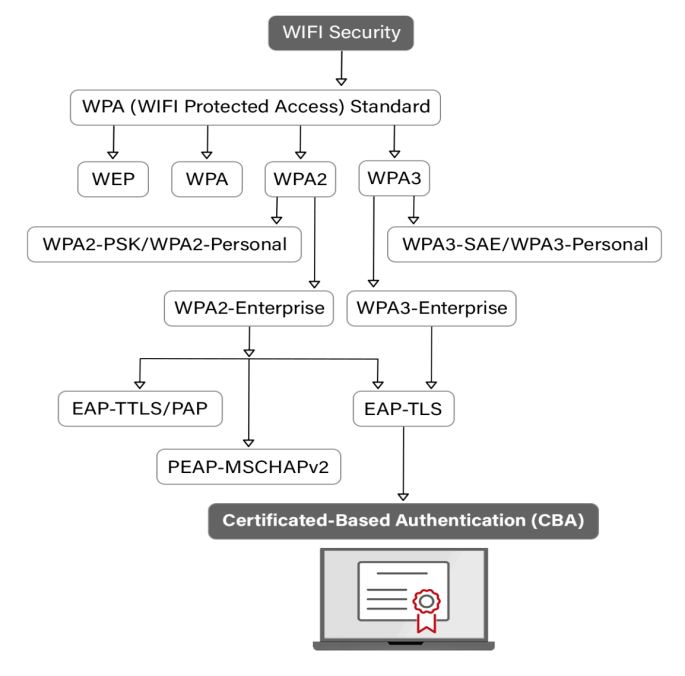
Let's take a quick trip down memory lane. In the ancient history of Wi-Fi (okay, maybe just a couple of decades ago), there was a security type called WEP (that stands for Wired Equivalent Privacy, if you're curious). Imagine it as one of those old-fashioned, rusty padlocks you might find on a garden shed. It looked like a lock, and it technically was a lock, but it wasn't exactly Fort Knox.
Must Read
Turns out, WEP was about as secure as hiding your diary under your pillow. Smart folks figured out ways to crack it pretty easily, meaning your digital living room wasn't really that private at all. So, if your Wi-Fi still says WEP, it's definitely time for an upgrade! Think of it like upgrading from a creaky wooden door to something a bit more substantial.
WPA & WPA2: Your Everyday Sturdy Padlocks
Luckily, the digital locksmiths got to work, and soon after came WPA (Wi-Fi Protected Access). This was a much-needed improvement, like replacing that rusty padlock with a new, stronger one. It brought in a fancy technique called encryption, which is essentially like scrambling your data into a secret code before sending it out, and then unscrambling it only for the intended recipient. Pretty neat, huh?
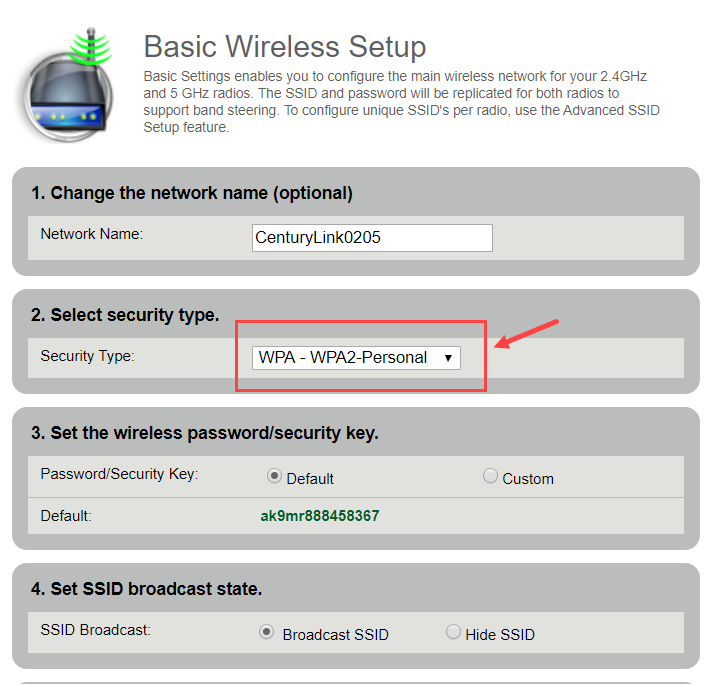
But the real workhorse, and what most of us have probably been using for years, is WPA2. This is still the most common type of Wi-Fi security you'll find, and for good reason. Imagine it as a really solid, reliable deadbolt on your front door. It uses even stronger encryption than WPA, making it much harder for unwanted guests to peek in.
WPA2 has kept us safe for a long time, protecting everything from our online banking to our goofy cat videos. It’s like the trusty old friend who always has your back. Is it perfect? Well, no security is absolutely 100% impenetrable (even the best locks can eventually be picked by a master thief), but WPA2 does a fantastic job for most everyday uses.
Enter WPA3: The New Kid on the Block (Fort Knox Level!)
Now, for the really exciting stuff! Just a few years ago, a new champion entered the ring: WPA3. If WPA2 is a sturdy deadbolt, then WPA3 is like a biometric scanner combined with a titanium vault door, guarded by a very smart dragon. Okay, maybe not dragons, but you get the idea – it’s a big leap forward!
What makes WPA3 so cool? For starters, it makes it much, much harder for someone to guess your Wi-Fi password through brute force attacks (that's when someone tries thousands of password combinations until one works). It also offers better protection even on public Wi-Fi networks, which is super handy when you're grabbing a coffee and connecting to the cafe's Wi-Fi. It essentially gives you a more private connection, even if others are sharing the network.
It’s like having a special, encrypted tunnel just for your data, even on a shared highway. This means less chance of someone snooping on your internet traffic when you're out and about. It’s a game-changer for digital privacy and makes those little worry lines about public Wi-Fi a thing of the past.
How Do You Check Your Wi-Fi's Security Type?
Curious about what kind of digital bouncer your Wi-Fi has? It's usually pretty easy to find out! On your phone or computer, when you look at the list of available Wi-Fi networks, you can often tap or click on your connected network, and it will show you details like the security type (WPA2, WPA3, etc.).

You can also usually find this information in your router's settings. Just type your router's IP address (often something like 192.168.1.1) into your web browser, log in (your router usually has a sticker with the default password if you haven't changed it), and poke around in the Wi-Fi or wireless settings. It's a fun little adventure into the heart of your home network!
Why Does It Matter So Much?
Beyond the cool tech and clever acronyms, understanding your Wi-Fi security is about peace of mind. In our increasingly connected world, where everything from our smart speakers to our doorbells is online, having strong Wi-Fi security is like having a sturdy, reliable shield for your entire digital life.
It ensures that your private conversations stay private, your sensitive information remains secure, and your online experiences are as smooth and safe as possible. It’s not just about stopping hackers; it's about building trust in the invisible currents of data that flow all around us. So, next time you connect, give a little nod to the incredible technology working behind the scenes to keep you safe!