
How To Stop Fire Alarm Chirping Without Battery

Alright, folks, let's talk about that tiny, persistent, utterly infuriating sound that can single-handedly ruin your otherwise peaceful night: the fire alarm chirp. You know the drill. It’s 2 AM. You’re deep in dreamland, perhaps finally winning that argument with your boss or finding that lost sock. Then, chirp.
You jolt awake. Your heart does a little panic-flounder. You sit up, ears perked, scanning the ceiling like a prairie dog on high alert. Nothing. You lie back down. You close your eyes. Chirp.
The Great "No Battery" Mystery
Now, here's where it gets interesting, and frankly, a little maddening. You climb up, wrestle the thing off the ceiling (because they're never easy to get down, are they?), twist open the little battery compartment, and triumphantly pull out the 9-volt. You toss it aside, declare victory, and settle back into bed, already anticipating sweet silence. Then, chirp.
Must Read
Wait, what? You literally just removed the battery! It's like finding a ghost still making noise after you've pulled the plug on its stereo. How on earth can a fire alarm chirp
Let's unravel this nocturnal nuisance, shall we? Because you're not going crazy, and your fire alarm isn't possessed (probably).
The Plot Twist: It's Probably Hardwired (and Has a Backup)
Most modern homes, especially newer builds, have fire alarms that are

And guess what makes that incessant chirping sound? Yep, it’s usually that little
So, when you pulled out the primary 9-volt (which might have been dead too, or just a placeholder), the hardwired unit was still getting power from your house. But its backup battery was screaming its last dying breath. It’s like a tiny, ungrateful roommate who insists on complaining even after you’ve paid all the bills.
How to Silence the Whiny Widget (The Real Steps)
This is where we go from sleep-deprived zombie to master alarm tamer.

Step 1: Find the Breaker Box (Your Power Control Center)
First things first, you need to cut the main power to that particular alarm. This means a trip to your
Pro tip: Do this during the day, or at least with a flashlight. Nobody wants to stumble around in the dark, especially when an angry chirp is your only soundtrack.
Step 2: Dismount the Alarm and Remove ALL Batteries
Once you've cut the main power, it's time to get up there again. You'll need to
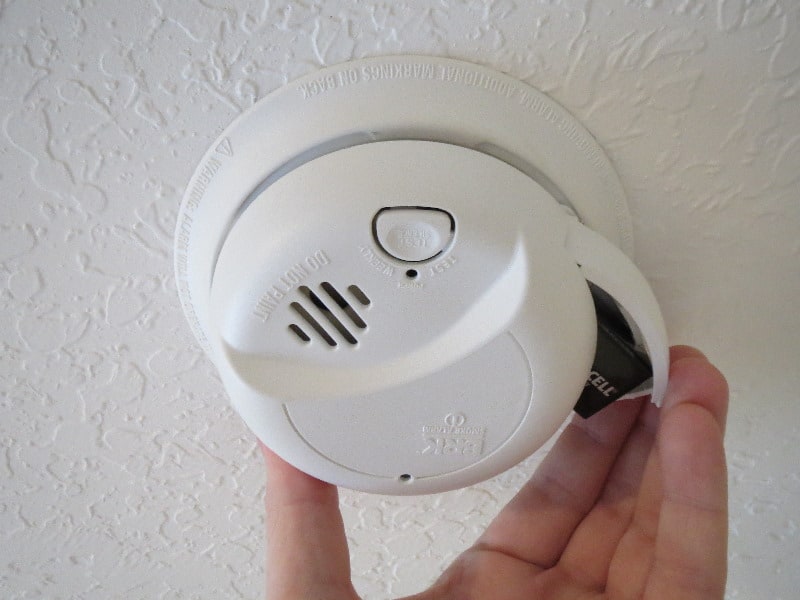
Now, locate all battery compartments. Seriously. Some have two. Remove any and all batteries you find. This is the crucial step for hardwired units. You're effectively taking away all sources of power – both the main house current and any backup battery.
Step 3: The "Drain Residual Power" Trick (The Ghost Buster Move)
Even after removing all batteries and disconnecting power, these little gadgets can sometimes hold onto a tiny bit of residual charge. It’s like they have a minuscule memory of being annoying. To truly clear it out,
Step 4: Reassemble (Carefully!)
With all power drained, it's time to put it back together. But here's the kicker:

Step 5: Restore Power and Enjoy the Silence
Flip the breaker back on. If all goes well, you might hear a brief self-test chirp (which is normal and good!), and then... glorious, beautiful, uninterrupted silence. It's a victory so sweet, you might just do a little happy dance.
What if it STILL Chirps?
If you've followed these steps and that tiny terror is still chirping, you might have a different issue:
1. It's a different alarm: Sometimes the chirp is so echoey you think it's one, but it's another.
2. It's faulty: Fire alarms don't last forever (usually 7-10 years). If it's old and still acting up, it might be time for a
But for most of us, understanding the hidden backup battery and cutting all power sources will put an end to that maddening late-night serenade. So next time that tiny beep tries to ruin your sleep, you'll be ready. You'll smile, nod, and know exactly how to silence that little mechanical menace once and for all.