
How To Replace Battery Garage Door Opener

Ever pulled into your driveway, hit the garage door remote, and... nothing? Or worse, there’s a power outage and suddenly your trusty garage door is as stubborn as a mule, leaving you to lift it manually? It’s a bit of a head-scratcher, isn't it? We rely so much on these modern marvels, yet sometimes, they have a little secret. And that secret often involves a small, unassuming battery hidden within the guts of your garage door opener.
Now, hold on a minute! A battery? In my garage door opener? Yep, you heard that right! Many modern garage door openers come equipped with a backup battery. It's like a secret superpower for your garage door, ready to kick in when the main power decides to take a coffee break. And just like any superhero, that power source needs a refresh now and then.
Why is this even a thing, and why should I care?
Think about it: Your garage door is often the largest moving part of your home. It’s also a key access point. When the power goes out, the last thing you want is to be locked out (or in!) your garage. That's where the backup battery swoops in like a tiny, but mighty, guardian angel. It gives you those precious few cycles of opening and closing, even when the lights are out. It’s not just a convenience; it’s a little slice of peace of mind.
Must Read
It's actually pretty cool to know your home has these hidden layers of functionality, isn't it? It’s like discovering your car has a secret compartment you never knew about, or finding out your smartphone can do that one amazing trick. This isn't just about maintenance; it's about understanding and appreciating the clever engineering behind the everyday items in our lives.
How do I know my garage door opener battery needs replacing?
Great question! Unlike your TV remote, which just stops working, your garage door opener is often a bit more communicative. The most common sign? A rather insistent beeping sound. It’s usually a consistent beep every 30 seconds or so, a gentle nudge from your opener saying, "Hey, buddy, my backup power is running low!" Think of it like a smoke detector, but instead of warning you about smoke, it's warning you about a depleting power reserve.

Some openers also have an indicator light – often a red or orange light that flashes or stays illuminated when the battery needs attention. And of course, the most obvious sign is when the power goes out, and your door opener just... dies. No whirring, no movement, just silence. That's a pretty strong hint that your backup battery has officially retired.
Okay, I'm convinced. How do I actually replace it?
Relax, this isn't rocket science! You're not going to need a degree in electrical engineering. In fact, it's usually a surprisingly straightforward process. It’s a DIY project that gives you maximum satisfaction for minimal effort.
Step 1: Safety First! Before you touch anything, always unplug your garage door opener from the ceiling outlet. Seriously, just do it. It’s like unplugging a toaster before cleaning it – a simple step that keeps you safe. Better safe than sorry, right?

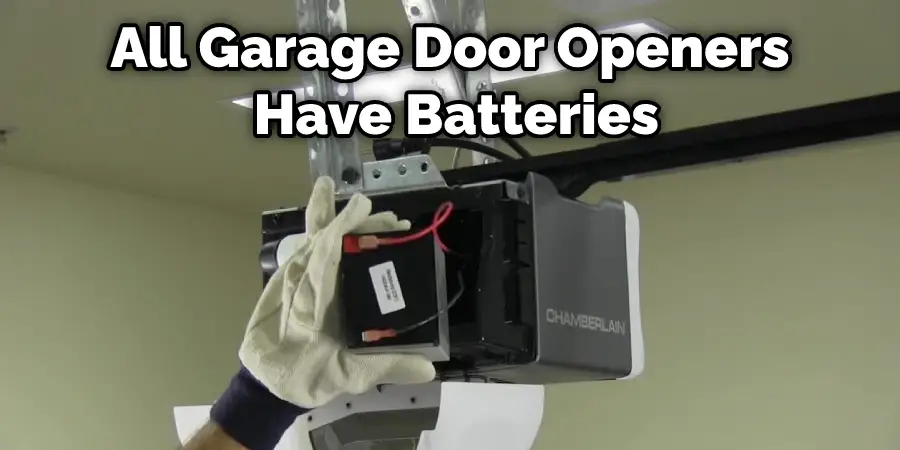
Step 2: Locate the Battery. Now, look at your opener unit, the big box mounted on the ceiling. There’s usually a specific compartment for the battery. It might be on the side, front, or back, often marked with a small battery icon or simply a panel with a few screws. It's usually pretty obvious once you start looking. It’s not hiding in plain sight like Waldo, but it’s not buried deep within the machine either.
Step 3: A Little Unscrewing. You might need a screwdriver (usually a Phillips head) to remove a few screws holding the battery compartment cover in place. Nothing too complex, just a couple of twists and turns.
Step 4: The Swap. Once you open the compartment, you'll see the old battery. It’s typically a sealed lead-acid battery, often a 12V 5Ah or similar. Notice how it's connected: usually, two wires, red and black, with simple clip-on terminals. Gently disconnect the wires from the old battery. Then, lift out the old battery. It might have a little weight to it, but it’s not heavy like a car battery.
Before you toss the old battery, take a quick peek at its label. This is your cheat sheet for buying a new one. Note the voltage (e.g., 12V) and the amp-hour rating (e.g., 5Ah). This ensures you get the correct replacement. Think of it as matching socks – you want the right pair!
Then, take your shiny new battery, connect the red wire to the positive terminal (usually marked with a '+') and the black wire to the negative terminal (usually marked with a '-'). Make sure the connections are snug. Slide the new battery into the compartment.
Step 5: Button Her Up! Replace the cover, screw it back into place, and then – don’t forget this crucial step! – plug your garage door opener back into the ceiling outlet. Your opener might do a little self-test, and the beeping should stop. Voila! You've just performed minor surgery on your garage door opener.

Where do I get a new battery?
These batteries are pretty common! You can usually find them at hardware stores, electronics stores, or readily available online. Just remember to match the voltage and amp-hour rating from your old battery. It's not a generic AA battery, so don't try to force one in there!
So, why is this cool?
Because you just fixed something! You empowered yourself. You saved a few bucks on a service call. You learned a little more about the technology that makes your life easier. And the next time the power flickers, you can smirk knowingly as your garage door glides open, thanks to your handiwork. It’s a small victory, but hey, victories are victories!
So go ahead, take a peek at your garage door opener. Is it quietly beeping a distress signal? Now you know what to do. Embrace your inner DIY hero, and give your garage door opener the fresh start it deserves! You’ve got this.