
How To Make Your Own Roblox Pants

Alright, so you wanna ditch the boring default Roblox pants and rock something truly you? Awesome! Making your own Roblox pants is surprisingly easy, even if you think you're, like, artistically challenged. Trust me, if I can do it (and I once drew a stick figure that looked suspiciously like a squashed spider), you can do it.
First things first: You'll need... stuff.
Okay, gather 'round, gather 'round! Here's your shopping list (sort of):
- A Roblox account (duh!). And hopefully, you have a Roblox Premium subscription. If not, you can still create the pants, but you need Premium to sell them and rake in those sweet, sweet Robux. Think of it as the VIP pass to fashion fame!
- Image editing software. I'm talking Photoshop, GIMP (which is free and awesome!), Paint.net... whatever floats your creative boat. Even MS Paint can work in a pinch, though your results might be... ahem... abstract.
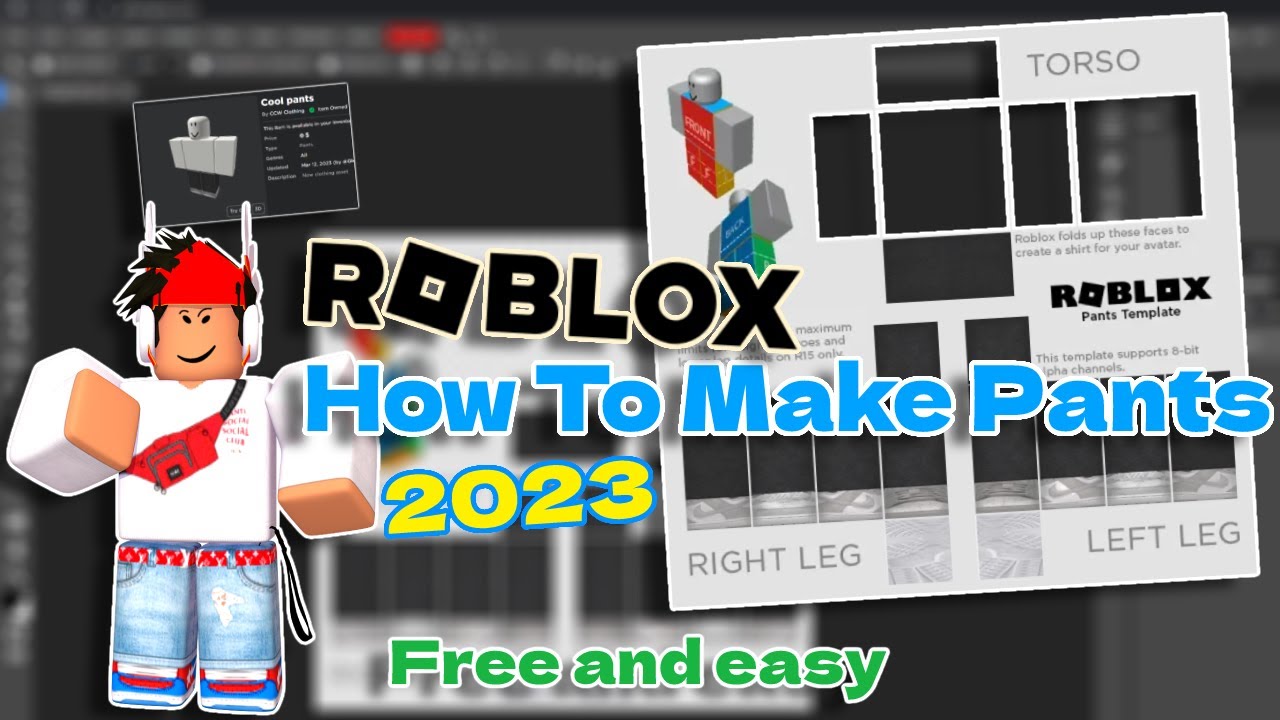
- The Roblox pants template. You can find this by just searching "Roblox pants template" on Google. Make sure you download the right one, otherwise, your pants will look like they were designed by aliens. Seriously.
- Imagination! This is the most important ingredient. Unleash your inner fashion designer! (Or just copy your favorite band's tour merch. No judgment here.)
Got all that? Good. Let's move on, shall we?
Must Read
Decoding the Template: It's Like a Fashion Puzzle!
Okay, that template might look like a jumbled mess of squares and rectangles at first. Don't panic! It's actually quite logical (ish). Each section corresponds to a different part of the pants. Front, back, sides, legs... it's all there. Think of it as a paper doll, but for pants. A very pixelated paper doll.
Now, open that template in your image editing software. This is where the magic happens! (Or, you know, just a lot of clicking and dragging.)
Design Time: Unleash Your Inner Picasso (or Just Copy and Paste)
Here's where you get to express yourself! Feel free to go wild with colors, patterns, logos, whatever your heart desires. Want sparkly unicorn pants? Go for it! Prefer a minimalist design with just a single black stripe? You do you! The only limit is your imagination... and maybe copyright law. Just saying.
Pro tip: Use layers! Seriously, they're your best friend. If you mess something up (and you probably will, we all do!), you can easily delete a layer without ruining your entire design. Thank you, technology!

Another pro tip: Use references! Look at real pants for inspiration. Think about the folds, the seams, the way fabric drapes. Or, you know, just steal ideas from your favorite video game characters. I won't tell.
Saving Your Masterpiece: File Formats and Other Scary Stuff
Okay, you've created the most amazing pair of digital pants the world has ever seen! Now you need to save it correctly, otherwise, all your hard work will be for naught. Sad face.
Save your file as a PNG. It's the best format for Roblox textures. Trust me on this one.
Uploading to Roblox: Prepare for Robux Riches! (Maybe)
Alright, time to upload your pants to Roblox! Head to the "Create" tab (you need to be on the website, not the app). Find the "Shirts," "Pants," or "T-Shirts" section. Click "Choose File" and select your PNG masterpiece.
Give your pants a catchy name! Something that screams "BUY ME!" Or, you know, just something that makes sense. Add a description, if you're feeling fancy. Then, click "Upload."
Now, here's the catch: To actually sell your pants, you need Roblox Premium and you'll need to pay a small Robux fee to put them on sale. It's an investment, people! Think of it as funding your future fashion empire!
Testing and Tweaking: The Devil's in the Details
Once your pants are uploaded, try them on your avatar! See how they look in the game. Are the seams lined up correctly? Is the texture distorted? If something looks off, don't worry! Just go back to your image editing software, make the necessary tweaks, and re-upload. It's a process, but it's worth it to have perfectly-fitting (and stylish) pants.
And there you have it! You've created your very own Roblox pants. Now go forth and conquer the virtual fashion world! Just remember to give me a shoutout when you become a millionaire. You know, for all the helpful advice. wink, wink