
How To Hook Up A Doorbell

Okay, picture this: You’re finally settling down after a long day, maybe about to dive into that new Netflix series everyone’s talking about, when suddenly… KNOCK KNOCK KNOCK! It’s your neighbor, just dropping by to say hi. Or worse, it’s that package delivery you’ve been waiting for, and the driver decided your doorstep was a perfectly good place to leave it, no ring, no warning. You know the drill, right? It's that moment you realize, yet again, that your doorbell is either completely MIA, giving up the ghost, or just never existed in the first place.
I mean, seriously, in an era of smart homes and AI assistants, is it too much to ask for a reliable "ding-dong" when someone's at the door? Apparently not! Because today, my friend, we’re going to tackle that very problem. We’re going to talk about how to hook up a doorbell, turning you from a passive package-accepter into a proactive doorbell-installer. And trust me, it’s not as scary as it sounds. You don’t need a degree in electrical engineering, just a little patience and a dash of daring.
First Things First: Gather Your Troops (aka Tools)
Before we embark on this grand adventure, let's make sure you've got everything you need. Think of it as preparing for battle, but instead of swords, we have screwdrivers. Much safer, I promise.
Must Read
- Your new doorbell kit: This usually includes the chime unit, the button (or buttons, if you're fancy and have a back door!), and often a transformer. If it doesn't, you might need to buy a 16-volt (V) transformer separately. Don't worry, they're pretty standard.
- Screwdrivers: Phillips and flathead. Because, you know, screws.
- Wire strippers: For getting those wires naked and ready for action.
- Drill: If you're putting in new wires or mounting something fresh.
- Voltmeter/Multimeter (optional, but highly recommended): For those of us who like to know things are working, or not working, before getting a surprise zap (don't worry, it's low voltage, but still!).
- Wire nuts: Sometimes handy for securing connections.
The Holy Trinity of Doorbell Systems: Button, Chime, Transformer
Before you start yanking wires, it’s super helpful to understand how these things actually talk to each other. It’s like a tiny electrical conversation:
The Button: This is the humble little guy outside your door. When you push it, it simply completes a circuit, allowing electricity to flow.
The Chime: This is the part that makes the noise. When it receives the electrical signal from the button, it goes "ding-dong" (or whatever delightful tune your new chime plays).

The Transformer: This is the unsung hero, the powerhouse. Most household electricity is 120V (or 240V in some parts of the world), which is way too much for a doorbell. The transformer steps that high voltage down to a safe, low voltage—usually 16V or 24V. This is crucial!
Safety First, Always! Seriously, Don't Skip This Step.
Before you touch a single wire, find your electrical panel (breaker box) and TURN OFF THE POWER to the circuit that powers your existing doorbell transformer. If you’re not sure which one it is, err on the side of caution and flip the main breaker. Better to be safe than sorry, right? Trust me on this one. You don't want any sparks flying or unexpected tickles.
The Nitty-Gritty: Let's Get Wiring!
Step 1: Locate Your Transformer
This is often the trickiest part. Transformers are usually tucked away in some inconspicuous spot: near your main electrical panel, in the attic, in the basement, or sometimes even in a closet. Look for a small, cube-shaped box, often metal, with a couple of low-voltage wires coming out of it. If you're replacing an old doorbell, it should be there. If you're starting fresh, you'll need to install one near a 120V power source.

Step 2: Connect the Transformer (If You're Installing a New One)
If you have a new transformer, you’ll connect its high-voltage side (usually two wires, black and white) to a 120V circuit. This might mean tapping into an existing light fixture or outlet, but if you’re unsure, please consider calling an electrician for this part. It’s the only high-voltage connection you’ll be making.
The low-voltage side of the transformer (usually two screws) is where your doorbell wires will connect.
Step 3: Wire Up the Chime Unit
Most chime units have three terminals (screws):
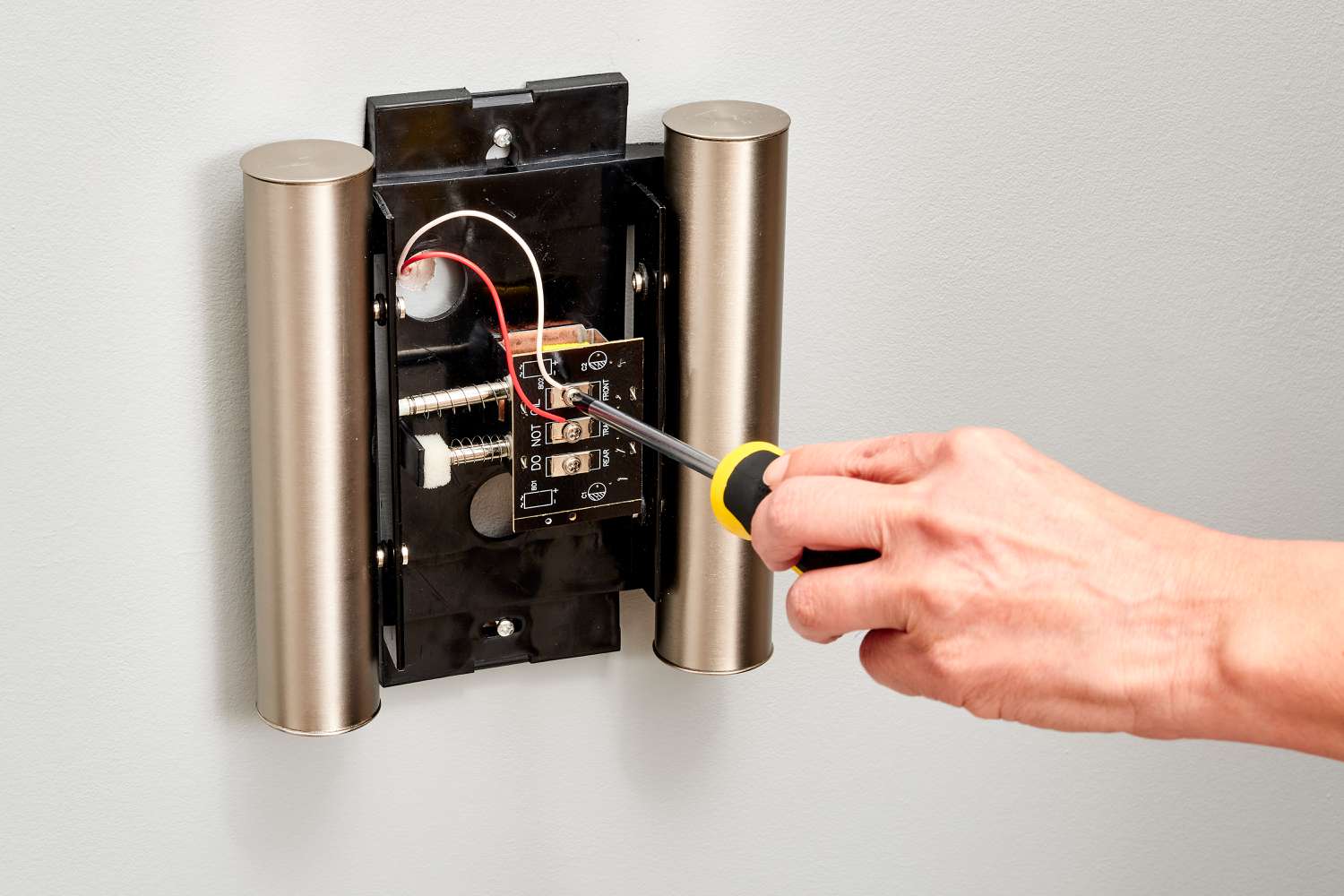
- FRONT: For your front doorbell button.
- TRANS (or C): For the wire coming from your transformer.
- REAR (optional): If you have a second doorbell button for, say, your back door.
Connect one low-voltage wire from your transformer to the TRANS terminal on the chime. Connect the wire from your front doorbell button to the FRONT terminal. If you have a rear button, you guessed it, connect its wire to the REAR terminal.
Step 4: Connect the Doorbell Button(s)
This is probably the easiest part. Your doorbell button usually has two screws. Just strip the ends of the two low-voltage wires coming from the chime (one from the FRONT terminal, one from the TRANS terminal, effectively looping back) and secure them to these two screws. It doesn't matter which wire goes to which screw.
For a rear doorbell button, you'd do the same, but using the wire from the REAR terminal and the TRANS terminal.

Step 5: Double-Check Everything and Test!
Once all your connections are snug and secure, take a deep breath. Go back to your electrical panel and flip the power back on. Now, for the moment of truth! Head to your doorbell button and… PUSH IT!
Did you hear a glorious "ding-dong"? Success! Did you hear nothing? Don’t panic, it happens. Time to troubleshoot.
Troubleshooting: When the Ding-Dong Goes Missing
If your doorbell isn't singing its sweet song, here are a few things to check:
- Is the power on? (Seriously, we all make this mistake.)
- Are the wires connected securely? Give each wire a gentle tug to make sure it's not loose.
- Is the transformer working? Use your voltmeter to check the output voltage on the low-voltage side. It should read around 16V or 24V. No voltage? Your transformer might be dead or not getting power.
- Is the chime unit faulty? Unlikely, but possible.
- Is the button faulty? Short the two wires at the button location. If the chime rings, your button is the culprit.
And there you have it! You’ve just hooked up a doorbell. No more missed packages, no more unexpected neighborly ambushes. You’ve brought the sweet symphony of "ding-dong" back to your home, and frankly, that’s a small victory worth celebrating. So go ahead, give yourself a pat on the back. You earned it!