
How To Change Battery In Kidde Fire Alarm

Ever hear that little chirp? You know the one. It usually starts in the dead of night, sounds like a tiny, distressed bird, and seems to be coming from... everywhere and nowhere all at once. If you’ve got a fire alarm, especially a trusty Kidde one, you’ve probably experienced the famous “low battery warning.” And let's be real, it can feel a bit like your house is trying to tell you a secret in Morse code.
But here's the cool thing: that chirp isn't just annoying; it's your home’s tiny, vigilant guardian letting you know it needs a little energy boost. Think of your fire alarm as a miniature superhero, always on watch, and that battery? That’s its super-powered energy drink! Changing it might sound like a daunting task, something only an electrician or a super-handy person could do, right?
Wrong!
Must Read
It's actually one of the simplest, most empowering little bits of home maintenance you can do. And honestly, it’s kind of fascinating to get to know the inner workings of something so vital to your safety. So, grab a cup of coffee (or your preferred chill beverage), and let’s dive into the surprisingly easy and super satisfying world of giving your Kidde fire alarm a fresh lease on life.
Why Bother? It's Your Tiny Act of Home Heroism!
Before we even touch the alarm, let's talk about why this is actually cool. Every time that alarm chirps, it's doing its job – telling you it's running low. It's not broken; it's just being diligent! Ignoring it is like ignoring the “low fuel” light in your car. Sure, you can keep driving for a bit, but eventually, you're going to be stranded. Or, in this case, unprotected.
By learning how to swap that battery, you're not just silencing a chirp; you're becoming a proactive homeowner. You're taking control. You're ensuring your family's safety. How awesome is that? It’s like giving your little superhero a fresh charge so it can continue its important work. You, my friend, are the sidekick, enabling the hero!

Getting Ready: Your Mission Briefing
Okay, operation Kidde Power-Up is a go! What do you need? Not much, thankfully.
- A fresh battery: Most Kidde alarms use a standard 9-volt battery. Some might use AA or AAA, but 9V is the most common. Check your alarm if you're unsure, or better yet, grab one for your emergency kit!
- A step stool or ladder: Safety first! No balancing on rickety chairs, please.
- Maybe a flathead screwdriver: Some models have a tiny latch or screw, but many are tool-free.
That's it! No fancy gadgets, no arcane knowledge. Just a few simple items. See? Easy peasy already.
The Big Moment: Operation Battery Swap
Now for the fun part! Let's get that Kidde alarm singing a happy tune again.

Step 1: Silence the Chirp, Temporarily
First, identify the chirping culprit. Climb up carefully to the alarm. Now, most Kidde alarms are mounted on a base plate. To remove the alarm itself, you usually just need to twist it counter-clockwise. Think of it like opening a jar lid. Give it a gentle twist, and it should unlatch from the ceiling mount. It might have a small wire harness connecting it, but many modern ones are self-contained once off the mount.
If it's a hardwired alarm, don't worry about the wires for now – the battery is usually just a backup. You just need to twist the main unit off its base. It's designed to be detached for maintenance.
Step 2: The Big Reveal – Opening the Compartment
Once you have the alarm in your hand (or still gently dangling if it's hardwired), look for a battery compartment. It's often a small slide-out drawer, or a hinged door. Sometimes there's a little tab you push, or a tiny screw to loosen (this is where that screwdriver might come in handy).
Pop it open! You'll see the old 9-volt battery snuggled inside. Take a quick mental note (or snap a pic!) of how it's connected.
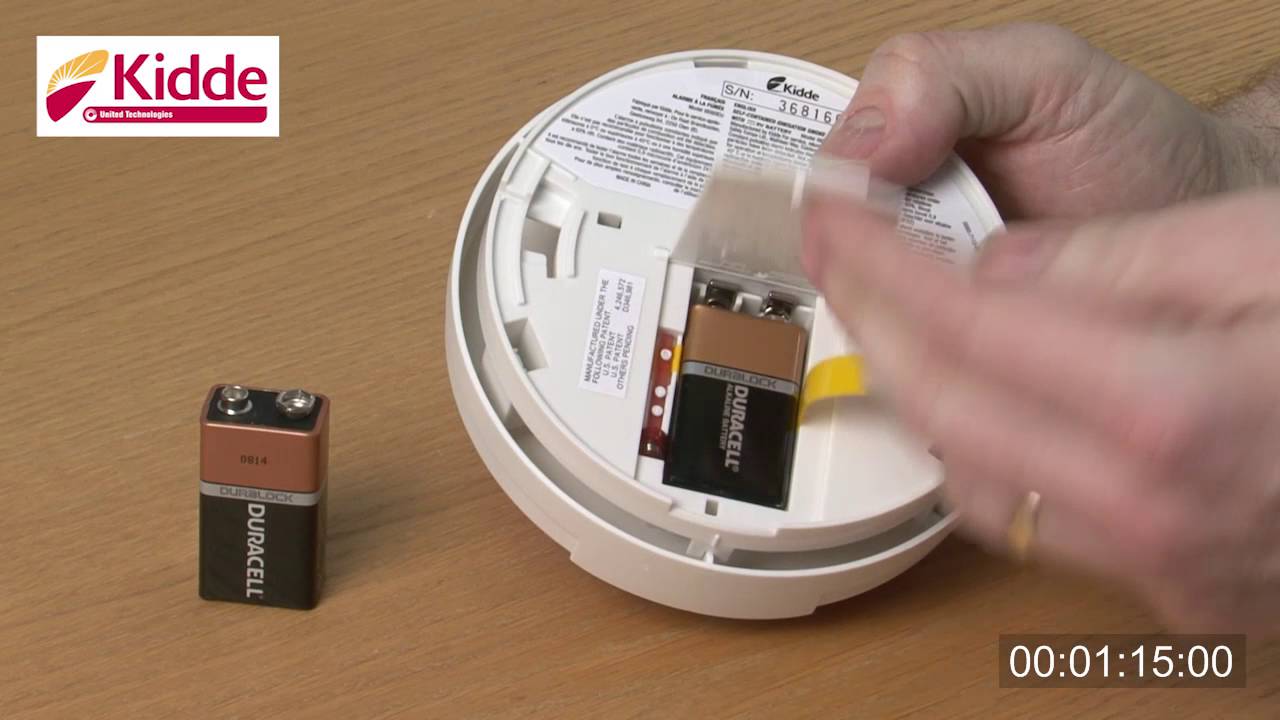
Step 3: The Swap! Out With the Old, In With the New
Carefully disconnect the old battery. It’s usually connected with a couple of small clips – a positive (+) and a negative (-) terminal. Gently pull the battery away from the clips.
Now, grab your shiny new 9-volt battery. Connect it to those same clips, making sure to match the positive to positive and negative to negative. It’s pretty hard to mess this up because the connectors are usually shaped to only fit one way. Push it firmly into place.
You might hear a quick beep or chirp when the new battery connects. That’s a good sign! It means it’s powering up.

Step 4: Test and Re-Mount
Before you close the compartment and remount, look for a small "Test" button on the fire alarm. Press and hold it for a few seconds. Your alarm should let out a loud, ear-piercing shriek. That’s its way of saying, "Yep, I'm alive and ready for action!"
If it screams, you're golden! Close the battery compartment securely. Now, carefully twist the alarm back onto its ceiling mount, turning it clockwise until it locks into place. Give it a gentle tug to ensure it’s secure.
Congratulations, You're a Domestic Rockstar!
And there you have it! You’ve successfully changed the battery in your Kidde fire alarm. The chirp is gone, your home is safe, and you've gained a new skill. Isn't it wild how something that seemed a bit intimidating turns out to be so straightforward?
It's not just about a battery; it's about empowerment, understanding your home, and making small, significant changes for big peace of mind. So next time that chirp starts, you won't dread it; you'll grab your 9-volt, flash a confident smile, and say, "Alright, little hero, time for your energy drink!" How cool is that? Super cool.