Att Fiber Installation What To Expect

Get Ready for Liftoff: Your AT&T Fiber Installation Journey!
Ready to ditch the digital snail pace and dive into the blazing-fast world of AT&T Fiber? Congratulations! You're about to experience internet speeds that feel less like a gentle breeze and more like a warp-speed rocket ship. The difference is just that glorious!
So, you've signed up, you're excited, and now you're wondering, "What exactly happens on installation day?" Well, buckle up, because we're going to walk you through it, making it sound as easy and exciting as it truly is!
Booking Your Fiber Fast-Pass
First things first, scheduling your installation is usually smoother than a buttered slide. You'll pick a date and time, either online or with a friendly agent. It’s almost too easy, like ordering your favorite pizza, but instead of pepperoni, you're getting internet speeds that will make your jaw drop! You’ll get a confirmation and a reminder, then it’s time to prep.
Must Read
Pre-Game MVP: Preparing for Arrival
Before your AT&T Fiber technician arrives, a few tiny things will make everything go super-duper smoothly. Think of yourself as the pre-game MVP:
- Clear the Path: Make sure the areas where the tech might need to work – both inside and outside – are clear. Imagine trying to perform surgery in a cluttered closet! So, move that rogue shoe pile, clear off that dusty shelf near your computer, and ensure a clear path from the outside entry point to where your new Wi-Fi gateway will live (usually near an electrical outlet and somewhere central for optimal signal).
- Pet Prep: If you have furry friends, maybe put them in their own little spa day retreat for a few hours. We love our pets, but they sometimes have a knack for "helping" in ways that aren't quite... helpful!
- Adult Supervision: And, of course, an adult (someone 18+) must be home for the entire process. The tech will need access and someone to ask about equipment placement.
The Grand Arrival & Installation Magic
Ding dong! Like a superhero arriving to save your slow internet, your friendly AT&T Fiber technician is here! They'll introduce themselves, confirm the plan, and do a quick walkthrough. This is your chance to show them preferred spots for equipment – don't be shy!

Outside Adventures: First up, they'll usually start outside. This is where the magic happens, connecting your home to the colossal AT&T Fiber network. They'll run a new, super-thin fiber optic line from the street to your house. This might involve delicate digging or fishing through existing conduits, but don't worry, they're pros. Think of them as delicate garden surgeons, making sure your internet lifeline is perfectly placed and practically invisible. They'll need to drill a small, neat hole, usually in an inconspicuous spot, to get that fiber line inside. Don't panic! It’s tiny, expertly sealed up tighter than a drum. No chilly drafts or critter invasions, just pure fiber goodness coming your way.
Inside Intelligence: Once the fiber is inside, it's time for the brains of the operation: the Optical Network Terminal (ONT) and your shiny new Wi-Fi gateway.
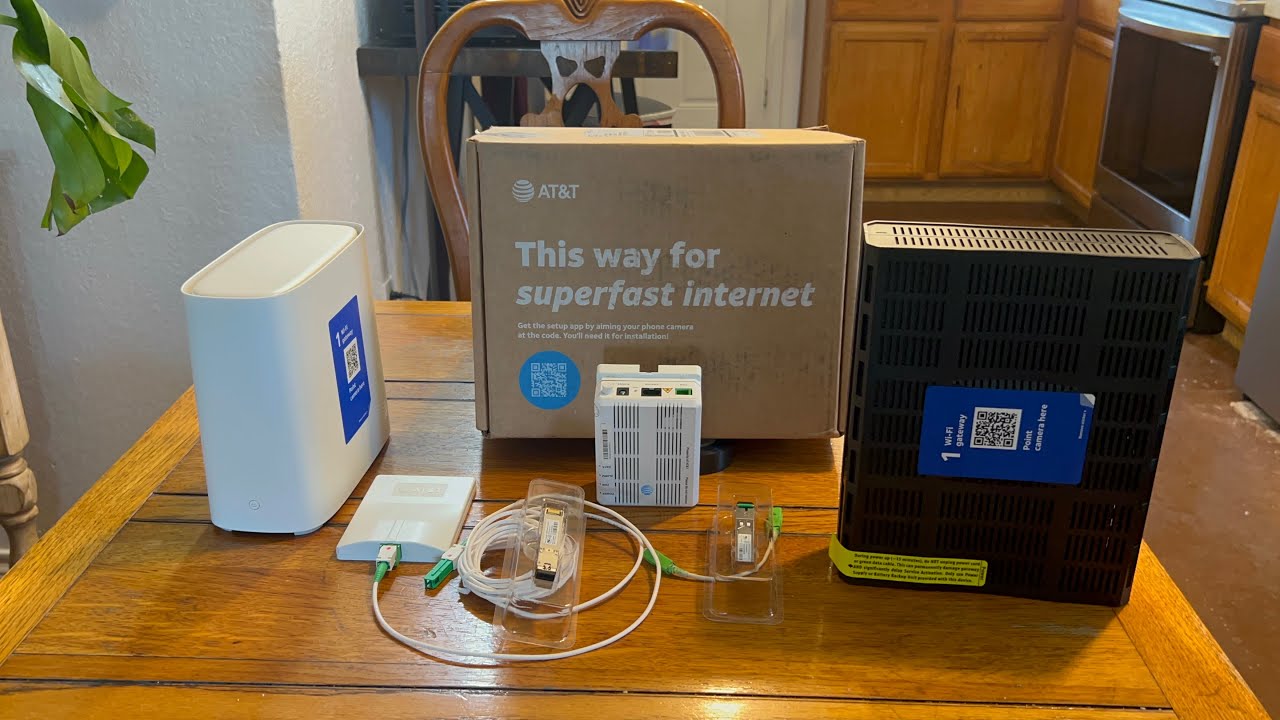
- The ONT: This small box, about the size of a paperback, converts light signals from the fiber into electrical signals your devices understand. It's the translator! It needs power, so it'll typically go near an electrical outlet.
- The Wi-Fi Gateway: Then comes the sleek Wi-Fi gateway (that marvelous box dishing out all the internet goodness). The tech will connect the ONT to the gateway, power everything up, and boom! Lights blink, magic happens, and the air crackles with impending speed.
They'll get your Wi-Fi network set up, connect a test device, and run speed tests to ensure you're getting those advertised, mind-blowing speeds. This is your happy dance moment! See those numbers? That's your internet flying!
Pro Tip: Don't be afraid to ask questions! Your technician is a fountain of fiber knowledge. Want to know the best spot for the Wi-Fi? Ask! Wondering about the blinking lights? Inquire! They’re there to help you understand your new setup.
The Grand Finale: Welcome to the Future!
Once everything is installed, tested, and sparkling, your technician will clean up, explain your new setup, and answer all your questions. They'll provide your new Wi-Fi name and password, so you can immediately start streaming 4K shows, gaming with zero lag, and browsing at speeds you didn't think were possible.
So, sit back, relax, and get ready to experience the internet like you've only dreamed. No more buffering nightmares, no more pixelated video calls, just pure, unadulterated speed and reliability. Welcome to the future, powered by AT&T Fiber! You're going to love it!