Why Does My Phone Alarm Sound So Low
Alright, let's talk about something super relatable, shall we? You know that feeling. You set your alarm, fully confident you'll conquer the morning, only to wake up an hour later in a cold sweat, realizing your phone's supposed "screaming" alarm was actually more of a gentle, almost apologetic whisper. "Did it even go off?" you wonder, staring daggers at your device. Trust me, you're not alone. Your phone isn't secretly plotting against your sleep schedule (probably), but there are some sneaky reasons why it might be sounding like it's trying to pass a secret note instead of waking you up.
The Obvious Culprits (We've All Been There)
First things first, let's get the low-hanging fruit out of the way, because sometimes, it really is just us. Have you checked your alarm volume specifically?
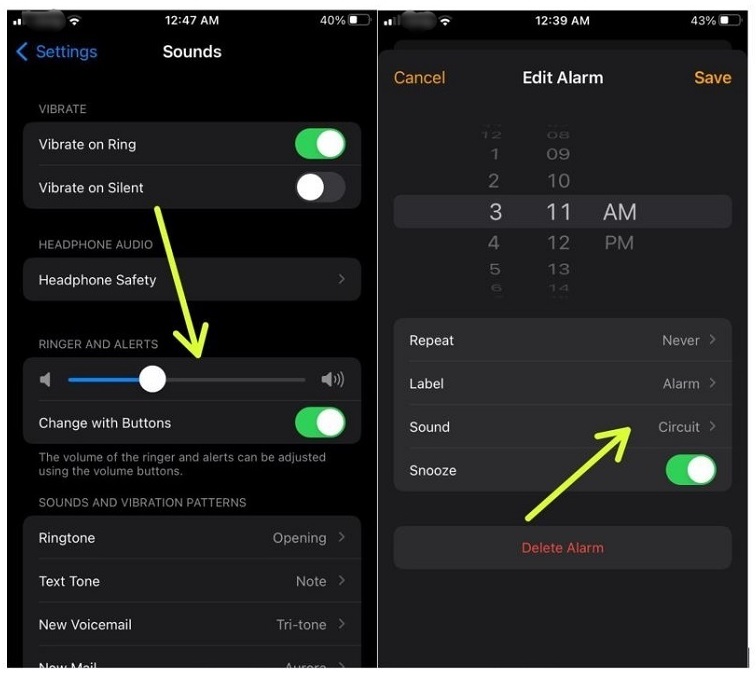
Yep, I know, seems basic. But here's the kicker: your alarm volume on many phones (looking at you, iOS users!) isn't always tied directly to your ringtone or media volume. It can be its own little beast. Go into your clock app, find an alarm, and check if there's a specific volume slider there. Or, for iPhones, go to Settings > Sounds & Haptics and look for the "Ringer and Alerts" slider. Make sure "Change with Buttons" is off if you want a consistent alarm volume that doesn't accidentally get lowered when you're just adjusting a YouTube video.
Must Read
For Android users, it's often Settings > Sound & vibration > Alarm volume. Easy peasy! Give it a boost. Seriously, crank it up. Your future self will thank you.
And then there's the silent assassin: Do Not Disturb (DND) mode. Ah, the sweet relief of no notifications, often forgotten until your alarm plays a game of telephone with your brain. Most DND modes have an option to allow alarms to bypass them, but sometimes, that setting is a bit… shy. Double-check your DND settings to ensure "Alarms" are allowed to make some noise. Because nobody wants to miss work just because their phone was trying to be polite.
The "Smart" Features That Are Maybe a Little Too Smart
Okay, now for the trickier stuff. Our phones are getting smarter, and sometimes, that means they're overthinking things. Ever heard of Attention Aware Features (on iPhones, for example)? This little gem uses your front-facing camera to detect if you're looking at your phone. If it sees your sleepy face staring at it, it might actually lower the alarm volume because it assumes you're awake and don't need a full-blown air horn. Handy for texts, maybe not so much for waking the dead.
You can turn this off if it's causing you grief. For iPhones, it's under Settings > Face ID & Passcode > Attention Aware Features. Toggle it off and let your phone scream its heart out.
Similarly, some Android phones have features that detect if you pick up your phone or if it's face down, and they might adjust sound accordingly. Dive into your sound settings and look for anything related to "flip to shhh" or "smart gestures" that might be inadvertently silencing your morning call.
The Physical Blockers & Wireless Woes
Where's your phone sleeping? Is it snuggled under a pillow? Buried beneath a mountain of laundry? Your phone's speakers are usually on the bottom edge. If they're pressed against a soft surface, they're basically trying to yell through a thick blanket. And guess what? It won't work. Give your phone some breathing room; place it on a hard, flat surface with the speakers unobstructed. A nightstand is perfect!
And finally, the classic blunder: Bluetooth devices. Is your phone connected to a Bluetooth speaker, headphones, or even your car's stereo from yesterday's drive? If so, your alarm might be happily blaring away… in the next room, in your gym bag, or silently into the ether from your parked car. Always double-check your Bluetooth connections before you hit the hay, or better yet, simply turn off Bluetooth if you don't need it overnight.
It's Not a Conspiracy (Probably)
At the end of the day, your phone isn't trying to make you late. These features are often designed with good intentions—to save your ears from a sudden blast or to be less disruptive. But sometimes, those intentions backfire when it comes to the crucial task of prying you from the sweet clutches of slumber.
So, take a few minutes tonight to check those settings. Crank up that alarm volume, tell your phone it doesn't need to be so "aware," give its speakers some space, and disconnect those Bluetooth gadgets. You've got this. Reclaim your mornings, one loud, clear, definitely-not-whispering alarm at a time!
Here's to waking up on time, feeling refreshed, and perhaps even having a moment to enjoy that first cup of coffee before the chaos of the day begins. You deserve it! Now go forth and conquer those alarms!