
Typeerror: 'builtin_function_or_method' Object Is Not Subscriptable
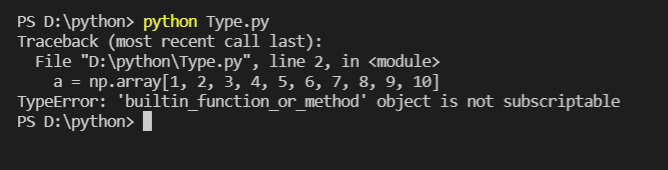
Okay, folks, let's talk about something that's tripped up every coder at least once: the dreaded TypeError: 'builtin_function_or_method' object is not subscriptable. Sounds scary, right? Like some kind of alien invasion in your Python code. But trust me, it's more like accidentally trying to use a spoon to cut your steak – frustrating, but ultimately solvable.
What in the World Does That Mean?
Think of it this way. Imagine you're trying to order a pizza. You want the ingredients, right? The toppings. In Python, "subscripting" is like asking for a specific ingredient from a list (or, you know, a pizza). You use square brackets, like my_list[2] to get the third item.
Now, a "builtin_function_or_method" is like the whole pizza-making process itself. It's a pre-made function that Python gives you, like len() to find the length of a string or list, or print() to show something on the screen. It's the action and not the thing.
Must Read
So, the error basically says: "Hey! You're trying to treat a pizza-making process like it's a list of ingredients. You can't ask for the 'second ingredient' of the pizza-making process. That makes no sense!"
I know, I know. It sounds convoluted. But it gets easier, promise!
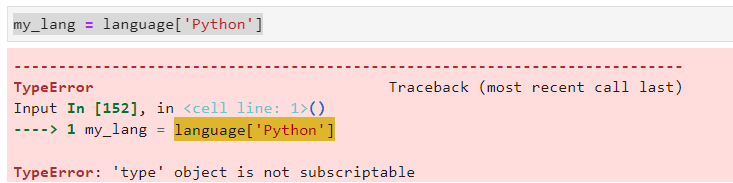
The Usual Suspects: How This Happens
The most common culprit? Forgetting parentheses! Let's say you want to get the length of a string. You should use len(my_string). But if you accidentally type len[my_string], Python will throw that "builtin_function_or_method" error at you, and it'll feel like a personal attack.
It's like trying to start your car by yelling "Engine!" at it. You need to do something to the engine, like turn the key!

Another classic is trying to access a method without calling it first. For example, if you have a string called my_string, you want to use the lower() method to convert it to lowercase. You need to call it with parentheses: my_string.lower(). Writing just my_string.lower is like holding a phone but not dialing the number. You're just... holding a potential connection.
I’ve definitely spent way too long staring at code like my_string.lower[0] before realizing I needed to call the method first and then get the first character: my_string.lower()[0].

Debugging Tips: Be the Code Detective
So, how do you catch this little bugger? Here’s your detective toolkit:
- Look for Missing Parentheses: This is the most common cause. Double-check your
len()s, yourprint()s, and any method calls. Is there a stray square bracket where there should be parentheses? - Check Your Method Calls: Are you trying to access something on a method without calling it first? Remember, methods are actions, so they need those parentheses.
- Read the Error Message Carefully: Okay, sometimes error messages in programming can be cryptic. But in this case, the message is pretty direct. It tells you that you're trying to subscript a "builtin_function_or_method".
Example Time!
Let's say you have this code:
![[Solved] TypeError: method Object is not Subscriptable - Python Pool](https://www.pythonpool.com/wp-content/uploads/2021/05/Solved-TypeError-‘method-Object-is-not-ubscriptable.jpg)
  my_list = [1, 2, 3]
  length = len[my_list]
  print(length)
You'll get the "TypeError: 'builtin_function_or_method' object is not subscriptable" error. Why? Because you're trying to subscript len instead of calling it as a function. The fix is simple:
  my_list = [1, 2, 3]
  length = len(my_list)  # Corrected line!
  print(length)
See? No more error. And now you know how to order your pizza… I mean, write your Python code… correctly.
The Takeaway
This error might seem daunting at first, but it's really about understanding the difference between a function/method and its result. Always remember: parentheses are your friends! And when in doubt, take a deep breath, read the error message carefully, and think about whether you're trying to treat a process like an ingredient. Happy coding!