
Tv Consumes How Many Watts
Hey there, couch potato connoisseur! Ever found yourself midway through a marathon of your favorite show, a bag of chips precariously balanced, and suddenly thought, "Man, how much juice is this glowing rectangle actually sucking down?" You're not alone! It's a surprisingly common thought. And today, we’re diving into the wonderful, slightly murky world of how many watts your TV consumes, no engineering degree required. Promise!
First off, let's get one thing straight: there's no single, one-size-fits-all answer. It's not like asking "how many legs does a dog have?" (Unless it's a very specific, three-legged dog named Tripod, but I digress). Asking "how many watts does a TV consume?" is a bit like asking "how much does a car cost?" – it massively depends! Don't worry, we'll break it down simply; you'll feel like an energy guru by the end.
The Big "It Depends" Factor: What Influences Your TV's Thirst?
So, what makes one TV a dainty sipper and another a veritable power chugger? A few key things come into play:
Must Read
- Screen Size: This one's a no-brainer: a tiny 32-inch screen simply needs less power than a colossal 75-inch behemoth. Bigger screen, more watts!
- Technology Type: Are we talking ancient CRT (remember those chunky beasts?), classic LCD, popular LED, or fancy-pants OLED? Each has its own power profile. Modern LED and OLED TVs are generally far more efficient than their predecessors.
- Brightness & Settings: If you've got your TV set to retina-scorching brightness, it's going to work harder and consume more power. Eco modes, dynamic brightness, and lower contrast settings can make a surprising difference.
- Age of Your TV: Older tech tends to be less efficient. Think of it like an older car – not always peak performance in the energy-saving department.
Okay, But Give Me Some Numbers!
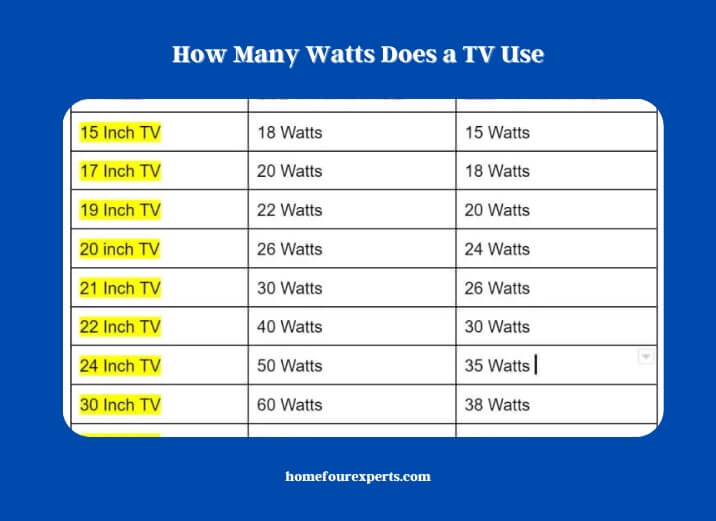
Alright, alright, I hear you! While exact numbers vary wildly, we can talk in some general ranges to give you a ballpark idea. Think of these as friendly guidelines, not gospel carved in stone.
For most modern LED TVs (which is what most of us have these days):
- Smaller (32-inch to 43-inch): You're often looking at something in the range of 20 to 60 watts when it's actively displaying your shows. Pretty modest, right?
- Medium (50-inch to 65-inch): These popular sizes usually hover around 60 to 120 watts. Still not breaking the bank, even during a Lord of the Rings extended edition marathon.
- Larger (70-inch and up): When you get into the true cinema experience at home, expect something like 100 to 250+ watts. Big screen, relatively big power consumption.
What about OLED TVs? These are super cool because each pixel lights up individually. For dark scenes (think outer space), they can actually be more energy-efficient than an LED TV, as they literally turn off pixels. However, for bright, colorful scenes, they sometimes use a bit more power. Generally, they fall into similar ranges as LED TVs of comparable size.
The Sneaky Power Thief: Standby Mode!
Here’s a little secret: your TV doesn't just stop sucking power when you hit the power button. It goes into standby mode, patiently waiting for your next command. And even in standby, it's munching on a tiny bit of electricity! We're talking generally between 0.5 to 3 watts, sometimes a bit more for "instant on" features.
While that sounds tiny, those watts add up, silently nibbling at your electricity bill. It's like a tiny faucet dripping all day – not a flood, but certainly not ideal!
How Can I Actually Figure Out My TV's Watts?
Want to get super specific? You've got a few fun options:
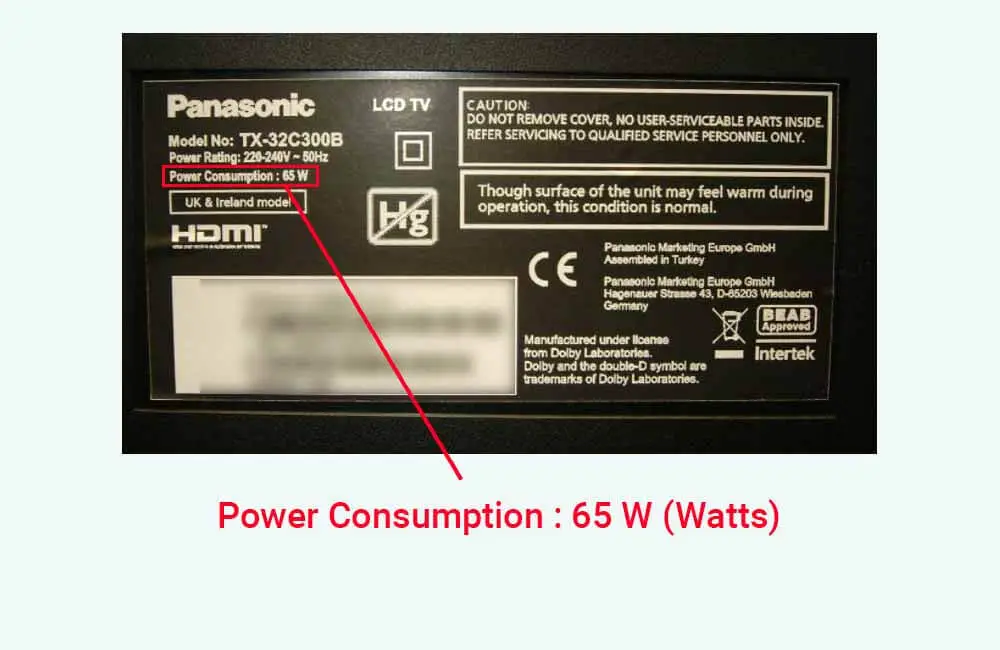
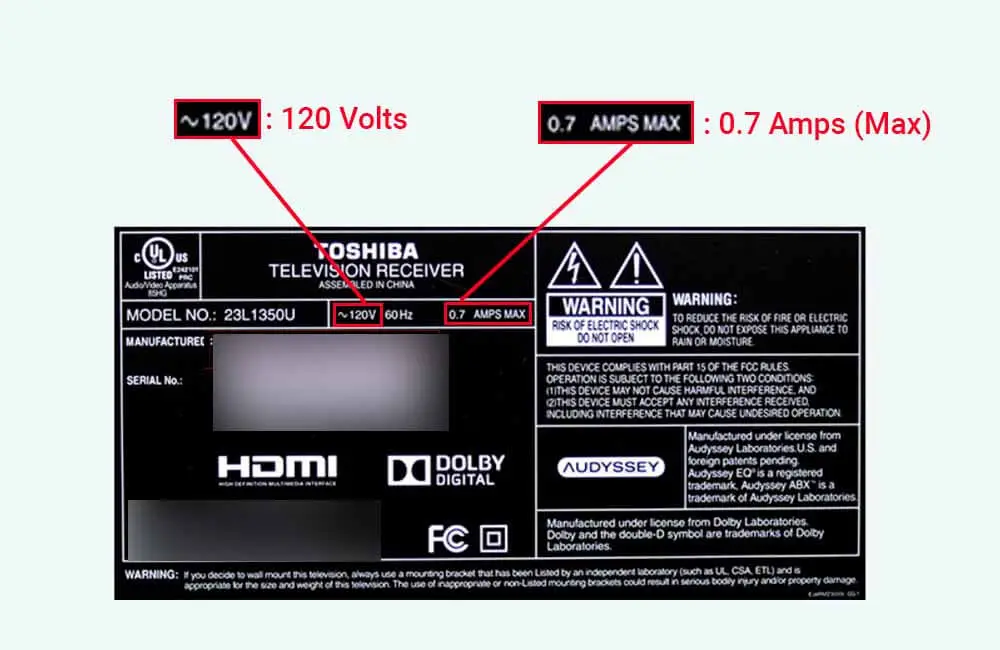
- Check the Label: Flip your TV around (carefully, please!) and look for a label on the back. It often lists the "rated power" or "power consumption" in watts (W) or amperes (A) and volts (V). If it's A and V, you just multiply them (Watts = Amps x Volts).
- Consult the Manual: Remember that little booklet you probably tossed aside? It usually has a specifications section with power consumption details.
- Get a Gadget! For the truly curious, grab a Kill A Watt meter (yes, that’s its actual name!). Plug your TV into it, and it tells you exactly how much electricity it's using in real-time. It's surprisingly fun to see what your appliances are up to!
So, Should I Start Panicking About My Electricity Bill?
Absolutely not! Modern TVs are remarkably energy-efficient, especially compared to their ancestors. While a giant plasma TV from 15 years ago might have been a power hog, today's models are pretty lean, mean, entertainment machines.
Your TV is likely only a small fraction of your overall electricity bill. Bigger culprits are usually your AC, heating, water heater, or that old, inefficient fridge.
A Few Friendly, Fun Tips to Be Even More Energy-Savvy:
- Dim the Lights: Lowering your TV's brightness a notch or two can save power and often looks better in a dimly lit room anyway! Your eyes (and wallet) will thank you.
- Embrace Eco Mode: Many TVs have an "Eco Mode" or "Energy Saving" setting. It often adjusts brightness and other picture settings automatically to reduce consumption. Give it a try!
- Unplug or Power Strip It: If you're going away for a while or just want to be super diligent, plug your TV into a smart power strip that you can switch off completely, cutting out that standby drain.
- Size Wisely: When buying a new TV, consider the size of your room. A 75-inch screen might be awesome, but if you're sitting 6 feet away, a 55-inch might be plenty awesome and save you a few watts.
See? Knowing how many watts your TV consumes isn't a scary, complicated thing! It's actually pretty fascinating, and it empowers you to make small, smart choices if you want to. So, go forth, enjoy your shows, and rest easy knowing your glowing rectangle isn't secretly draining the national grid. It's just doing its job: bringing you endless entertainment. Now, about those chips...
