Missing 2 Required Positional Arguments

Okay, picture this: it’s Friday night, I’m finally about to unwind after a brutal week, and I decide to order pizza. Super simple, right? I go to my favorite online place, meticulously build my dream pizza (extra cheese, obviously), click "order," and BAM! An error message pops up: "Missing required toppings: Sauce, Cheese." Like, seriously? Pizza… missing sauce and cheese? What is this, cardboard disc delivery service?
That’s kind of like dealing with the dreaded "Missing 2 required positional arguments" error in Python (or any programming language, really). You think you've got everything perfectly lined up, ready to execute, and then the interpreter throws a digital wrench in your plans. It's frustrating, a little embarrassing (did I really forget something that basic?), and definitely a mood killer. (Don't tell me you haven't been there!)
What's Actually Going On?
So, what exactly is this "missing required positional arguments" business? Well, think of a function in your code like that pizza order form. The function expects certain inputs, arguments, to do its job. Some of these are required; the function simply can't function (pun intended!) without them.
Must Read
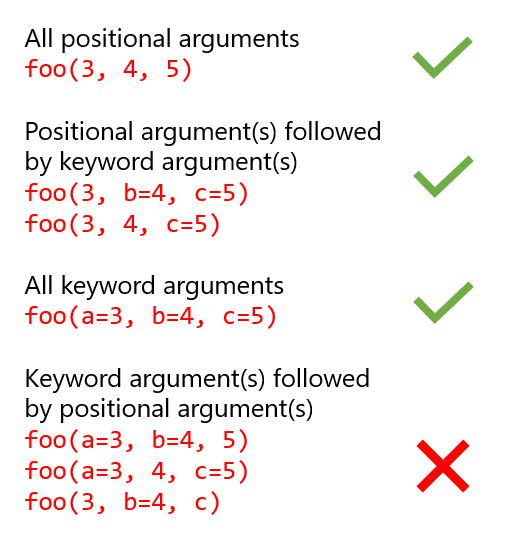
Positional arguments are those arguments where the order matters. If you define a function like this:
def calculate_area(length, width):
  return length * width
…Python expects the first argument you provide to be the `length` and the second to be the `width`. If you call the function with only one argument, or with the arguments in the wrong order, you're going to run into trouble. (Imagine getting the length and width switched... Suddenly your tiny bedroom looks like a ballroom on paper!)

The error message "Missing 2 required positional arguments" means you called a function that needed two arguments in specific positions, but you didn't provide them. Or, perhaps you provided them, but not in the order that the function expected. The interpreter is basically saying, "Hey, I’m missing vital ingredients here! I can’t bake this cake (or run this code) without them!"
Decoding the Error Message
The error message itself can be super helpful, once you understand what it's trying to tell you. It usually looks something like this:
TypeError: my_function() missing 2 required positional arguments: 'arg1' and 'arg2'
The `TypeError` tells you the type of error you’re facing (in this case, an error related to the type of input). The `my_function()` part tells you which function is causing the problem. And, most importantly, it lists the missing arguments: `'arg1'` and `'arg2'`. Pay close attention to these! They’re the keys to solving the puzzle.
How to Fix It (The Fun Part!)
Okay, so you've got the error message. Now what? Here's a simple troubleshooting checklist:

- Read the function definition: Go back to where the function is defined and carefully examine the arguments it expects. Are they in the correct order? Are any of them supposed to have default values (which would make them optional)?
- Double-check your function call: Make sure you’re providing all the required arguments when you call the function. Are you passing the correct number of arguments? Are they the right type?
- Look for typos: It sounds silly, but a simple typo in the function name or argument names can cause all sorts of havoc. I once spent an hour debugging because I had `lenght` instead of `length`… don’t be me! (We all make mistakes, right?)
- Consult the documentation (RTFM!): If you’re using a function from a library or module, the documentation will often tell you exactly what arguments are required and in what order.
Pro-Tip: Using a good IDE (Integrated Development Environment) can help catch these errors before you even run your code. Many IDEs will highlight missing or incorrectly ordered arguments, saving you a ton of frustration. Think of it as having a really smart spellchecker for your code!
In Conclusion: Embrace the Errors!
Encountering errors like "Missing 2 required positional arguments" is a normal part of the coding process. Don't get discouraged! View them as learning opportunities. Each error you solve makes you a better, more resilient programmer. Besides, every solved error gets you one step closer to that delicious, perfectly functioning code. (And maybe, just maybe, a real pizza that actually includes sauce and cheese.) Good luck and happy coding!