
Javascript Number Of Days In Month
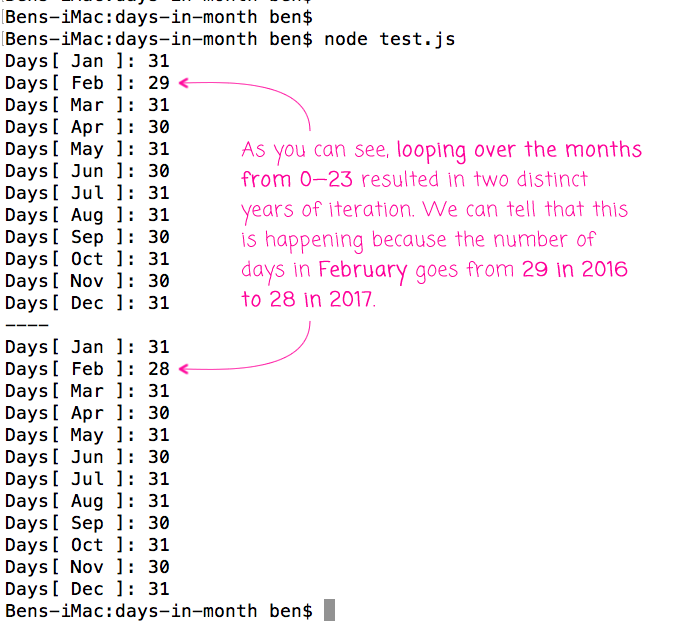
Ever wondered how computers know exactly how many days are in February? Or why your online calendar is always spot-on with its dates?
It's not magic, I promise! It involves a bit of clever coding, specifically using JavaScript, and some interesting rules about our calendar.
The Month Mystery
We all know some months have 30 days, some have 31, and February is… well, February is a special case. Remember that old rhyme? “Thirty days hath September…”
Must Read
But how do you translate that rhyme into something a computer can understand? That's where JavaScript comes in, riding to the rescue!
There's a sneaky little trick to figuring out the number of days in a month. It revolves around something called the Date object in JavaScript.
Date Object Shenanigans
Imagine telling JavaScript, "Hey, create a date for the 0th day of March." Now, logically, there's no "0th" day of March.
But JavaScript, being the clever language it is, doesn't throw an error. Instead, it rolls back to the last day of the previous month – February!
It’s like a time-traveling DeLorean, except instead of going to the past, it just subtly adjusts the date to fit reality. Pretty neat, huh?
So, if you ask for the 0th day of March, JavaScript quietly gives you the last day of February. That's how it knows how many days are in February!
Think of it as a calendar loophole, a quirky way to get the information you need without explicitly saying, "Tell me how many days are in February."
Leap Year Leapfrog
Now, let's talk about leap years. Every four years, February gets an extra day, making it 29 days long. (Unless the year is divisible by 100 but not by 400... but let's not go too deep into the weeds!)
The JavaScript Date object handles leap years automatically! When you ask for the 0th day of March in a leap year, it correctly returns February 29th.
It's like the calendar is always whispering the correct answer to JavaScript, making sure it never makes a mistake (well, almost never!).
Imagine the poor programmer who had to manually hardcode all the leap year rules into a program before this nifty trick was discovered. Yikes!
Code Snippets (Simplified!)
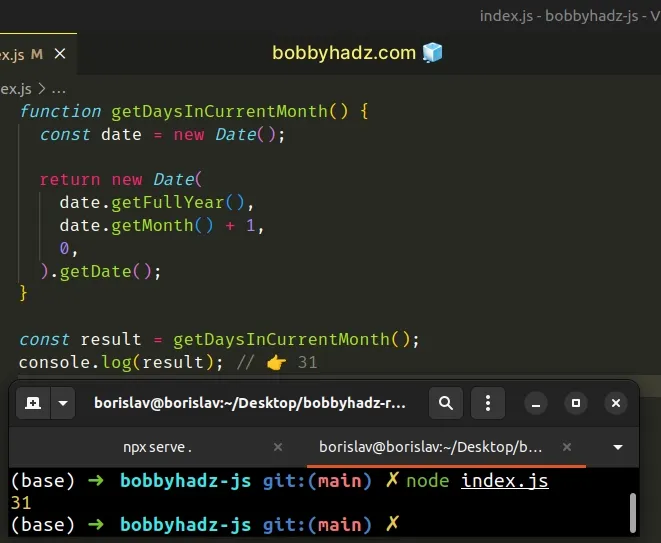
Okay, let's get slightly technical, but I promise to keep it easy. Here's a simplified snippet of how this might look in JavaScript:
function daysInMonth(year, month) {

  return new Date(year, month, 0).getDate();

  }
Don't worry if you don't understand all the code. The important part is the new Date(year, month, 0). That's where the magic happens!

We're creating a new Date object with the given year and month, but with the day set to 0. As we discussed, this cleverly gives us the last day of the previous month.
Then, .getDate() simply extracts the day number from that date. Voila! Number of days in the month!
The Human Side of Code
While JavaScript and the Date object handle the heavy lifting, it's important to remember that real people wrote this code. People who had to think creatively about how to solve a problem.
Think about the person who first realized that using the "0th" day trick would be a simple and elegant solution. That's some serious coding genius!
It's a reminder that even seemingly simple things like knowing the number of days in a month involve human ingenuity and problem-solving.
Beyond Calendars: Why This Matters
Understanding how JavaScript handles dates and times isn't just about calendars. It's fundamental to many things we use every day.
Think about scheduling appointments, setting reminders, calculating deadlines, or even tracking your fitness progress. All of these rely on accurate date and time calculations.
Behind the scenes, JavaScript is diligently working to keep everything synchronized, ensuring that your online life runs smoothly.
Imagine trying to schedule a meeting without knowing how many days are in each month. Utter chaos!
The Quirky World of Dates
The world of dates and times in programming is full of quirks and surprises. Different cultures have different calendar systems, time zones can be a nightmare, and leap seconds… well, let’s not even go there.
JavaScript does a pretty good job of handling these complexities, but it's not always perfect. There are edge cases and gotchas that can trip up even experienced programmers.
That's why libraries like Moment.js and date-fns exist – to provide more robust and user-friendly ways to work with dates and times in JavaScript.
These libraries take care of all the messy details, so you don't have to worry about accidentally scheduling a meeting on February 30th (which, thankfully, doesn't exist!).
A Little Appreciation
So, the next time you check your calendar or schedule an online appointment, take a moment to appreciate the clever code that makes it all possible.

It's a testament to the power of programming to solve real-world problems, even seemingly simple ones like knowing how many days are in a month.
And remember the unsung heroes: the programmers who painstakingly crafted the JavaScript Date object and the libraries that build upon it.
They're the reason why your computer knows that February has 28 (or 29!) days, and why your online calendar is always ready for your next adventure.
Final Thoughts
Learning about the JavaScript Date object and how it determines the number of days in a month is more than just a technical exercise.
It's a glimpse into the fascinating world of programming, where creativity and logic combine to solve everyday problems.
So go forth and appreciate the cleverness behind the code, and never underestimate the power of a well-placed "0" when it comes to dates!
Who knew that knowing how many days are in February could be so interesting? JavaScript, you continue to surprise us!
And remember, when in doubt, just ask JavaScript. It probably knows the answer. And if it doesn't, well, that's what Google is for!