How To Turn Off Fire Alarm Beeping Low Battery

Ever woken up in the middle of the night to that infuriating, intermittent, high-pitched chirp? You know the one. It’s the sound of your fire alarm declaring its battery is officially on its last legs. While it might feel like a tiny, aggressive bird has taken up residence in your ceiling, dealing with this common household annoyance is surprisingly simple and, dare I say, a little bit fun once you know how!
This isn't just about silencing an annoying noise; it's about reclaiming your peace and quiet, and feeling like a domestic superhero. For beginners and anyone who's ever thought, "I should probably call someone about this," learning to swap out a fire alarm battery is a fantastic entry-level DIY skill. You'll save yourself the cost of an electrician, not to mention the precious hours of sleep. For busy families, it's a lifesaver, ensuring babies stay asleep and adults don't resort to drastic measures like ripping the alarm from the ceiling (we've all been tempted!). And for those who enjoy a bit of home maintenance, it's a satisfying tick on the chore list, empowering you to handle minor issues with confidence.
You might encounter a few variations of these chirping nuisances. Most commonly, it's a battery-only smoke detector that needs a fresh 9V battery. However, you might also have a hardwired alarm with a battery backup. These still need battery changes, usually annually, to ensure they work during a power outage. The chirp pattern can also vary – some might give a single "chirp" every 30-60 seconds, while others have a slightly different cadence. The good news? The solution is almost always the same: a new battery! While the low battery chirp is the main villain here, remember that consistent beeping could also signal dust buildup (which often just needs a quick vacuum) or the alarm reaching its expiry date (typically 7-10 years, marked on the back). But for that classic, intermittent "I'm dying!" beep, it's almost certainly the battery.
Must Read
Ready to tackle that tiny terror? Here are some simple, practical tips to get you started:
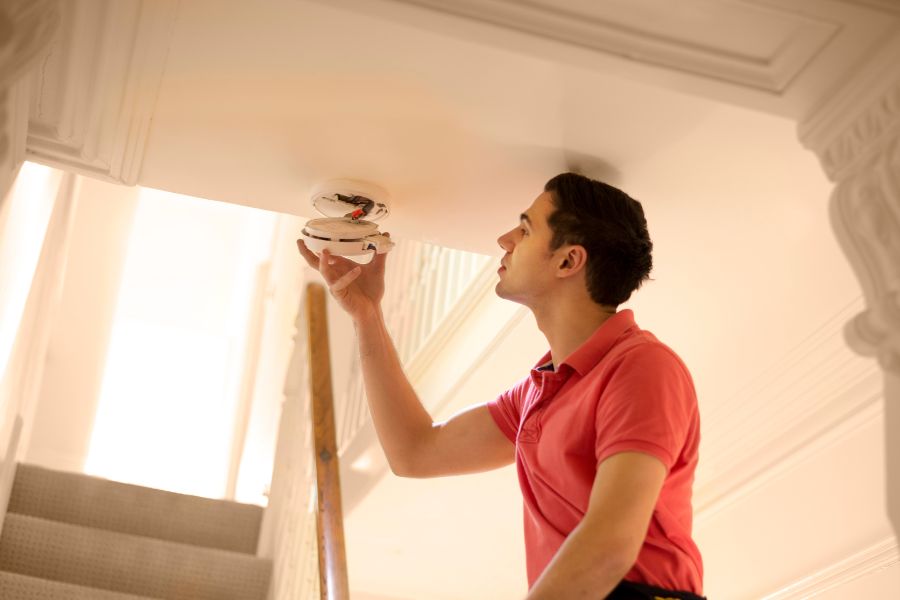
- Locate the Culprit: First, you need to figure out which alarm is beeping. Sometimes it's obvious, but if you have several, listen carefully or even recruit a helper to pinpoint the exact source.
- Safety First: Grab a sturdy step stool or a small ladder. No balancing on wobbly chairs, please!
- Open it Up: Most fire alarms twist off their ceiling mount or have a small latch that allows them to slide open. You might need to twist counter-clockwise or press a tab. Don't be shy; they're designed to be opened.
- Find the Battery: Once open, you'll usually see a 9V battery, though some models use AA or AAA. Note its orientation before removing.
- The Secret Sauce: This is a crucial step! Before inserting the new battery, press and hold the alarm's "Test" button for about 15-20 seconds. This drains any residual charge, often preventing the new battery from immediately chirping as if it were low. It's a little trick that saves a lot of frustration!
- Insert New Battery: Pop in a fresh battery, making sure it's oriented correctly.
- Test It Out: Press the "Test" button again. It should emit a loud, continuous alarm. This confirms it's working properly.
- Reassemble: Close the cover and twist or slide the alarm back onto its mount until it's secure.
- Date It: As a good habit, use a permanent marker to write the current date on the new battery or inside the alarm. This helps you remember when to change it next year!
And just like that, silence reigns supreme once more! There’s a real sense of accomplishment in fixing something that was driving you absolutely bonkers. It’s a small victory, but a significant one for your peace of mind and your home’s safety. Enjoy the quiet – you've earned it!