
How To Tell If The Power Supply Is Bad

Your computer, that trusty sidekick, usually hums with life. But then, one day, it just… stops. Or maybe it acts a little wonky, like it's having an off day. What's going on inside that digital brain?
Often, the culprit is hiding in plain sight, a quiet hero until it decides to retire. We're talking about the power supply unit, or PSU. It’s like the heart of your computer, pumping essential electricity to every single part.
When this vital organ starts to falter, things can get pretty dramatic. It’s a bit like a detective story, where you’re the super sleuth trying to piece together the clues. And honestly, it can be quite satisfying to crack the case yourself!
Must Read
The Mysterious Case of the Silent Machine
Imagine you press the power button, expecting that familiar whir and glow. But nothing happens. Just an eerie silence. This is perhaps the most classic sign that your power supply might be giving up the ghost.
Your computer might be completely unresponsive. No fans spinning, no lights blinking, no happy beeps. It's just a very expensive, very quiet brick.
This absolute lack of life is a strong hint. It suggests that no power, or not enough power, is even making it to the essential components. The PSU is usually the first suspect in such a chilling mystery.
The Intermittent Enigma
Sometimes, the problem isn't a complete shutdown. Instead, your computer plays a cruel game of peek-a-boo. It might turn on for a bit, then suddenly shut down without warning.
Or perhaps it struggles to boot up, turning on for a second before flicking off again. It's like a temperamental light switch, constantly frustrating your attempts to get work done. This on-again, off-again behavior is a classic sign of a struggling power supply.
It suggests the unit can’t deliver a consistent, stable flow of power. This can be more perplexing than a complete failure, as it keeps you guessing.

Strange Sounds and Smells: The Sensory Clues
Computers usually make a gentle hum, the sound of hardworking fans. But what if you hear something... else? A sudden, loud clicking noise from inside your machine can be a red flag.
Sometimes, fans inside the PSU might try to spin up, then immediately stop. This stuttering sound is like a warning signal, telling you something is amiss with its internal mechanics.
And then there's the unforgettable smell. If you catch a whiff of something burning, like melting plastic or singed electronics, that's a serious alarm bell. Power supplies can sometimes overheat or short out internally, leading to a very distinct, unpleasant odor.
"That burning smell? That's your computer trying to tell you something dramatic is happening inside its brain!"
Never ignore a burning smell from your computer. It’s a clear sign of an internal fault that needs immediate attention. Unplug it right away to prevent further damage or even a small fire.
Visual Cues: A Peek Inside (Carefully!)
For the truly brave troubleshooters, a peek inside the computer case can offer more clues. Before you do anything, though, make sure your computer is completely unplugged from the wall. Safety first, always!
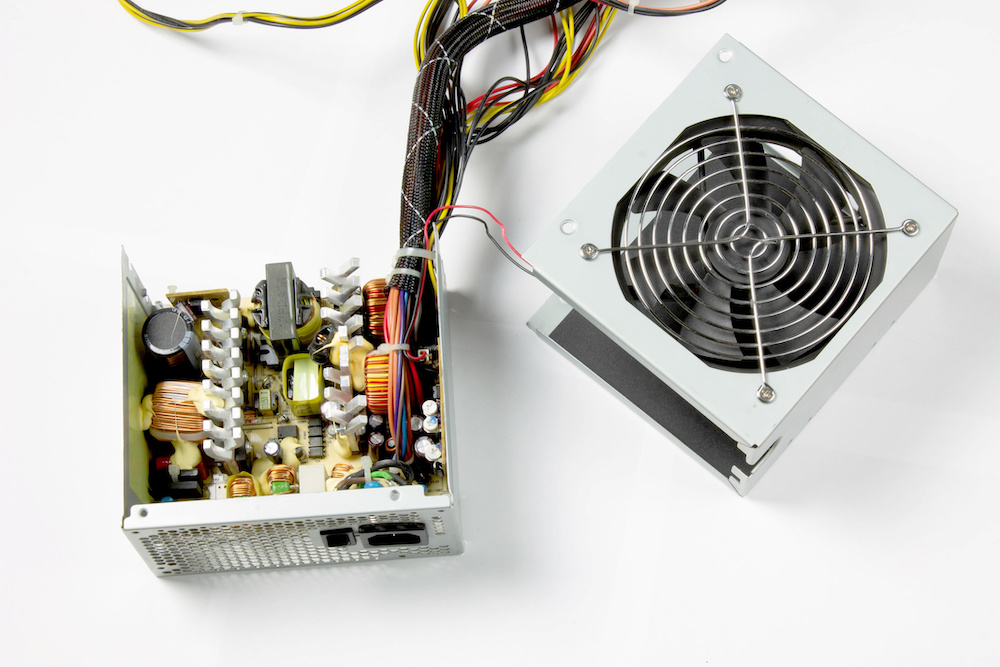
Once the case is open, take a look at the PSU itself. It’s usually a metal box with a fan, located at the top or bottom rear of your computer. Look for anything out of the ordinary.

Are there any visible scorch marks? Do you see any bulging capacitors, which look like little battery-shaped cylinders on the circuit board, with tops that are rounded or popped instead of flat? These are clear indicators of internal damage.
Even dust can be an issue. A thick layer of dust inside the power supply can hinder its cooling, causing it to overheat and fail prematurely. Cleanliness really does matter for these sensitive components.
The Not-So-Obvious Signs: A Bit More Subtle
Sometimes, a failing PSU doesn't just cut power entirely. It might start to deliver unstable power to your components. This can lead to all sorts of puzzling issues.
Your computer might experience frequent random crashes or reboots. It’s like it’s suddenly getting surprised by something, shutting down to protect itself. These can often be blamed on a struggling power supply.
Or maybe certain components aren't working right. Your hard drive isn't detected, or your graphics card fans aren't spinning up properly. These could be signs that those specific parts aren't receiving enough stable power.
Even peripheral devices acting strangely, like USB ports suddenly not working, can sometimes point back to an ailing power supply. It's all about that consistent energy flow.
The Paperclip Test: The Ultimate Showdown
This is where the detective work gets really exciting, and a little bit legendary! There’s a simple, albeit careful, test you can perform on your power supply when it’s disconnected from your computer. It’s famously known as the paperclip test.
Again, extreme caution is key here. Make sure the PSU is completely disconnected from the wall and all other components inside your computer. You only want to test the power supply unit by itself.
You'll need a paperclip, bent into a U-shape. You then carefully insert one end into the green pin (the Power On signal) and the other into any black pin (ground) on the largest connector, the 20 or 24-pin ATX connector.
With the paperclip in place, plug the PSU back into the wall outlet. If the power supply is working, its fan should spin up immediately. If nothing happens, or if the fan only twitches, then you've likely found your culprit!
"Performing the paperclip test feels like conducting a tiny, personal science experiment, with very satisfying results!"
This test isolates the power supply, telling you whether it can even power itself on. It's a quick, decisive way to check its basic functionality. But always, always be careful when handling electronics and electricity.
Beyond the Power Supply: What If It's Not The PSU?
Of course, diagnosing a computer problem is never just one thing. Even if your PSU seems fine after the paperclip test, other components can mimic similar symptoms. This is why troubleshooting is such a fun puzzle.
A faulty motherboard, for example, can prevent your computer from powering on. Bad RAM can cause crashes, and a failing graphics card can lead to display issues or random reboots. It's a whole ecosystem of parts!
But by systematically checking the power supply first, you eliminate a major suspect. You narrow down the possibilities, getting closer to solving the mystery of your digital companion's woes.
The Thrill of Diagnosis and the Path Forward
There's a real sense of accomplishment when you correctly identify a problem with your computer. It's like being a tech wizard, understanding the hidden language of electronics. You become the hero of your own digital story.
Once you've determined your power supply is bad, replacing it is often a straightforward process. New units are readily available and come with clear instructions. You just need to match the wattage and connections.
It’s a fantastic way to learn more about how your computer works, empowering you to tackle future tech mysteries. You'll gain confidence and a deeper appreciation for the intricate dance of components inside that box.
So, next time your computer acts up, don't despair. Embrace the challenge! Grab your detective hat, look for those clues, and perhaps even perform that legendary paperclip test. You might just discover you have a knack for solving tech puzzles, and that's a truly special feeling.