How To Fill Out W-9 Form For Only Fans

Okay, so you're making some serious bank on OnlyFans? Go you! But with great power (and great content) comes great responsibility...and paperwork. Ugh, I know. But trust me, filling out that W-9 form doesn't have to be a soul-crushing experience. Think of it as your official "I'm a legitimate business (person!)" badge. Let's break it down in a way that's actually...dare I say...enjoyable?
What's a W-9 Anyway?
Simply put, a W-9 form is how OnlyFans (or any company paying you) gets your taxpayer identification number (TIN). This is usually your Social Security Number (SSN) if you're operating as an individual. They need this info to report your earnings to the IRS. Don't worry, they're not out to get you! They just need to follow the rules.
Think of it like this: the W-9 is like introducing yourself to the IRS. "Hi IRS, this is me, and this is how much I made. Please don't come after me." (Okay, maybe it's a little more than that, but you get the gist.)
Must Read
Step-by-Step: Filling Out the W-9 Like a Pro
Alright, grab that form (usually available as a PDF on the OnlyFans platform) and let's get started! I promise, it's less scary than it looks.

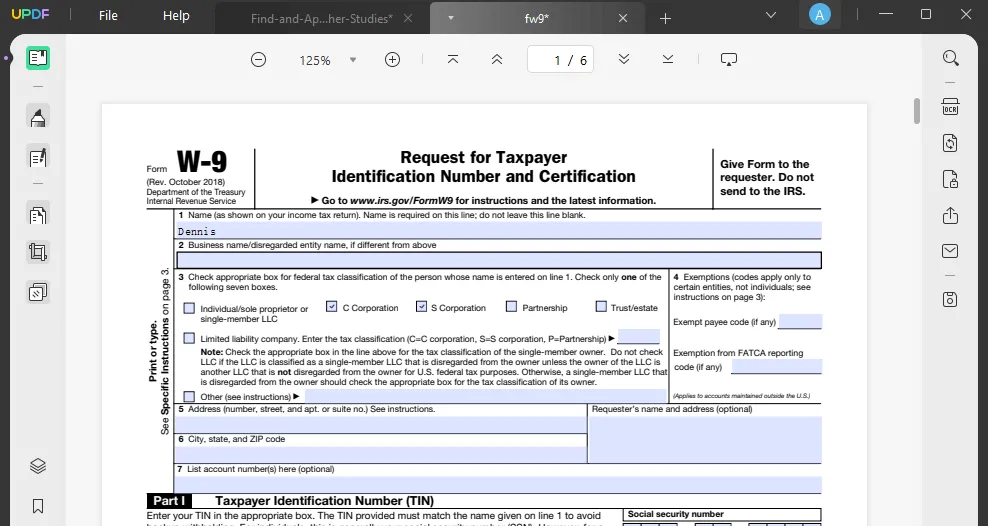
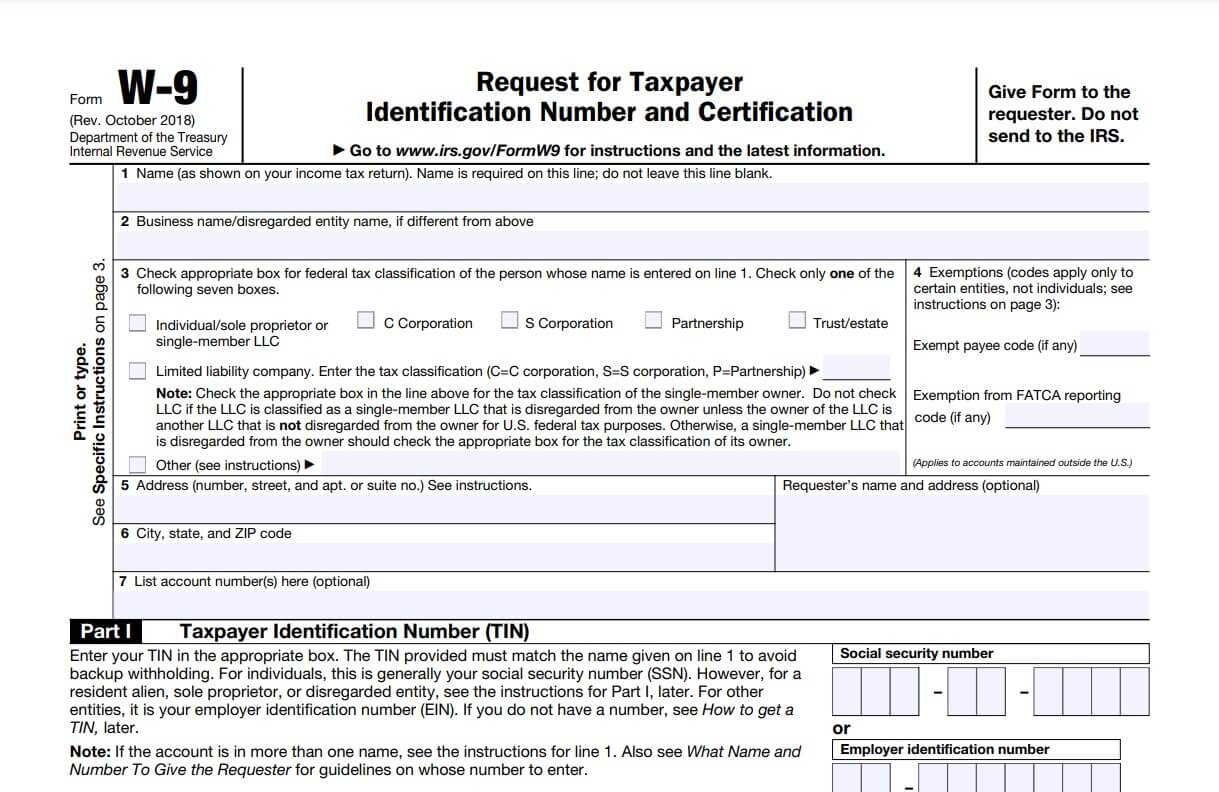
- Name (as shown on your income tax return): This is you! Put your legal name here, the one the IRS knows and loves (or, at least, tolerates). If you're using a stage name on OnlyFans, that doesn't go here. Use the name that matches your Social Security card.
- Business name/disregarded entity name, if different from above: This is where things get interesting. If you're operating under your own name (as most people starting out do), just leave this blank. If you've created a fancy LLC or business entity for your OnlyFans earnings, put that name here. (Disclaimer: I'm not a tax advisor! If you're unsure about business entities, consult a professional.)
- Check appropriate box for federal tax classification: This is super important! Most likely, you'll be checking the "Individual/sole proprietor or single-member LLC" box. Again, if you have an LLC taxed as a corporation or partnership, you'll need to choose the appropriate box. Don't just guess!
- Other: This is only needed if you check the "Limited liability company (LLC)" box and need to clarify how the LLC is classified for tax purposes (e.g., disregarded entity, partnership, or corporation). If you checked the "Individual" box, you can safely ignore this.
- Address (number, street, and apt. or suite no.): Pretty straightforward. Your current mailing address. Make sure it's accurate so you actually get important tax documents!
- City, state, and ZIP code: More address info! Double-check you've got the ZIP code right. Nobody wants tax forms going to the wrong state (unless you want a pen pal who works for a state revenue department...okay, probably not).
- Account number(s) (optional): This is typically for the payer's internal tracking purposes. You can usually leave this blank unless OnlyFans specifically asks you to fill it in.
- Part I Taxpayer Identification Number (TIN): This is the big one! If you're an individual, enter your Social Security Number (SSN) here. This is crucial! Don't mess it up. If you have an Employer Identification Number (EIN) because you operate your OnlyFans business as a corporation, use that instead.
- Part II Certification: Read this carefully. By signing, you're basically saying that the information you provided is true and correct, you're not subject to backup withholding, and you're a U.S. citizen or resident alien. Then, sign and date it! A digital signature is usually fine.
Common Mistakes to Avoid
Let's prevent some headaches, shall we?
- Using your stage name instead of your legal name: This is a big no-no. Stick with your legal name on the W-9.
- Entering the wrong TIN (SSN or EIN): Double, triple-check this! An incorrect TIN can cause all sorts of problems.
- Forgetting to sign and date the form: It seems obvious, but it happens! Make sure you actually sign and date it before submitting.
Submitting Your W-9 to OnlyFans
Once you've filled out the W-9 form, submit it to OnlyFans according to their instructions. Usually, this involves uploading it through their platform. Make sure you keep a copy for your own records! This is your proof that you did your part.

And that's it! You've successfully navigated the treacherous waters of the W-9 form. Congratulations! Now go back to creating awesome content and raking in the dough. You've earned it!
Remember, this isn't financial or legal advice. When in doubt, talk to a professional. But hopefully, this has made the whole process a little less intimidating (and maybe even a little bit fun...okay, maybe not fun, but at least manageable!).