
How Much Energy Is My Computer Consuming

Okay, picture this: I’m staring at my electricity bill the other day. It's not huge, but it's definitely nudged up a little. My eyes do that slow pan across the room, past the fridge, past the TV (which, let's be honest, is mostly off), and then they land on my trusty, ever-humming PC. It’s always there, lights blinking, fans whirring, a silent sentinel in the corner. And a thought, a truly profound thought for someone who’s worked with computers for decades, suddenly hit me: How much energy is this thing actually sucking down?
You’ve probably had a similar moment, right? That little niggle in the back of your mind wondering if your digital companion is secretly costing you a fortune. Because while we all know the fridge is an energy hog, and the AC is basically a money furnace, a computer just seems… smaller. More innocent. But is it?
The Great "It Depends" Adventure
Here’s the thing about computer energy consumption: it’s not a simple answer. It’s less like ordering a coffee and more like trying to explain quantum physics to a squirrel. Because, my friend, it depends on a lot of factors. Think of it like a car – a tiny city car uses less fuel than a monster truck, even if both are "cars."
Must Read
First up, laptop versus desktop. This is probably the biggest differentiator. Laptops are designed for efficiency. They run on batteries, after all! Their components are miniaturized and optimized to use as little power as possible. We're talking anywhere from 20 watts (W) for a basic laptop just browsing the web, up to maybe 70-80W when it’s doing something intensive, like light gaming or video editing.
Desktops, on the other hand? Oh, desktops are a whole different beast. They don't have to worry about battery life, so they can afford to be a bit more… indulgent. A typical desktop PC, just idling or doing light work, might sip around 60-100W. But fire up a demanding game, launch a 3D rendering task, or start crunching some serious data, and you could easily be looking at 300W, 400W, or even 500W+ if you have a top-tier gaming rig with a powerful graphics card and CPU.

The Usual Suspects: What's Sucking Watts?
Within your computer, certain components are hungrier than others. The big one? The Graphics Processing Unit (GPU). If you game or do any kind of graphic-intensive work, your GPU is probably the biggest power draw in your system. We’re talking hundreds of watts under load for a high-end card. Next up is the Central Processing Unit (CPU), which can consume anywhere from 30W to 150W+ depending on its power and what it's doing.
Then there are the less obvious culprits:
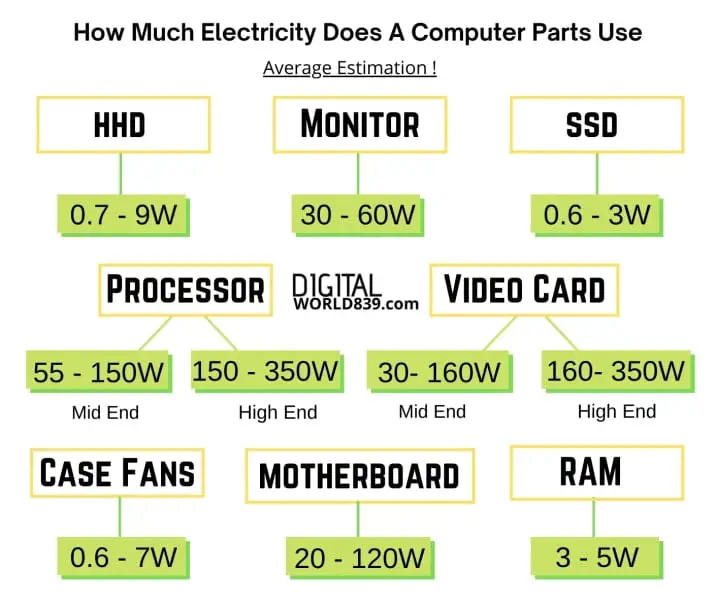
- Your monitor(s): Each screen can add another 20-50W to your total. Got two? Double it.
- Storage drives: SSDs are super efficient (a few watts), but older HDDs use a bit more.
- RAM: Minimal, usually just a few watts.
- Peripherals: External hard drives, fancy RGB keyboards, speakers, charging your phone via USB – it all adds up!
So, that "innocent" desktop might be drawing 60W at idle, but add a couple of monitors (50W each), a gaming session that pushes your GPU to 250W, and suddenly you're looking at a total system draw north of 400W. Phew!
Putting It Into Perspective: What Does That Cost?
Let's do some quick, rough math, shall we? Electricity is measured in kilowatt-hours (kWh). If your computer draws 100W for 10 hours, that's 1 kWh. If your electricity costs, say, $0.15 per kWh (check your bill, it varies!), then that's $0.15 for those 10 hours.

Now, if your gaming monster pulls 400W for 4 hours every evening, that's 1.6 kWh. Over a month (30 days), that's 48 kWh, costing you around $7.20. And that’s just the gaming! Factor in idle time, other usage, and that bill starts to look a little less innocent, doesn't it?
Can We Be More Energy Efficient? Yes!
Don't despair! You don't have to go back to pen and paper. There are simple ways to reduce your computer's energy footprint:
- Use power saving modes: Windows, macOS, and Linux all have excellent power management settings. Set your monitor to turn off after 10-15 minutes of inactivity, and your computer to sleep after 30-60 minutes.
- Turn it off: If you're done for the day or going to be away for more than an hour or two, just shut it down. It boots up fast enough these days, honestly.
- Unplug peripherals: External drives and phone chargers still draw a trickle of power even when not in use.
- Dim your screen: A brighter screen uses more power. Simple!
- Upgrade smartly: When it's time for new components, look for energy-efficient options. Newer CPUs and GPUs often offer better performance per watt.
So, the next time your computer is whirring away, think about it. It’s not just a box of magic; it’s a tiny power plant on your desk. A little awareness can go a long way, both for your wallet and, you know, for the planet. Now, if you'll excuse me, I'm off to actually turn off my monitor for the first time in forever!
