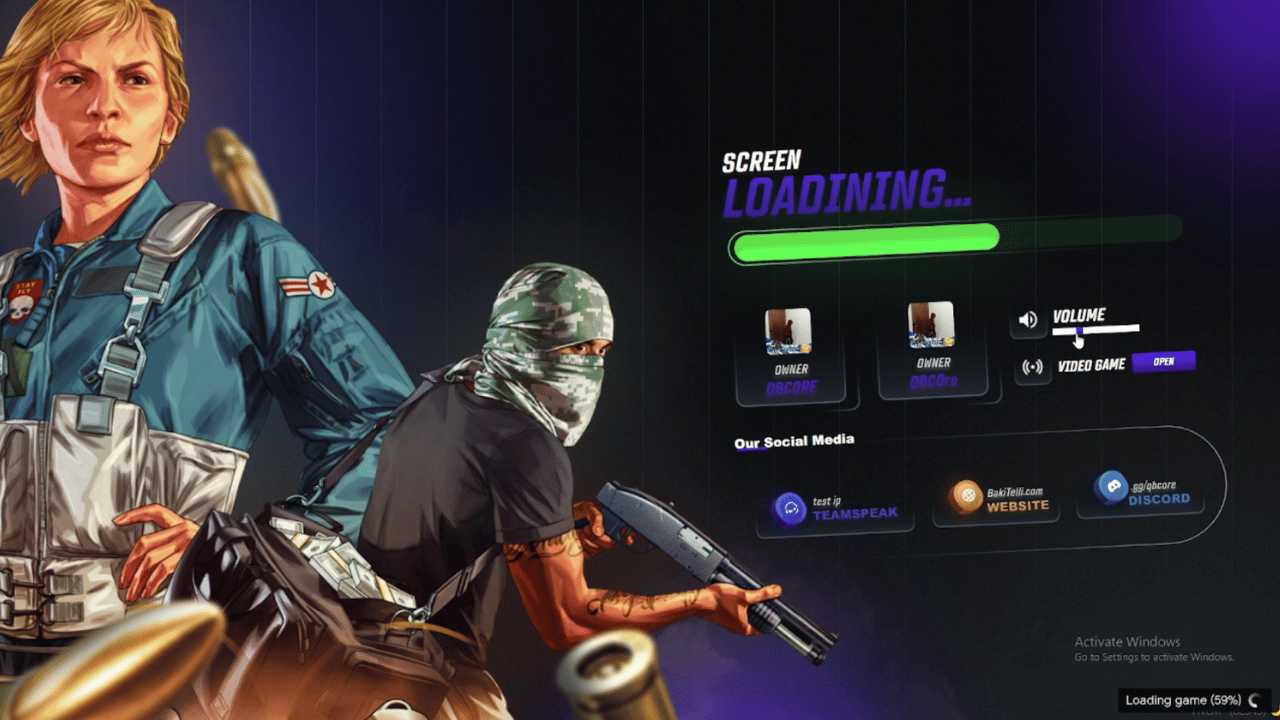
Fivem Change Loading Screen

Alright, friend! You wanna spice up your FiveM server? Specifically, that oh-so-familiar (and maybe a little boring) loading screen? You've come to the right place! Trust me, swapping out that default screen is like giving your server a digital facelift. First impressions matter, right? It's like choosing the right outfit for a date... except the date is with your entire community!
Why Bother Changing the Loading Screen?
Okay, let's be real. The default loading screen is...functional. But it's about as exciting as watching paint dry. Think of a custom loading screen as a hype builder. It's a chance to:
- Showcase your server's vibe: Is it serious RP? Wild West? Gang warfare? The loading screen sets the stage.
- Inform your players: Display server rules, Discord links, or maybe even some fun facts (Did you know a group of owls is called a parliament?).
- Reduce boredom: Nobody likes staring at a blank screen. Give them something to look at! A cool animation, a slideshow of in-game screenshots... the possibilities are endless!
- Improve engagement: A well-designed loading screen can actually get people excited to join! Think of it as free advertising.
Basically, it makes your server look pro. And who doesn't want to look pro?
Must Read
Five Easy Ways to Pimp Your Loading Screen
Alright, let's get down to the nitty-gritty. Here are five ways to revamp your FiveM loading screen, from super simple to a little more involved. Don't worry, I'll hold your hand (figuratively, of course. Unless you're into that. No judgment here!).
1. The Easiest Option: Simple Image Replacement
This is the "I'm not a coder, but I want something" option. Find a nice, high-resolution image (think 1920x1080 or larger) that represents your server. Then, locate the default loading screen image file in your server files. It's usually in a folder called something like loading-screen or html/loading (check your specific server setup!). Rename the original image (just in case you want to revert), and then rename your chosen image to match the original file name. Boom! Done. It's like swapping a picture frame – quick and satisfying.

2. HTML Magic: Basic Text and Customization
Feeling a little braver? Time to dabble in some HTML! Most loading screens use HTML, CSS, and maybe a little JavaScript. Find the index.html file in your loading screen folder. You can open it with any text editor (Notepad, Sublime Text, VS Code – whatever floats your boat). From there, you can edit the text, add basic styling (change colors, fonts), and maybe even throw in a little animated GIF. There are tons of free HTML tutorials online if you're feeling lost. Don't be afraid to experiment! (Just remember to back up the original file first, in case you accidentally turn your loading screen into a scrambled mess of code).
3. Resource Packs: Pre-Made Awesomeness
Don't want to code? No problem! The FiveM community is awesome, and there are tons of pre-made loading screen resource packs available. Just search on forums or resource sites like CFX.re. These packs usually come with everything you need – HTML, CSS, images, sometimes even JavaScript – all ready to go. Just download the resource, drop it into your server's resources folder, and add it to your server.cfg file. Easy peasy lemon squeezy! (Just make sure the resource is reputable and from a trusted source).

4. Dynamic Content: RSS Feeds and More
Want to get fancy? You can add dynamic content to your loading screen! This could be anything from an RSS feed displaying the latest server news to a countdown timer for a server event. This usually involves some JavaScript and potentially a little PHP, but there are plenty of tutorials and examples online to get you started. This is a great way to keep your players informed and engaged while they're waiting to join the server. Just remember to test it thoroughly to make sure it doesn't break anything!
5. Custom Development: The Sky's the Limit!
If you're a coding wizard (or know someone who is), you can create a completely custom loading screen from scratch! This gives you complete control over every aspect of the design and functionality. You can integrate with your server's database, create interactive elements, or even add a mini-game to play while loading. This is the most advanced option, but it also offers the most potential for creating a truly unique and memorable loading screen. Go wild!
Final Thoughts
Changing your FiveM loading screen is a simple but effective way to improve your server's overall experience. It's a chance to show off your server's personality, inform your players, and reduce boredom. So, go forth and create something awesome! Don't be afraid to experiment, have fun, and remember: even a small change can make a big difference. And hey, if you mess something up, you can always revert back to the original. No harm, no foul! Now go make that loading screen sparkle!