
How To Turn Off Honeywell Thermostat Pro Series
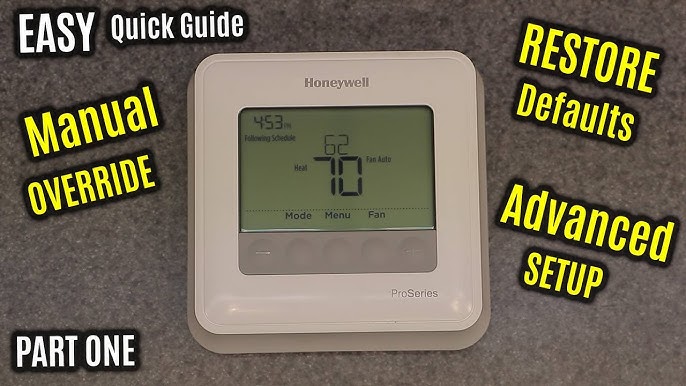
Maybe you're jetting off to an exotic locale, or perhaps the weather gods have finally bestowed upon us that perfect, no-HVAC-needed bliss. Either way, knowing how to gracefully power down your home's climate control is a secret superpower for mindful living (and saving a few bucks). We’re talking about your trusty Honeywell Thermostat Pro Series – that sleek rectangle on your wall that usually dictates your comfort.
Why Hit the Off Switch?
Think about it. Summer breezes are rolling in, crisp autumn air makes an appearance, or you're simply unplugging for a week-long escape. Leaving your HVAC system running when it’s not needed is like leaving the lights on in an empty room – a bit of a waste, right? Turning it off isn't just about saving energy; it’s about taking control of your environment, preventing unnecessary wear and tear on your system, and giving yourself a little peace of mind. Plus, who doesn't love a slightly smaller utility bill?
The How-To: Your Simple Steps
Alright, let’s get down to brass tacks. Your Honeywell Pro Series thermostat might look a little different depending on the specific model (think T4, T6, T10 Pro, or even some older variations), but the core functionality is wonderfully intuitive across the board.
Must Read
First, locate the display screen. It’s usually backlit and clearly shows the current temperature and system mode.
Next, you'll want to find the System or Mode button. This is your magic wand. It might be a physical button on the front or side, or a touch-sensitive option on a newer touchscreen model.
![Honeywell Pro Series Thermostat Fan Won'T Turn Off [Solved]](https://smartacsolutions.com/wp-content/uploads/2023/07/Honeywell-Pro-Series-Thermostat-Fan-WonT-Turn-off.jpg)
- Press the System or Mode button repeatedly.
- As you press it, you’ll cycle through various options: Heat, Cool, Auto (which switches between heating and cooling as needed), and finally, our desired destination: Off.
- Once Off appears on the screen, simply stop pressing the button. The thermostat will usually confirm the selection after a few seconds. And voilà! The system is now dormant.
Don't forget about the Fan! Even when the system is off, your fan might still be set to "On," meaning it'll continuously circulate air without heating or cooling. To stop this, look for the Fan button and cycle it to Auto. This ensures the fan only kicks on when the heating or cooling system is actively running (which, in this case, will be never, because it's off!).
Fun Facts & Smart Tips
Ever wondered about the history of thermostats? The first truly automatic thermostat was invented way back in 1883 by Albert Butz, using a bimetallic strip to regulate temperature. Imagine, no touchscreen menus, just pure mechanical genius! Fast forward to today, and our Honeywell Pros are a testament to how far we've come.

- Battery Check: Even when "off," your thermostat still uses a tiny bit of power for its display and internal clock. If your screen goes blank unexpectedly, it might just need fresh batteries (usually AA or AAA). It's always a good idea to swap them out annually, especially before a long trip. Think of it as a little wellness check for your home's brain.
- Seasonal Switches: For those delightful shoulder seasons of spring and fall, many people simply turn their system to Off rather than constantly fiddling with temperatures. It’s a beautifully simple way to embrace natural climate control and open up those windows!
- Vacation Mode vs. Off: If you're going away for an extended period, completely turning off your system can save a significant chunk of change. However, if there's a risk of pipes freezing in winter or extreme heat damaging electronics in summer, consider setting it to a minimal "away" temperature (e.g., 55°F in winter, 85°F in summer) rather than full Off. Some newer Honeywell models even have a dedicated "Vacation" setting for this purpose, which is extra snazzy!
- The Thermostat Wars: We’ve all been there. One person likes it Arctic, the other prefers a tropical paradise. Turning it off completely sometimes means a temporary truce in these classic household battles – at least until the weather demands its return! Peace out, climate control debates.
A Quick Troubleshooting Nudge
What if your thermostat is being a rebel and won't switch to Off? First, double-check those batteries. A dying battery can cause all sorts of quirks. If that's not it, a quick reset might be in order – sometimes gently pulling the thermostat off its wall plate for 30 seconds (if it's designed to be removed) can work wonders. In rare cases, if your entire HVAC system seems unresponsive, you might need to check your circuit breaker. But usually, it's just a matter of pressing that System button a few more times.
A Little Reflection
So there you have it. Turning off your Honeywell Thermostat Pro Series isn't just a technical task; it's a small act of intentional living. It’s about being mindful of your energy consumption, adapting to the rhythm of the seasons, and taking a tiny bit more control over your home environment. In a world full of smart tech constantly vying for our attention, sometimes the smartest thing we can do is simply... turn it off. Enjoy the silence, the natural breeze, and the satisfaction of a job well done.
![Honeywell Pro Series Thermostat Fan Won'T Turn Off [Solved]](https://smartacsolutions.com/wp-content/uploads/2023/10/How-Do-I-Reset-My-Honeywell-Pro-Series-Thermostat-1024x587.jpg)
