
How To Stop Nest Thermostat From Changing Temp
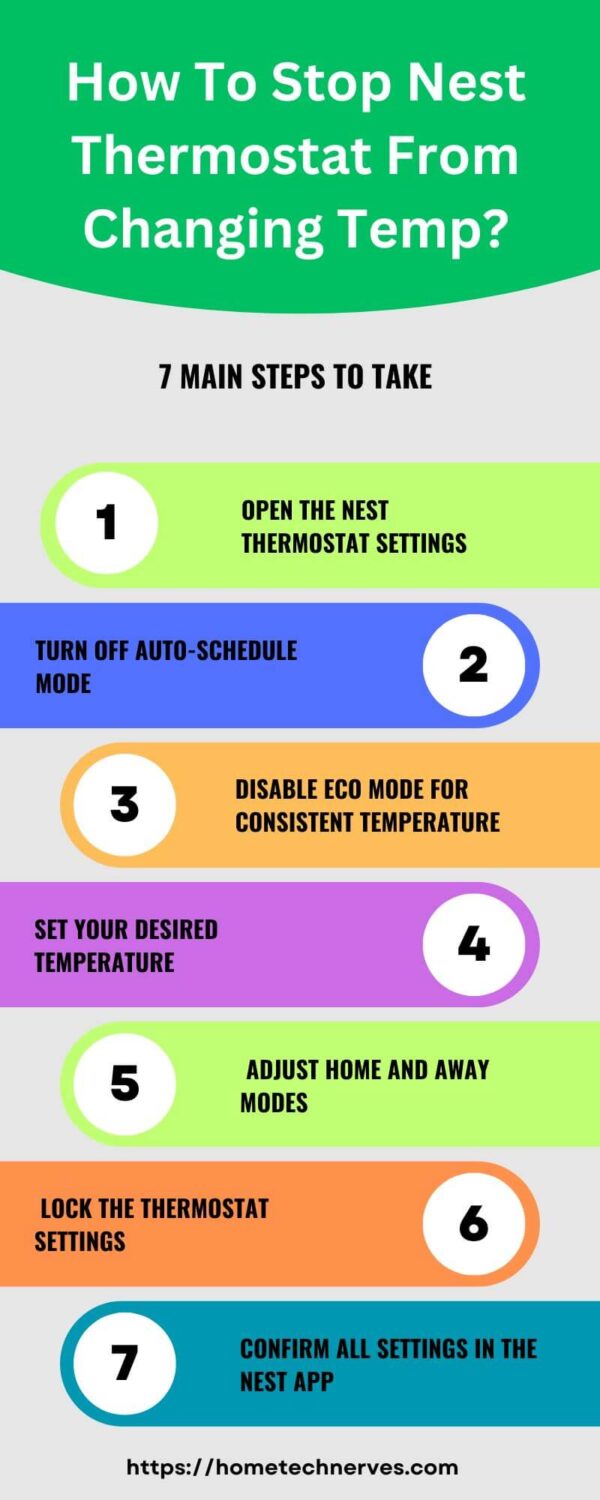
Okay, let's talk about that smart little disk on your wall. The one that sometimes seems to have a secret life. You know it, you love it, but sometimes you just want to grab it and say, "Listen here, pal, I set it to 72°F for a reason!" We're diving into the delightful drama of the Nest Thermostat changing temperatures without your explicit permission. It's a tale as old as time, or at least as old as smart home tech!
Ever walked into a room and thought, "Wait, why is it suddenly Arctic in here?" Or perhaps, "Is it just me, or is this house trying to become a sauna?" You glance at your Nest, and sure enough, it's quietly adjusted itself. It’s like a tiny, well-meaning but ultimately rebellious house elf, constantly trying to optimize your comfort (or energy bill) behind your back. But fear not! We're here to reclaim your climate destiny.
The Great Temp Tussle: Why Does It Even Happen?
Your Nest Thermostat isn't being nefarious, not really. It's just doing what it was designed to do: learn. It's a thermal anthropologist, a data junkie trying to figure out your patterns. It watches when you tweak the temperature, how often you’re home, and even how long you’ve been away. It's constantly collecting data points, trying to predict your thermal desires like a digital psychic. Which is cool, until its predictions are wildly off!
Must Read
This "learning" process, while brilliant in theory, can sometimes feel like a tiny robot overlord is dictating your indoor climate. But don't worry, we can teach the overlord who's boss. It’s all about understanding the main culprits behind its auto-adjusting antics.
Culprit #1: The Phantom Adjuster (aka Auto-Schedule)
This is the big one. The brain behind the mischief. Your Nest has an "Auto-Schedule" feature. It basically takes notes on your temperature changes. If you consistently turn it down at 10 PM for a week, it thinks, "Aha! They like it cooler at 10 PM!" and starts doing it automatically. Sneaky, right? It builds a schedule based purely on your habits.

How to tame it: You want to shut down this thermal Sherlock Holmes. Grab your phone, open the Nest app, and navigate to the "Schedule" icon. Look for "Auto-Schedule" and simply toggle it off. Poof! No more unsolicited temperature advice from your wall-mounted friend. You've officially put an end to its note-taking shenanigans. Now, you create the schedule, or just manually adjust it whenever you feel like it!
Culprit #2: The Home/Away Houdini (aka Home/Away Assist)
Your Nest isn't just watching your adjustments; it's also trying to figure out if you're actually home. It uses phone location (if you allow it), motion sensors on the thermostat, and even other Nest devices to guess your whereabouts. If it thinks you’ve left the building, it might dial back the temperature to save energy. Which is super helpful, unless you're actually just napping on the couch and it thinks you’ve vanished into thin air!
Imagine this: you're having a lazy Sunday, binge-watching your favorite show. Nest sees no motion in the hallway for an hour, your phone hasn't left the house but maybe it's on silent, and BAM! It decides you've gone to Fiji and starts cranking up the AC in winter. Not cool, Nest, not cool.

How to wrangle it: Head back to the Nest app, find "Settings," then "Home/Away Assist." You can either turn it off entirely (the nuclear option!) or just tweak which sensors it uses. Maybe you want it to ignore your phone's location but still pay attention to its own motion sensor. It’s all about finding that sweet spot of control. This way, your thermostat won't mistakenly declare your home empty just because you're really good at staying still.
Culprit #3: The Eco-Warrior (aka Eco Temperatures)
Ah, the ever-so-polite "Eco Temperatures." Your Nest’s way of saying, "Hey, maybe you don't really need it this warm/cool." These are pre-set temperature ranges that Nest jumps to when your home is empty (thanks, Home/Away Assist!) or when it's just trying to be super energy efficient. If your Nest thinks you're gone, or it's just in a particularly thrifty mood, it might jump to these settings. And suddenly, your cozy living room feels like a slightly-too-chilly cave or a surprisingly stuffy attic.

These temperatures are designed to save you money, which is admirable, but sometimes comfort trumps savings for a moment. It's like your smart home is giving you a gentle, passive-aggressive nudge about your carbon footprint. You just want to be warm, Nest, not feel guilty!
How to adjust its ethos: In the app, under "Settings," you'll find "Eco." Here, you can adjust these temperatures to be less drastic. Maybe you want your "away" temperature to be 68°F instead of a brisk 62°F. Or, if you're feeling particularly rebellious, you can disable them entirely. Take that, eco-guilt! You're back in charge of defining what "eco" means for your personal comfort.
Taking Back Total Control: The "Hold" Button is Your Friend!
But what if you just want to set it and forget it for a while? To tell your Nest, "Listen, pal, I'm in charge today, and I want it to stay at 72°F until further notice"? That's where the "Hold" function comes in. This is your power move! Set your desired temperature, and then, crucially, tell it to hold that temperature indefinitely, or for a specific duration.
This overrides everything else. It's like putting your foot down with a toddler – firm, but necessary! Whether you do it directly on the device by turning the ring and then tapping to "Hold," or via the app (look for the "Hold" option after setting your temp), this is your ultimate weapon against thermal unpredictability. Your Nest will dutifully maintain that temperature until you tell it otherwise. Finally, peace and predictable indoor weather!
The Joy of Predictable Temperatures
So, there you have it! Your Nest Thermostat is a marvel of modern engineering, a little digital brain on your wall. But sometimes, even the smartest brains need a gentle nudge (or a firm disable button) to remember who's truly in charge of the comfort kingdom. Now you know how to tame its learning instincts, manage its home-sensing features, and adjust its eco-friendly urges.
Embrace the power! Your home, your rules, your temperature. Enjoy the sweet, sweet satisfaction of knowing that when you set it to 72°F, it's actually going to stay at 72°F. It's a small victory, but oh, is it a satisfying one!