
How To Replace Battery In Honeywell Thermostat

Ever woken up to a suspiciously chilly house, only to realize your trusty Honeywell thermostat screen is as blank as your mind on a Monday morning? Or perhaps it’s flashing that dreaded "Low Batt" warning, like a tiny, digital cry for help. Don't panic! Before you start imagining life without central heating, or contemplating a career as a thermostat whisperer, know this: replacing the battery in your Honeywell thermostat is one of the easiest "adulting" tasks you can conquer.
Consider it your DIY superpower activation. No need to call in the pros, no complicated tools required. Just a few minutes, a dash of common sense, and you'll be back to cozy temperatures and basking in the warm glow of self-sufficiency. Think of the money you'll save! That's more for oat milk lattes or that streaming service you just can't quit.
Why Batteries, Anyway?
You might be thinking, "But my thermostat is wired into the wall, right?" And yes, you're probably correct! However, many Honeywell models, even those directly connected to your home’s electrical system, still rely on a battery backup. These tiny powerhouses ensure your thermostat can hold its settings, display the time, and generally keep its digital brain humming, especially during power outages or if your furnace's power is interrupted.
Must Read
It's like the watch battery for your home's climate control – small but mighty. No one wants to come home to a surprise ice age inside.
Gather Your Supplies (It's Not Much!)
Good news! Your toolkit for this mission is probably already lurking in a drawer somewhere. You'll need:

- New Batteries: This is crucial, naturally! Most Honeywell thermostats use either AA or AAA alkaline batteries. Before you do anything else, take a peek at your current thermostat to confirm the battery type. It's usually written near the battery compartment, or simply visible. Pro tip: always keep a spare set of these on hand, just like you would for your TV remote.
- A Small Screwdriver (Optional): Some models might have a tiny screw holding the battery compartment or the entire faceplate in place. A simple Phillips head will usually do the trick.
That's it! No flux capacitor needed, no ancient incantations. Just basic household items.
The Easy-Peasy Steps to a Warm Home
Ready? Let's get this done. Think of it as a mini-challenge, a quick win for your day.
Step 1: Locate the Battery Compartment
This is where models can vary slightly. For many common Honeywell thermostats, you might find the battery compartment:

- On the bottom edge of the thermostat.
- On the side edge of the thermostat.
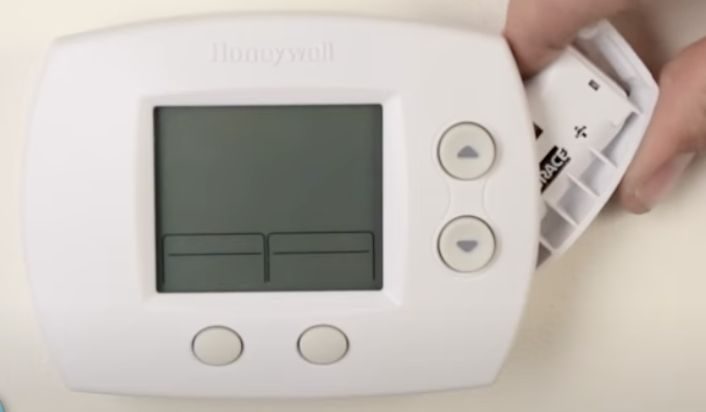
- Behind the faceplate. For these, gently pull the faceplate straight out from the wall. It's often held by clips and should pop off without too much force. Don't worry, you won't break it if you're gentle!
If you're unsure, look for a small arrow or a latch mechanism. If it's the faceplate, remember that satisfying click when you put it back.
Step 2: Remove the Old Batteries
Once you've located and opened the compartment, simply pop out the old batteries. Notice how they're oriented – usually, there's a "+" and "-" symbol indicating polarity. You'll want to remember this for the new ones.
Fun Fact: Alkaline batteries slowly lose power over time, even if not in use. That's why that "spare" battery from 2018 might not be quite up to snuff!
Step 3: Insert the Fresh Batteries
This is the big moment! Take your brand-new, ready-to-work batteries and insert them, making sure to match the correct polarity (+ to + and - to -). This is super important, like putting your shoes on the right feet.
Step 4: Close Up and Test
Gently snap the battery compartment cover back into place, or reattach the faceplate. You should hear a satisfying click. Now, watch your thermostat screen come back to life! It might take a few seconds, and you may need to re-enter the current time and day. Some fancier models might retain these settings.

Give it a test run: try raising or lowering the temperature slightly to ensure it responds. You've done it! High five!
Pro Tips & Troubleshooting Bits
- Change Annually: A great habit is to change your thermostat batteries when you adjust your clocks for Daylight Saving Time. It’s an easy-to-remember schedule!
- Quality Matters: Stick with reputable, good-quality alkaline batteries. Off-brand or rechargeable batteries can sometimes have inconsistent voltage, which might confuse your thermostat.
- Recycle Old Batteries: Don't just toss those old batteries in the regular trash. Many stores (like electronics retailers or hardware stores) have battery recycling programs. It's a small act that makes a big difference for our planet!
- Still Blank? If your screen remains blank after a fresh battery change, check your home's circuit breaker to ensure the furnace or HVAC system has power. If all else fails, it might be time for a professional diagnosis. But usually, it's just the batteries!
A Small Act, A Big Impact
See? That wasn't so bad, was it? In just a few minutes, you've prevented a potential cold snap, saved yourself a service call, and gained a little boost of confidence. It’s these small acts of maintenance – changing a light bulb, watering a plant, or replacing a thermostat battery – that keep our homes running smoothly and our lives feeling just a little more in control.
So, next time something seems "broken," take a breath, investigate, and remember the power of a simple battery. You got this! Now, go enjoy that perfectly temperate living room.