
How To Remove Honeywell Thermostat To Replace Battery

Hey there, thermostat tamer! Is your Honeywell giving you the silent treatment? Or perhaps it’s flashing that ominous “Low Batt” message, practically begging for a power snack? Don’t you worry your pretty little head, because we’re about to embark on a super-easy, totally non-scary adventure to swap out those batteries!
You might be thinking, "But how do I even get to the batteries? Do I need a toolbox worthy of a professional contractor? Am I going to accidentally summon a tiny electrical fire?" And the answer to all those questions is a resounding, giggling, "Nope!" This is easier than assembling that flat-pack furniture you bought last weekend (and probably more rewarding, too!).
Let's get your cozy home back to its optimal temperature, shall we?
Must Read
First Things First: A Tiny, Playful Safety Pep Talk
Before we go full-on DIY hero, a super quick and totally non-scary safety note. We're dealing with a low-voltage device here, so there's no need to wear a hazmat suit or cut the red wire (unless you're actually a bomb defuser, in which case, different article!). However, if you're ever feeling a smidgen nervous, you could flip the breaker for your furnace/AC unit. Think of it as giving your system a tiny, temporary nap. But honestly, for this particular task, it's often not even necessary. We're just being gentle, okay?
Identify Your Honeywell's "Personality"
Honeywell makes a bunch of different thermostat models, from the fancy touchscreen ones to the more classic digital displays. But guess what? The way you remove the main unit to get to the batteries is surprisingly similar across most of them. It's almost like they want to make it easy for us! Imagine that!
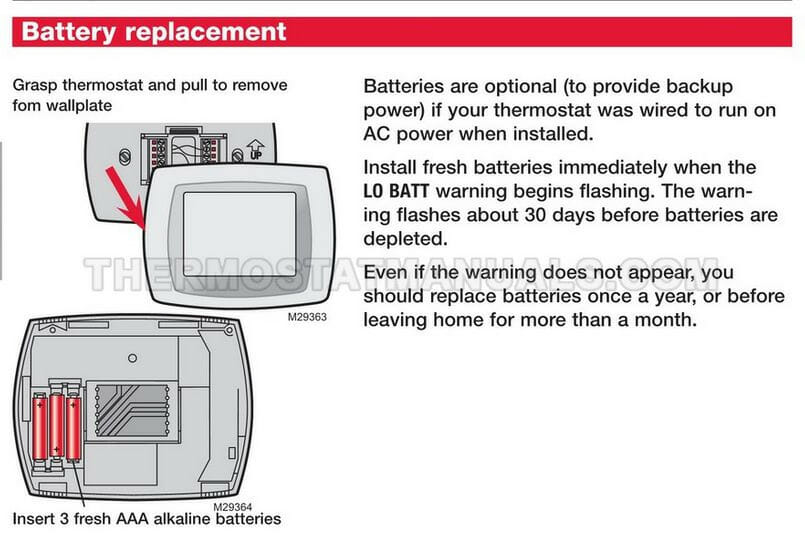
Take a good look at your thermostat. Notice how the main display unit seems to be sitting on a baseplate? That baseplate is usually screwed into the wall, but the part you interact with – the screen, the buttons – is designed to pop right off. It’s like a secret handshake, but for your thermostat.
The Big Reveal: How to Gently Pop it Off!
Okay, this is the main event! Here’s where you become a thermostat whisperer:
Step 1: Locate the Secret Tabs or Buttons
Most Honeywell thermostats have a little trick to them. You'll either find:
- Buttons on the Side: Some models have small, spring-loaded buttons on the right or left side of the thermostat. You press these in, and the unit should unlatch.
- Tabs on the Top or Bottom: Other models have a tab (or two) that you might need to gently push upwards (if the tab is on the bottom) or pull outwards/downwards (if the tab is on the top) to release the unit from its baseplate.
- Just a Good Old Pull: And then there are the super simple ones! Sometimes, you just need to grab the thermostat firmly (but kindly!) from the top and bottom and gently pull it straight out from the wall. It might feel like you're going to break it, but trust me, it's designed for this. You might hear a satisfying "click" or "pop" when it releases.
The key here is gentle but firm. Don't go full Hulk on it! If it's not coming easily, take a moment, re-examine. Look for little arrows or symbols on the sides or bottom. They’re usually trying to give you a hint!
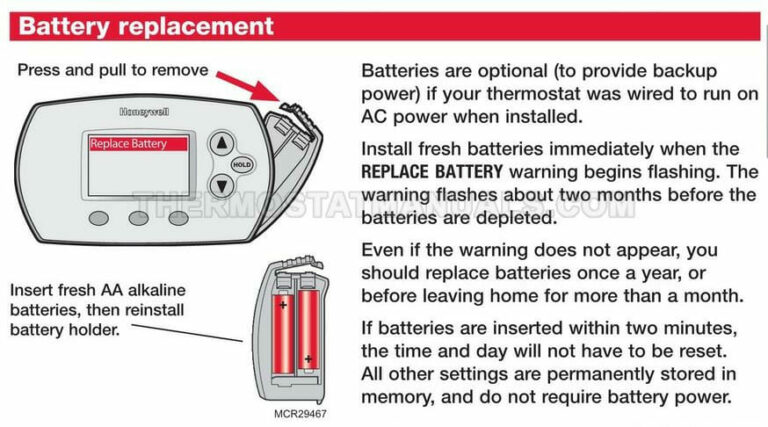
Once you’ve successfully unlatched it, the entire front faceplate of your thermostat should now be in your hands. Feel like a magician yet? Because you totally should!
Battery Time! The Power-Up Moment
Now that you're holding the thermostat faceplate, flip it over. Ta-da! You should see the battery compartment on the back. It’s usually pretty obvious, sometimes even labeled "BATTERY" or with a little battery icon.
Step 2: Note the Battery Type and Orientation
You'll probably find a couple of AA or AAA batteries chilling in there. These aren't just any old batteries, mind you; they're the lifeblood of your climate control! Take note of which way the positive (+) and negative (-) ends are facing before you pop them out. A quick mental picture or even a phone photo can save you a headache later.

Step 3: Swap 'Em Out!
Carefully remove the old, dead batteries. Give them a silent eulogy for their service. Then, grab your fresh, new ones (you did have them ready, right? Always be prepared, like a thermostat ninja!). Insert the new batteries, making sure they’re facing the correct way. Polarity matters! Misaligned batteries mean a sad, sleepy thermostat.
Putting it All Back Together: The Grand Finale
Step 4: Realign and Reattach
With fresh batteries powering your thermostat, it’s time to put it back on the wall. Look at the baseplate still attached to the wall and the back of your thermostat unit. You'll notice some connectors or pins. These need to line up perfectly.
Carefully align the thermostat with the baseplate. Sometimes there are little guides or slots that help you fit it into place. Once it's aligned, gently push the thermostat back onto the baseplate until you hear that satisfying "click" or "snap". This means it’s securely reattached and ready for action!

Test it Out!
Now, watch your thermostat spring back to life! It might take a moment to power on or display the correct time/temperature. If it asks you to confirm settings or a program, just follow the on-screen prompts. Most Honeywell models will remember your previous settings, so you won't have to reprogram everything (phew!).
Give yourself a high five! You’ve successfully performed thermostat surgery and brought your home's climate control back from the brink. No service call needed, no complicated tools, just you and a little bit of know-how. You're basically a superhero now, and your comfy home is your grateful sidekick!
Go forth and enjoy your perfectly regulated climate, you DIY champion! You deserve a treat, perhaps a perfectly chilled (or warmed!) beverage. You earned it!