
How To Make A Likert Scale On Survey Monkey
Hey there, survey superstar! Ever wondered how to capture the nuanced opinions of your audience beyond just a simple "yes" or "no?" Well, my friend, you're about to discover the magic of the Likert scale, and even better, how to whip one up on SurveyMonkey with the greatest of ease. Think of it as the secret sauce to really understanding what people truly think.
So, grab your imaginary lab coat (or your actual one, if that's your thing – no judgement!), and let's dive in!
What Exactly IS a Likert Scale, Anyway?
Okay, before we get hands-on, let's define our terms. A Likert scale is basically a way to measure attitudes or opinions using a range of options. Instead of just asking, "Did you like the movie?" you ask, "To what extent did you like the movie?" and offer choices like:
Must Read
- Strongly Disagree
- Disagree
- Neutral
- Agree
- Strongly Agree
See? Much more informative! It's like going from black and white to glorious technicolor in the world of data.
And hey, don't let the fancy name intimidate you. It's pronounced "Lick-ert," like you're trying to lick a really delicious candy. Now you'll never forget it!
Let's Build a Likert Scale in SurveyMonkey!
Alright, time for the fun part! Log into your SurveyMonkey account (or create one if you haven't already – it's free for basic use, and totally worth it). Ready? Let’s go!
Step 1: Create a New Survey
Click that bright, shiny "Create Survey" button. You can start from scratch or use a template. I recommend starting from scratch; it's like building your own survey Lego castle!
Step 2: Choose Your Question Type
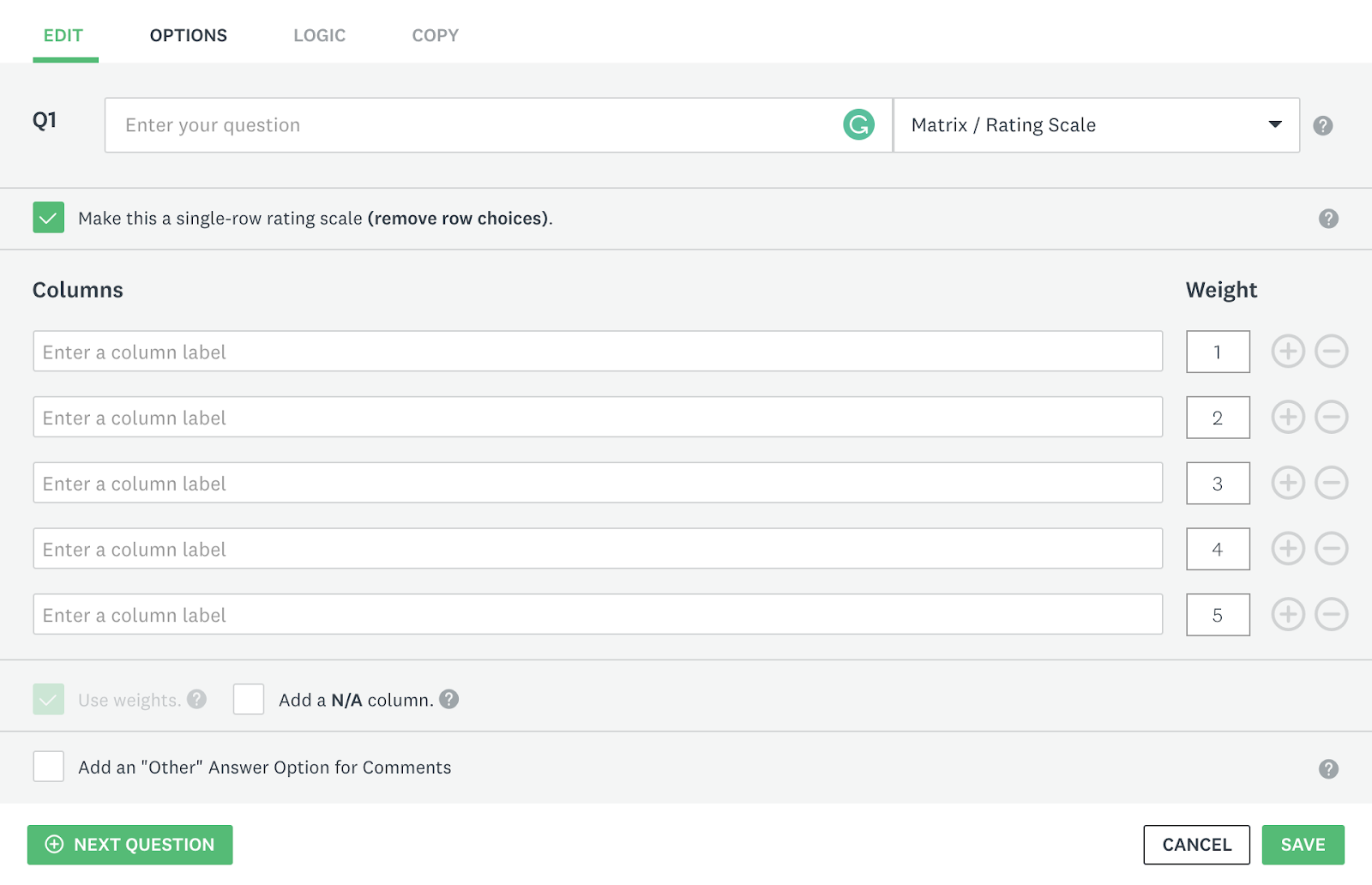
Here's where the magic happens. When adding a question, select the "Matrix/Rating Scale" question type. This is SurveyMonkey's dedicated tool for Likert-style questions.
Step 3: Craft Your Question (the Stem)

Now, carefully write your question stem. This is the statement you want people to agree or disagree with. For example: "The customer service representative was helpful."
Make sure your statement is clear, concise, and unbiased. You don't want to accidentally lead people towards a specific answer. That's like rigging a game of Monopoly – totally unfair!
Step 4: Define Your Scale Points (the Answer Choices)
This is where you decide on your scale options. As we mentioned earlier, "Strongly Disagree" to "Strongly Agree" is a classic, but you can tailor it to your specific needs. You could use:

- Not at all helpful - Extremely helpful
- Very Dissatisfied - Very Satisfied
- Never - Always
Just remember to keep the scale balanced (equal number of positive and negative options) and make sure the labels are clear and unambiguous. Nobody likes a confusing scale. It's like trying to assemble IKEA furniture without the instructions!
SurveyMonkey allows you to easily add and customize these scale points. You can even add labels to each end of the scale for extra clarity. Handy, right?
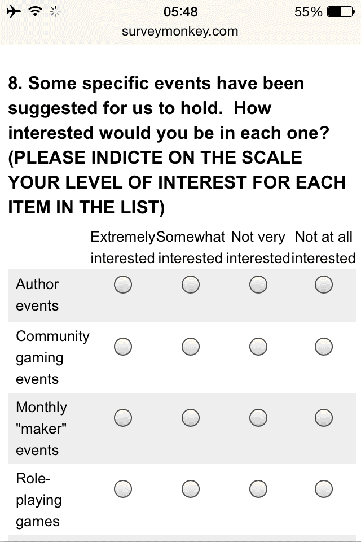
Step 5: Add More Rows (More Statements!)
Often, you'll want to ask multiple related questions using the same scale. For instance, you might follow up with statements like: "The customer service representative was knowledgeable," and "The customer service representative was courteous."

Just add more rows to your Matrix/Rating Scale question, and you're good to go!
Pro Tips for Likert Scale Awesomeness
- Keep it Consistent: Use the same scale options for all your questions to avoid confusing your respondents.
- Avoid Double-Barreled Questions: Don't ask about two things at once. For example, instead of "The website was easy to navigate and visually appealing," split it into two separate questions.
- Pilot Test: Before sending out your survey to the masses, test it with a small group to make sure everything is clear and working correctly.
Think of it like baking a cake – you wouldn't serve it to your guests without taste-testing it first, would you?
You Did It!
Congratulations! You've now successfully created a Likert scale survey on SurveyMonkey. You're officially a data-gathering genius!
Now go forth and create surveys that unlock valuable insights. Your audience will thank you, your boss will be impressed, and you'll feel like you can conquer the world… one survey at a time. Happy surveying! You are amazing! Keep it up!