
How To Disconnect Adt Security System

Hey there, friend! Pull up a chair. Got that ADT system in your house, and you're thinking, "You know what? It's time for a change." Maybe you're moving, maybe you're renovating, or maybe you just want to silence that little beeping beast once and for all. Whatever your reason, you're not alone in wanting to wrestle back control from your high-tech, ever-vigilant housemate. It can feel a bit like trying to break up with a very clingy robot, right?
So, you want to unplug, disconnect, tell it to take a chill pill. But how do you actually do it without setting off a neighborhood-wide alarm, or worse, getting a stern call from ADT themselves? Let's dive in, because it's totally doable. We're talking about reclaiming your peace and quiet, one wire at a time!
The Great Unplug: Temporary vs. Permanent
First things first, let's clarify something super important. Are we talking about a temporary silence (like, "please stop beeping while I paint this wall") or a permanent goodbye (as in, "we are never, ever getting back together")? Because those are two very different beasts, my friend. One involves a bit of DIY detective work; the other usually involves a phone call and maybe some contract acrobatics. We'll cover both!
Must Read
The DIY Disconnect: For a Little Peace and Quiet (Temporarily)
Alright, let's say you just need a break. You want to disable it yourself, right now, without calling anyone. This is for the brave, the bold, the "I just want this thing to stop making noise" kind of person. This usually means cutting off its power supply. Think of it like taking the batteries out of a noisy toy.
Here’s the game plan:
Step 1: Locate the Main Panel
This is usually a beige or white box, often in a closet, utility room, or basement. It’s the brain of the operation. It's often bolted to the wall, looking all unassuming, but don't be fooled – it holds the power! Find that sucker. If you can't spot it right away, sometimes following the wires from keypads can lead you there. It's like a scavenger hunt, but with less treasure and more silence as the prize.
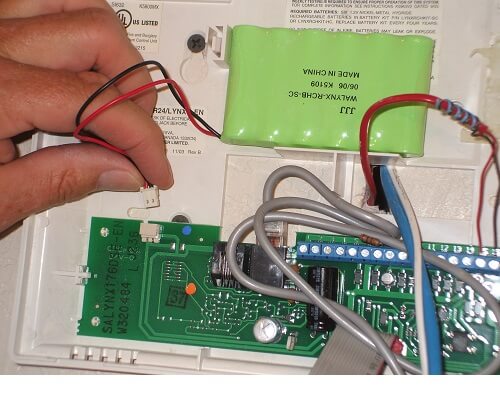
Step 2: Open the Panel (Carefully!)
Most panels have little latches or screws. You might need a screwdriver, but often, it's just a couple of clips. Pop it open. Don't worry, it's not going to zap you. Probably. (Just kidding, it's perfectly safe, but always be mindful of electronics, right?)
Step 3: Disconnect the Battery Backup
Inside, you’ll likely see a battery – often a rectangular, sealed lead-acid battery. This is the backup power. It's what keeps the system going even if your main power goes out. You'll see a couple of wires (usually red and black) connected to it. Gently disconnect one of the terminals first (usually the black one, but either is fine). Then disconnect the other. This cuts off its emergency juice.
Pro Tip: Don't worry if it beeps a bit when you do this. It's just complaining. Ignore it. You're in charge now!
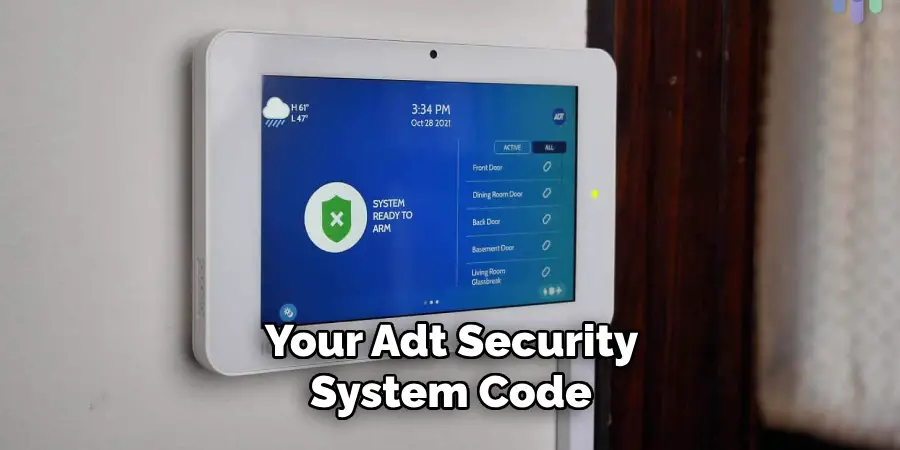
Step 4: Unplug the Transformer/Power Cord
Now, while the battery is disconnected, you need to cut off the main power. The ADT system usually gets its primary power from a small transformer that’s plugged into a wall outlet, often near the main panel. It might look like a bulky phone charger. Unplug it! This is the final step in truly silencing the system from a power perspective. If you can’t easily find the transformer, sometimes the power wire goes directly into the main panel, which means the power is coming from an electrical box in the wall. In that case, you might need an electrician to safely disconnect it. But usually, it's just a wall wart.
And voilà! Your system should now be completely powered down. No more beeps, no more arming, no more "door/window open" announcements. It's bliss, isn't it? Remember, this just deactivates it. The sensors are still there, the wires are still there. It's just sleeping.
The Big Breakup: Permanently Disconnecting (The Official Way)
Okay, so you're ready to make it official. You want to cancel the monitoring service and possibly even have the equipment removed. This is where ADT themselves come into play, because, well, contracts.

Step 1: Find Your Contract (Or At Least Your Account Info)
Before you even dial, arm yourself with information. Your account number, maybe the date you signed up, and any contract details you can find. Knowing your stuff makes the process smoother, trust me.
Step 2: Brace Yourself and Call ADT
This is the big one. You'll need to call ADT's customer service number. Be prepared for a conversation. They'll likely try to understand why you're leaving, and they might even offer you deals to stay. It's their job, after all!
Be polite, but firm. State clearly that you wish to cancel your monitoring service. Ask about any early termination fees, what happens to the equipment, and the exact date your service will cease.

Step 3: Equipment Removal?
Depending on your contract, ADT might send someone to remove their equipment, or it might become yours (or simply be left in place). Clarify this during your call. If they don't remove it, and you want it gone, you can usually take down the keypads and sensors yourself once the service is officially cancelled. Just be mindful of patching small holes!
Once you've made that call and sorted out the contractual bits, you're officially free! No more monthly bills, no more monitoring. It's like a weight off your shoulders, isn't it? You've successfully navigated the high-tech maze and emerged victorious. Go you!
Whether you're just silencing it for a bit or saying goodbye forever, taking control of your home's security system feels pretty good. Now, go enjoy that newfound quiet! You earned it.