
How To Clean Battery Terminals In Electronics

Alright, folks! Let's talk about a simple fix that can breathe new life into your gadgets. We're diving into the thrilling world of cleaning battery terminals!
Trust me, this isn't as scary as defusing a bomb. It's more like rescuing your TV remote from the clutches of sluggishness.
The Quick & Easy Terminal Tidy-Up
First, gather your supplies. You'll need a few things from around the house.
Must Read
Think of it as your gadget-saving toolkit! We need a toothbrush, white vinegar, baking soda, water, and a cloth.
Step 1: The Great Escape (Battery Removal)
Pop those batteries out! This is super important for safety.
Imagine leaving them in there while cleaning – it’s like giving your device a tiny, unwanted bath!
And nobody wants a soggy remote, unless you're trying to train your goldfish to change channels.
Step 2: Vinegar Victory
Grab your white vinegar. This is your secret weapon against battery crud!
It's like the superhero that dissolves all the gunk.
Dip your toothbrush into the vinegar. Not too much! We don’t want a vinegar waterfall in our electronics.
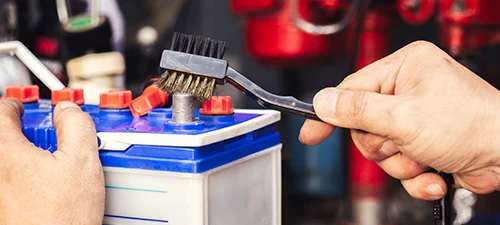
Step 3: Scrub-a-Dub-Dub!
Now, gently scrub those terminals. Be nice!
It’s like giving them a little massage to loosen up the corrosion.
Imagine the satisfaction of seeing that nasty buildup disappear.
If the corrosion is being extra stubborn, you can let the vinegar sit on the terminals for a minute or two.

That's called the "Vinegar Soak of Shame" for particularly naughty terminals.
Step 4: Baking Soda Boost (Optional)
Got some serious gunk? Time for the baking soda power-up!
Mix a tiny bit of baking soda with a drop of water to make a paste.
Apply the paste to the terminals and scrub gently. It's like bringing in the big guns!
Step 5: Rinse & Repeat (Water Works)
Dampen your cloth with water. And gently wipe away any vinegar or baking soda residue.
We don't want any leftover cleaning agents causing trouble.
It’s like giving the terminals a refreshing post-scrub shower.
Step 6: The Drying Game
Let everything dry completely before putting the batteries back in. This is crucial!
Patience, young Padawan. Moisture and electronics are not friends.
You can use a dry cloth to help speed things up. Or just let it air dry.
Step 7: Re-Energize!
Pop those batteries back in. And test your device!
Prepare for the triumphant return of power!
If it still doesn't work, repeat the cleaning process. Sometimes, stubborn corrosion needs a second scrub.
Troubleshooting Time
Still having issues? Okay, let’s troubleshoot a little. Don’t panic!
Sometimes, the battery terminals themselves might be damaged.
That's a job for a professional or time to replace the device.
Check the Batteries
Make sure your batteries aren't the culprit. Sometimes, they're just plain dead.
A battery tester is your friend here. Or try swapping in a fresh set.
We've all been there, blaming the remote when it was the batteries all along!
Look for Corrosion Elsewhere
Check the battery compartment for any signs of damage. Any cracks or broken pieces?
Make sure the springs that hold the batteries in place aren't bent or corroded.
A little bending back into shape might be all they need. And a quick clean of those springs wouldn’t hurt either.
When To Call In The Pros
If you’ve tried everything and your device still isn’t working, it might be time to call in a professional. Seriously!

There could be internal damage that's beyond your cleaning capabilities. No shame in that!
Sometimes, the best DIY is knowing when to say "I can't do this!"
Pro Tips & Extra Fun
Want to be a battery terminal cleaning ninja? Here are some extra tips.
These will help you become the master of gadget rejuvenation!
Preventative Measures
Take batteries out of devices you won't be using for a while. Like that remote in the guest bedroom.
This prevents corrosion from forming in the first place. It's like stopping a problem before it even starts!
Store batteries in a cool, dry place. Away from extreme temperatures.
The Q-Tip Trick
Q-tips are great for getting into tight spaces. Like those tricky corners around the terminals.
Dip one in vinegar and use it to clean hard-to-reach spots. It's like having a tiny cleaning army!
The Importance of Cleanliness
Keep your devices clean in general. Dust and grime can contribute to corrosion.
A quick wipe-down every now and then can go a long way. Treat your gadgets like royalty!

Consider Rechargeable Batteries
Rechargeable batteries are a great option for frequently used devices. You’ll save money and reduce waste!
Plus, you'll always have a fresh set ready to go. No more frantic searches for spare batteries!
The Ultimate Reward
The best part? You've saved a gadget from the brink of despair! High five!
Now, go forth and conquer those corroded battery terminals. You’ve got this!
Feel the power of revitalized electronics flowing through you.
Remember, a little cleaning can go a long way. And you just became a gadget-saving hero. Congrats!
So, go forth and clean! Your devices (and your sanity) will thank you.
And remember, even the simplest tasks can bring a surprising amount of satisfaction.
Happy cleaning, my friends! May your terminals be forever free of corrosion!
Now, go enjoy your newly revived gadgets. You earned it!
Go forth and conquer those corroded terminals. You’ve got this!
May the cleaning force be with you.