
How Can You Search An Image On Google
Alright, settle in, folks, because I'm about to blow your mind. (Okay, maybe just mildly amuse you. But still, buckle up!) We're diving deep – like, Mariana Trench deep – into the fascinating world of reverse image searching on Google. Basically, it's like being a digital Sherlock Holmes, but instead of a pipe, you've got a JPEG.
Why Would You Even Want to Search an Image?
Excellent question! Glad you asked! Imagine this: you see a picture of the most ridiculously fluffy cat wearing a tiny hat. Obviously, you need to know more. Is it a famous cat? Does it have an Instagram account? Is its tiny hat handmade by artisanal squirrels? Reverse image search to the rescue!
Or maybe you found a suspiciously cheap "antique" online. A quick image search can help you determine if it's actually a priceless artifact or just something Cousin Mildred glued glitter onto after one too many glasses of sherry. You know, for educational purposes...and to avoid potential familial awkwardness.
Must Read
Let's not forget the classic: tracking down the source of a meme. Because let's be honest, we've all been there. We see a hilarious image, and suddenly we're on a quest for its origins, a digital Indiana Jones searching for the Lost Ark of Internet Humor.
Okay, I'm Convinced. How Do I Actually Do This Magic Trick?
Fear not, my friend! It's easier than teaching a dog to play the ukulele. (Although, if you have managed that, please send pictures. Seriously.) Here's the breakdown:
Option 1: The Drag-and-Drop Delight
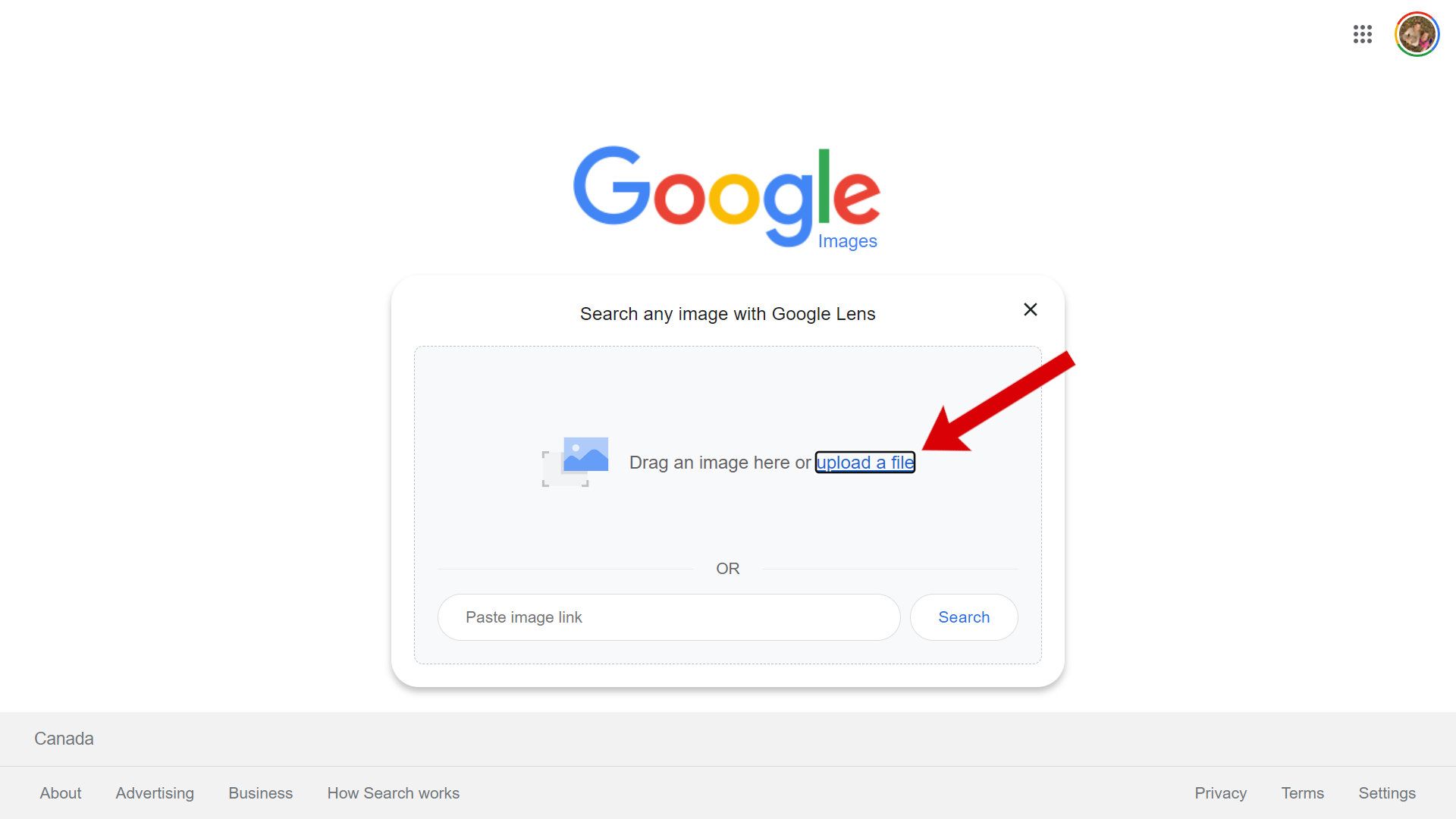
This is the simplest, most elegant method. Go to images.google.com. See that little search bar with the camera icon? Click it. Then, just drag the image you want to search directly onto that bar. It's like giving Google a visual treat!
Important note: This only works on desktop. Google hasn't quite figured out how to let you drag images out of your phone yet. (Probably something to do with quantum physics. Or maybe they're just busy working on self-folding laundry.)
Option 2: The Copy-Paste Caper
If you're on a website and can't download the image (maybe it's protected by some kind of digital fortress, or you just don't want to clutter your already overflowing downloads folder), this is your jam. Right-click on the image, and select "Copy image address" (or "Copy image URL" depending on your browser). Then, go back to images.google.com, click the camera icon, and paste that link into the box. BAM! Google's on the case.
Option 3: The Right-Click Revelation (Mobile Edition!)
Ah, mobile. The land of tiny screens and even tinier keyboards. But don't despair! On your phone, you can often (but not always, because technology is inherently fickle) right-click (or long-press, depending on your phone) on an image in your browser and select "Search image with Google Lens." This is basically Google's superpower for recognizing stuff. It's like having a digital art critic in your pocket, but instead of judging paintings, it's judging pictures of cats in hats.
What Happens Next? Prepare for the Onslaught of Information!
Once you've unleashed the Google image search beast, prepare to be amazed (or mildly underwhelmed, depending on the image). Google will spit out a torrent of information, including:

- Visually similar images: This is where you'll find variations on your fluffy cat picture, possibly with even more elaborate hats.
- Websites that use the image: This is crucial for tracking down the source. You might discover the cat's Instagram account, or the artisanal squirrel's Etsy shop.
- Possible related search terms: Google's attempt to figure out what you're really looking for. Sometimes it's spot-on, sometimes it's hilariously wrong. (Prepare for results like "fluffy cat wearing hat" or, more strangely, "Victorian-era taxidermy.")
Important Caveats (Because Nothing is Ever Perfect)
Reverse image search isn't foolproof. If the image is super obscure, or if it's been heavily modified, Google might struggle. It's like asking a detective to solve a crime based on a blurry photo of a shoe. They might get lucky, but it's not a guarantee.
Also, be aware that image search can sometimes lead you down some...interesting... rabbit holes. You might stumble upon things you never knew existed, and possibly things you wish you hadn't. Proceed with caution! (And maybe a strong cup of coffee.)
So There You Have It!
You are now equipped with the knowledge and skills to become a reverse image search master. Go forth and explore the digital world, track down those elusive memes, and uncover the secrets hidden within every pixel. And remember, if you ever find that artisanal squirrel's Etsy shop, send me the link. I need a tiny hat for my gerbil.
