Why Is My Iphone 15 Not Charging

Okay, picture this: It's 7 AM, your alarm is blissfully silent, and you wake up in a cold sweat. Not because of a nightmare, but because you instinctively reach for your phone to check the time, only to be met with a dead, black screen. Panic! You distinctly remember plugging in your shiny new iPhone 15 last night. You even heard the little charging chime! So, why is your phone now as lifeless as a zombie extra in a B-movie? Been there, felt that particular brand of digital dread, my friend.
You've got this beautiful, state-of-the-art piece of tech in your hand, and it's decided to take an unscheduled nap. Frustrating, right? Especially when you just dropped a pretty penny on it. But before you start rehearsing your angry phone call to Apple support, let's play detective together. Most of the time, the culprit behind a non-charging iPhone 15 isn't some catastrophic failure, but rather one of a few common, often easily fixable, issues. So, take a deep breath, grab a coffee (or a stronger beverage, no judgment here), and let's figure out what's going on.
The Classic Culprits (Let's Get the Obvious Out of the Way First)
Sometimes, the simplest explanation is the right one. And often, these are the things we overlook in our panic!
Must Read
1. The Cable & Adapter Tango: This is usually the first place to look. Is your charging cable in good shape? No kinks, no frays, no suspicious bends? Remember, while the iPhone 15 uses USB-C, not all USB-C cables are created equal. An old, worn-out cable, or a particularly cheap, non-certified one, might just not be making the connection (literally!). And what about the wall adapter? Is it plugged in properly? Have you tried a different one? Or a different wall socket entirely? Sometimes, it's just the wall outlet being moody, believe it or not. Swapping out both the cable and the adapter for known good ones is your first port of call.
2. The Charging Port Predicament: Your iPhone's charging port is a tiny, unsuspecting lint trap. Over time, pocket fluff, dust, and other tiny debris can get jammed in there, preventing the cable from making full contact. Grab a flashlight and peer into the port. See anything suspicious? If so, grab a non-conductive tool – a wooden toothpick works great, or even a soft-bristled, clean toothbrush (not the one you use for your teeth!). Be incredibly gentle, you don't want to damage the internal pins. A little careful excavation can often resolve this issue.
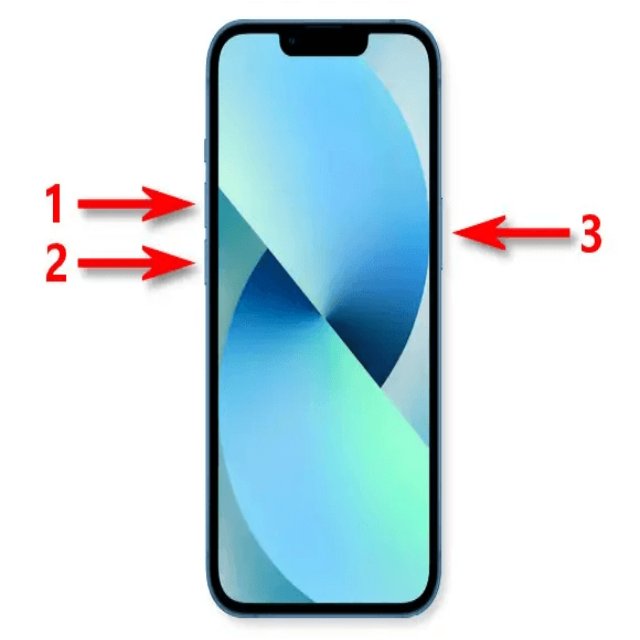
3. Restart, My Dear, Restart: Ah, the universal fix. "Have you tried turning it off and on again?" It's a cliché for a reason. Sometimes, a minor software glitch can mess with the charging capabilities. A quick restart can often clear up these temporary hiccups and get things flowing again. It’s like hitting the reset button for your phone’s brain.
Software Shenanigans (Because Sometimes It's Just Being Dramatic)
Your iPhone is a complex beast, and sometimes its software throws a fit.
1. iOS Updates: Is your iPhone's operating system up to date? Apple regularly releases updates that fix bugs and improve performance. While less common, an outdated iOS version could, in rare cases, contribute to charging weirdness. Head to Settings > General > Software Update to check.
![[iOS 18 Supported]iPhone 15 Not Charging? The Best Fixes!](https://www.passfab.com/images/topics/ipad/iphone-not-charging.jpg?w=800&h=618)
2. Optimized Battery Charging (The Sneaky One): Okay, this is a big one and often catches people off guard. Your iPhone 15, in its infinite wisdom, has a feature called "Optimized Battery Charging." Its goal is to extend the overall lifespan of your battery by learning your daily charging routine. So, if you usually leave your phone plugged in overnight, it might intentionally hold the charge at 80% and only finish charging to 100% closer to when you typically wake up. You might wake up thinking it's not charging, but it's actually just being smart. You can check this in Settings > Battery > Battery Health & Charging.
When to Consider the Big Guns
If you've gone through all the above steps and your iPhone 15 is still giving you the silent treatment, it might be time to think about something a bit more serious.

1. Liquid Damage: Did your phone recently take an unplanned swim, even a tiny splash? Liquid damage can wreak havoc on internal components, including the charging system. Your iPhone has liquid contact indicators that Apple technicians can check.
2. Battery Health & Component Failure: While less likely for a brand-new iPhone 15, internal hardware issues can happen. If the battery itself is defective, or there's a problem with the internal charging components, you'll need professional help. Your Battery Health can be checked in Settings > Battery > Battery Health & Charging (though a new phone should be at 100%).
So, there you have it. Most of the time, the fix for a non-charging iPhone 15 is thankfully simple. Before you stress too much, methodically check your cable, adapter, port, and settings. And remember, sometimes your phone is just being a little too clever with its optimized charging. Hopefully, this little guide helps you get back to a full battery, and avoids any more rude awakenings. May your charge be strong and your notifications ever-present!