
What Devices Should Be On 2.4 Ghz And 5ghz

Hey there, fellow digital adventurer! Ever wonder why some gadgets feel like speed demons and others dawdle like a sleepy sloth on your Wi-Fi? It’s not just magic, my friend. It’s all about the secret party happening in your router: the 2.4GHz and 5GHz bands!
Think of your Wi-Fi like a bustling highway, or maybe, a really awesome two-room party. Each room has its own vibe, its own guest list, and its own set of rules. And getting your devices into the right room? That’s where the fun begins!
The 2.4GHz Chill Zone: Slow & Steady Wins the Race (Sometimes!)
First up, we have the 2.4GHz band. This is your classic, laid-back lounge. It’s been around the block, it's reliable, and it loves a good chat from afar. What’s its superpower? Range! This band can travel further and punch through walls, floors, and even the occasional rogue fridge with impressive grace.
Must Read
But there's a catch, right? There always is. This lounge can get a bit crowded. Imagine everyone from your old wireless printer to your smart fridge, your Bluetooth headphones, and even – get this – your microwave oven trying to hang out in the same space. Yup, your microwave can literally jam up this band! It’s like a tiny, invisible Wi-Fi bully.
So, who’s on the guest list for the 2.4GHz party? Primarily, your Internet of Things (IoT) gadgets. Think smart light bulbs, your thermostat, older security cameras, smart plugs, robot vacuums, and perhaps that ancient laptop you keep for sentimental reasons. These devices don’t need blistering speed; they just need a stable connection to send little bits of data now and then. They're the quiet observers, happy to just exist in the background.

Quirky Fact: Bluetooth also operates on the 2.4GHz band! That’s why if you’re trying to stream music via Bluetooth and download a huge file on Wi-Fi nearby, things can get a bit… crunchy. It’s like two different conversations trying to happen in the same echo chamber.
The 5GHz Speed Demon Den: Fast & Furious, Up Close and Personal
Now, let’s burst into the 5GHz band party. This room is all about speed, low latency, and a much cleaner, less crowded vibe. If 2.4GHz is a cozy coffee shop, 5GHz is a Formula 1 racetrack. It’s built for raw data throughput.
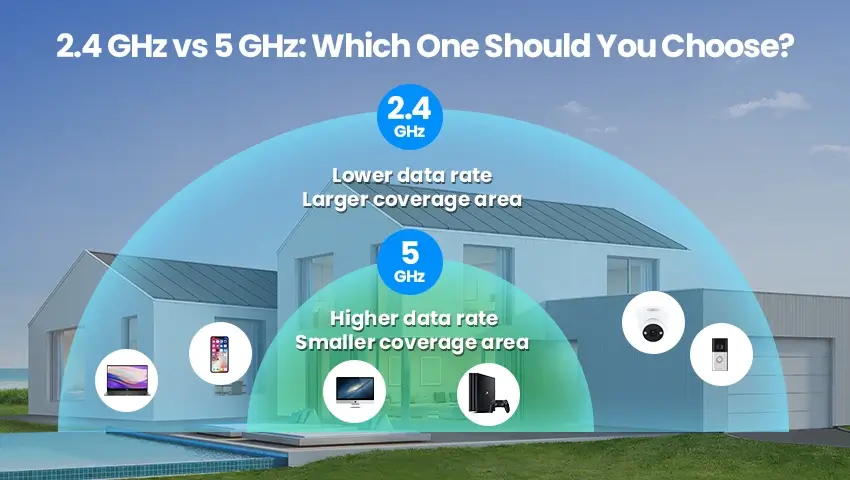
Its superpower? Speed! You get much faster downloads, smoother streaming, and virtually no lag for your online gaming marathons. The trade-off? Its range is shorter, and it’s not great at penetrating obstacles like walls. Think of it like a very fast sports car – amazing on the open road, but not so good at off-roading or going through tunnels.
Who's invited to this exclusive, high-speed bash? This is where your heavy-hitters belong! Your 4K streaming devices, gaming consoles (PlayStation, Xbox), VR headsets, brand-new smartphones, powerful laptops, and desktop PCs. Anything that demands a lot of bandwidth to look awesome or respond instantly should be chugging along happily on 5GHz.

Quirky Fact: 5GHz has way more channels than 2.4GHz. This means less interference from your neighbors' Wi-Fi, making for a much smoother, less congested experience. It's like having multiple lanes on a highway, compared to a single dirt track.
The Grand Device Shuffle: Who Goes Where?
So, how do you decide who gets a VIP pass to the 5GHz den and who's perfectly content in the 2.4GHz lounge?

- On 2.4GHz:
- Your smart doorbell, thermostat, smart plugs, light bulbs – basically anything "smart" that doesn't stream video constantly.
- Printers, older laptops, and older smartphones.
- Devices that are far from your router or behind multiple walls.
- Anything that primarily sends small bits of data.
- On 5GHz:
- Your streaming box (Apple TV, Roku, Fire Stick), smart TV, gaming consoles.
- VR headsets – these need the speed and low latency.
- Newer smartphones, tablets, and laptops that you use for heavy browsing, video calls, or work.
- Any device that's close to your router and needs maximum performance.
Many modern routers are "dual-band," meaning they broadcast both frequencies. Some even have "band steering" or "smart connect" features. This means your router tries to be a clever bouncer, automatically guiding devices to the best band. But sometimes, you need to step in and play Wi-Fi DJ yourself!
Why Bother, You Ask? Because It’s Fun (and Efficient)!
Why go through all this trouble? Because optimizing your Wi-Fi setup is like giving your entire digital life a serious boost! It means:
- Less Lag: Your game won't freeze just as you're about to score the winning goal.
- Smoother Streaming: No more buffering wheel of doom right at the climax of your favorite show.
- Happier Gadgets: Every device gets the connection it truly needs, not just whatever it can grab.
- Better Overall Performance: By intelligently distributing your devices, you reduce congestion for everyone. It’s like clearing traffic on a busy road.
It's not just techy jargon; it’s about making your home network a harmonious, efficient, and ultimately, more enjoyable place. So next time you're setting up a new gadget, take a moment to consider which Wi-Fi party it truly belongs to. Your digital self will thank you!