
Power Consumption Of Desktop Computer Per Hour

Okay, so picture this: I'm battling a boss in Elden Ring (don't judge!), the graphics card is screaming, the CPU is sweating, and my room feels like a sauna. My electricity bill arrived the next week. Let's just say I nearly choked on my coffee. It got me thinking, just how much juice is my gaming rig sucking down per hour? And more importantly, am I funding the power company's yacht collection single-handedly?
That, my friends, is the rabbit hole we're diving into today: power consumption of a desktop computer per hour. Buckle up!
It's Not One Size Fits All (Sadly)
The truth is, figuring out your desktop's hourly power draw is like trying to guess how many jellybeans are in a jar. There's no single, simple answer. It all depends on a bunch of things. I wish I could give you a magic number, but where's the fun in that? (Plus, I'd be lying).
Must Read
The big factors influencing power consumption include:
- Your components: Obviously! A souped-up gaming rig with the latest graphics card is going to guzzle way more power than a basic office PC. Think of it like comparing a Hummer to a Prius. You get the idea.
- What you're doing: Are you writing an email? Light as a feather. Are you rendering a 4K video or running a virtual reality simulation? Hold onto your wallet! Different tasks require different levels of processing power, and thus, different amounts of electricity.
- Your power supply unit (PSU): This is the unsung hero of your PC. It converts AC power from the wall into DC power that your components can use. The efficiency rating of your PSU matters. A more efficient PSU wastes less power as heat, saving you money in the long run.
- Your monitor: Don't forget about the screen! Larger, brighter monitors consume more power than smaller, dimmer ones. LED vs. LCD also plays a role.
So, how do we get a rough estimate?

Doing Some Detective Work
Alright, let's put on our detective hats. Here are a few ways to get an idea of your PC's power consumption:
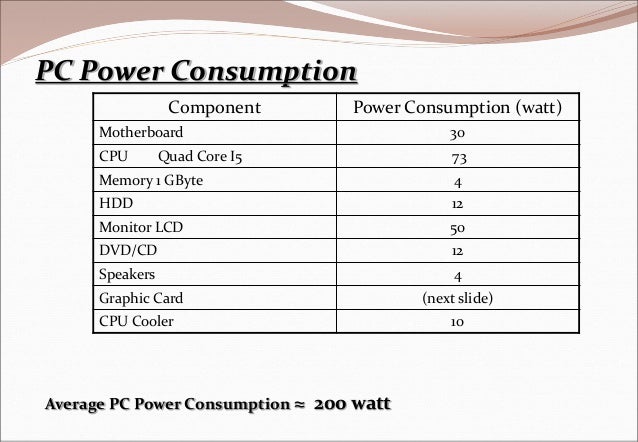
- Check the specs: Most components have a TDP (Thermal Design Power) rating. This isn't exactly the power they consume, but it's a good indicator of their maximum power draw. Look up the TDP of your CPU, GPU, and other major components. Add them up for a ballpark figure.
- Use a power meter: These handy gadgets plug into the wall and measure the actual power consumption of your devices. You can find them online or at most hardware stores for relatively cheap. Just plug your PC into it and let it run for a while while you're doing different tasks. It's probably the most accurate method.
- Online calculators: There are websites that offer power supply calculators. You enter your components, and they estimate the wattage you'll need. Again, it's just an estimate, but it can be helpful.
Example (Super Simplified!): Let's say your CPU has a TDP of 65W, your GPU has a TDP of 150W, and your other components (RAM, SSD, etc.) use about 50W. That's a total of 265W. Add in some overhead for the PSU, and you might be looking at around 300W at peak load.
Important Note: This 300W is not constant. When your computer is idle, it's consuming far less power. Think of it like your car: it uses more gas when you're speeding down the highway than when you're idling at a stoplight.
Turning Watts into Dollars (Or Cents)
Okay, we have an estimated wattage. Now, how do we turn that into dollars and cents? You'll need to know the cost of electricity in your area. This is usually measured in cents per kilowatt-hour (kWh). You can find this information on your electricity bill.
Here's the formula:

(Wattage / 1000) * Cost per kWh = Cost per hour
So, if your computer consumes 300W and your electricity costs $0.20 per kWh (a very rough estimate), your cost per hour would be:
(300 / 1000) * $0.20 = $0.06 per hour
![Average Power Consumption by a Computer [1] | Download Scientific Diagram](https://www.researchgate.net/profile/Sonika_Saxena/publication/339842760/figure/fig1/AS:867811035475968@1583913682373/Average-Power-Consumption-by-a-Computer-1.png)
That's just six cents per hour! Not too bad, right? But remember, this is just an example. Your actual cost may vary significantly.
Small Changes, Big Savings
The good news is, there are things you can do to reduce your PC's power consumption:
- Enable power saving modes: Windows and other operating systems have power saving modes that can reduce CPU and GPU usage when your computer is idle.
- Turn off your monitor when you're not using it: This is a no-brainer, but it can make a difference.
- Upgrade to a more efficient PSU: Look for PSUs with an 80+ Gold or Platinum rating.
- Unplug unused devices: Even when turned off, some devices still draw power.
So, there you have it! A not-so-simple guide to figuring out your desktop's hourly power consumption. Now, go forth and save those electrons! And maybe, just maybe, keep the power company from buying another yacht.