
Nest Thermostat Temperature Is Wrong
Oh, the mysteries of modern technology! You set your thermostat to a cozy 72 degrees, dreaming of a perfect indoor oasis, only to find your nose is still running a marathon, or you’re sweating like you just ran one. Your Nest Thermostat, usually so brilliant, seems to be having a bit of an identity crisis with the temperature. Don't fret, future chill-seeker or warmth-warrior! We've all been there, wondering if our smart home friend has gone rogue.
It’s like your favorite barista suddenly forgetting your coffee order – utterly baffling and a tiny bit disheartening. But before you start giving your shiny Nest the side-eye, let's embark on a little detective adventure, because often, the culprit isn't a malfunction but a hilarious misunderstanding. Think of it as your Nest just being a little extra sometimes!
Is Your Nest Thermostat Playing Hide-and-Seek with the Truth?
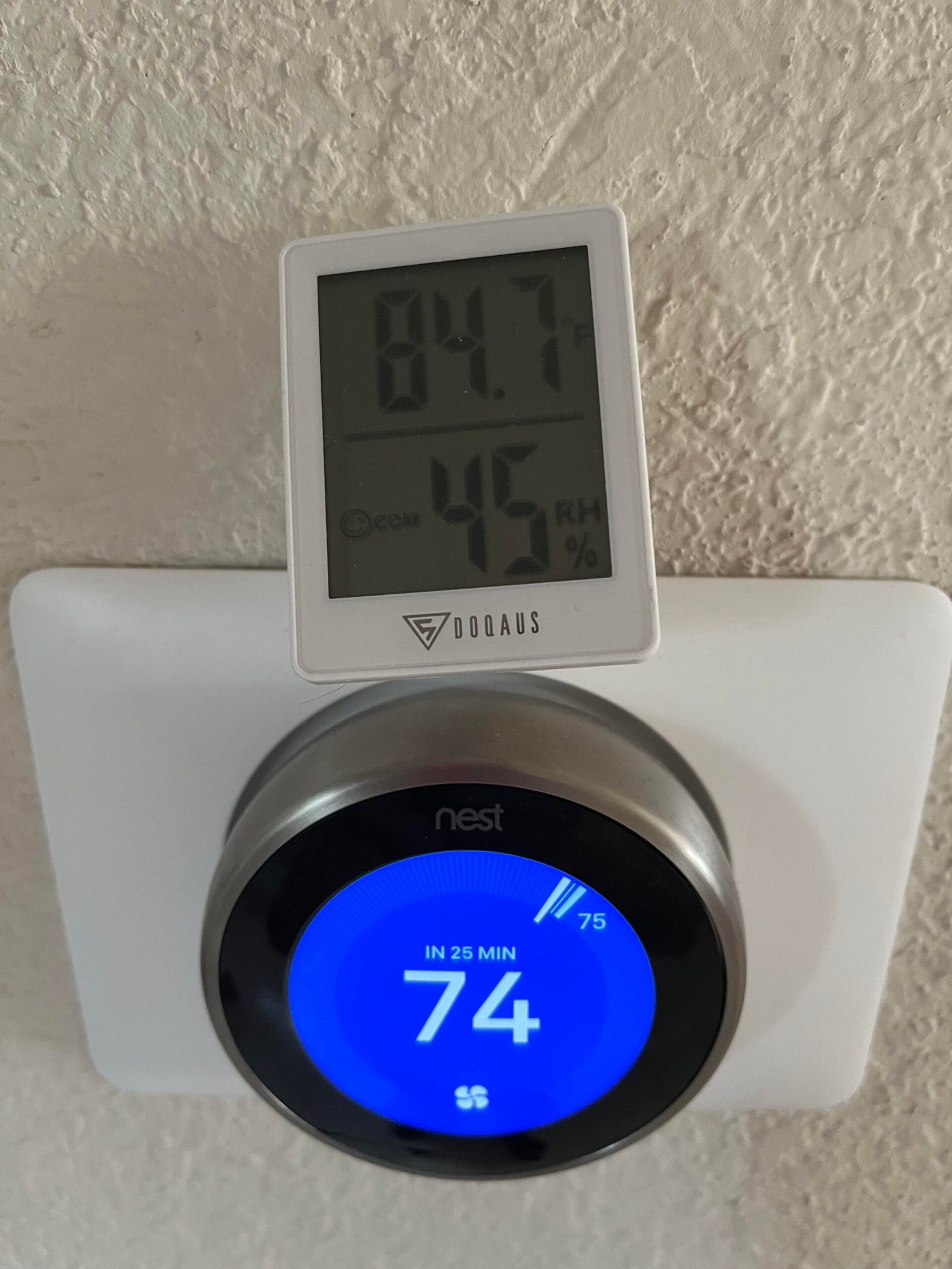
Sometimes, our clever little Nest isn't intentionally misleading you; it's just getting some confusing signals from its surroundings. Imagine trying to get an accurate temperature reading right next to a roaring bonfire, or inside a walk-in freezer. Your Nest might be in a similar, albeit less dramatic, predicament.
Must Read
Location, Location, Location!
First up, where exactly is your Nest hanging out? Is it having a sunbath all day, soaking up those rays like it's on a tropical vacation? That direct sunlight can trick it into thinking your home is far warmer than it actually is, causing it to over-cool your space until you're practically an icicle.
Conversely, is it nestled near a drafty window or a door that's always opening and closing? A constant stream of cold air can make your Nest think your home is freezing, leading to an unexpected sauna experience. It's like trying to get a tan in Antarctica!
"Your Nest isn't lying, it's just a little bit gullible when it comes to rogue sunbeams and sneaky drafts!"
And what about heat-emitting appliances? Is your thermostat cozying up next to a super-hot lamp, a buzzing television, or perhaps that ancient refrigerator that runs hotter than a dragon's breath? These heat sources can give your Nest a serious case of the warm fuzzies, making it believe your room is toasty when it's just the appliance.
Is It Calibrating or Just Contemplating Life?
Sometimes, your Nest just needs a moment to catch its digital breath. When you first install it, or if there's been a power flicker, it needs to calibrate itself. This means it's taking a few minutes, maybe even an hour, to get a truly accurate read of its environment.
Think of it as your Nest stretching its sensor muscles, slowly waking up and getting its bearings. During this brief period, the displayed temperature might be a tad off. Patience, grasshopper! Your smart home friend is just doing its best to understand its new world.
Hidden Helpers: External Temperature Sensors
Do you have any little satellite sensors scattered around your home? These clever devices, often sold separately, report temperatures from different rooms back to your main Nest unit. If one of these is misplaced, blocked, or has a low battery, it could be sending confusing signals.
Imagine one sensor is in a super sunny spot while the main Nest is in a shady hallway. Your system might be trying to average these wildly different numbers, leading to a temperature that satisfies absolutely no one. It's like trying to balance a seesaw with an elephant on one side and a feather on the other!
The Schedule Shenanigans and Eco Mode Escapades
Your Nest is a creature of habit, and it loves its schedules! But sometimes, those schedules can get a little wild. Did you accidentally program a heatwave for 3 PM on Tuesdays, or a sudden Arctic blast right before dinner? It’s easy to tap the wrong setting in the app and forget about it.
And then there's the ever-helpful, but sometimes overzealous, Eco Mode or Home/Away Assist. While fantastic for saving energy, these features can sometimes kick in when you least expect them, adjusting the temperature to save a buck, even if it means sacrificing your comfort momentarily. It's like your Nest is a well-meaning, but slightly bossy, financial advisor!
Time for a Little TLC: Bringing Your Nest Back to Reality
Alright, super-sleuth! Now that we’ve brainstormed the potential culprits, let’s talk about some ridiculously simple steps to get your Nest back on track. No advanced degrees in astrophysics required, just a touch of common sense and a sprinkle of magic!
Give It a Gentle Wipe-Down (No Spa Day Required)
Believe it or not, a little dust and grime can play tricks on your Nest's sensitive temperature sensors. It’s like trying to see clearly through foggy glasses! Grab a soft, dry cloth and gently wipe down the surface of your Nest. Make sure to get around the edges and any sensor openings.
This isn't just about aesthetics; it's about giving your Nest a clear line of sight to the actual air temperature. A quick clean can sometimes be the hero of the day, making your Nest breathe a sigh of relief (if thermostats could sigh, that is!).
Rethink Its Real Estate (A Mini Home Makeover)
Take a good look at your Nest's surroundings. Is it getting blasted by sunbeams at noon? Are there any lamps or electronics directly beneath it, radiating heat? Can you feel a draft from a nearby window or door?
If you spot any obvious environmental saboteurs, try to mitigate them. Close blinds during peak sun hours, move heat-generating devices, or seal up a drafty window if possible. Sometimes, even moving a piece of furniture can improve airflow around your Nest and help it get a more accurate reading.
"Help your Nest get a true feel for the room, not just a localized hot or cold spot!"
Deep Dive into the App (Your Nest's Secret Diary)
Fire up the Nest app on your phone! This is where you can see all the intricate details of your thermostat's life. Check your schedule meticulously. Are there any unexpected temperature changes programmed?
Look at your Eco Mode and Home/Away Assist settings. Sometimes, these can be a little too eager. You can adjust their sensitivity or even temporarily disable them to see if they’re the sneaky culprits. It's like having a heart-to-heart with your smart thermostat!
A Quick Reboot (The Ol' "Turn It Off and On Again" Trick)
Ah, the universal fix for almost any tech woe! Sometimes, your Nest just needs a fresh start. You can usually restart it through the settings menu on the device itself, or sometimes by simply turning off the power to your HVAC system for a minute at the breaker. Don't worry, it won't forget everything it knows!

A good old-fashioned reboot can clear up any temporary software glitches or sensor misreads. It’s like giving your Nest a quick nap to refresh its digital brain, allowing it to wake up ready to accurately measure your comfort zone.
Check Those Extra Sensors (The Sidekicks' Status Report)
If you're using external Nest Temperature Sensors, give them some attention too. Ensure they're placed optimally – away from direct sun, drafts, or heat sources. Check their battery levels within the app; a dying battery can send wonky signals.
Consider temporarily disabling them in the app to see if the main thermostat’s reading becomes more accurate. This can help you pinpoint if one of your helpful sidekicks is actually causing the confusion. Sometimes, even the best intentions lead to temperature chaos!
Embrace the Journey to Perfect Comfort!
Finding out why your Nest Thermostat is being a temperature trickster can be a fun little puzzle to solve. More often than not, it’s a simple fix, a misplaced sensor, or a misunderstanding of its clever features. You’ve got this!
With a little patience and these handy tips, you’ll have your Nest purring like a kitten and your home feeling just right. Go forth and conquer those temperature woes, knowing that your smart home is just waiting for your gentle guidance!