
Nest Doorbell Green Light On But Not Working

Oh, the sheer joy of unboxing a new gadget! The sleek design, the promise of futuristic convenience, the instant upgrade to your home's curb appeal! And the Nest Doorbell? Pure magic, right? It’s meant to be your tiny, vigilant sentry, always ready to tell you who’s at the door, even if you’re halfway across the globe.
You set it up, admire its smooth lines, and there it is: that beautiful, reassuring green light glowing steadily. Ah, perfection! All systems go, ready to welcome guests and shoo away porch pirates with its watchful gaze.
But then… the unthinkable happens. Someone rings the doorbell. You hear nothing. Your phone stays silent. You check the app, and it's like your Nest Doorbell has suddenly taken a vow of silence, despite that cheerful green light beaming away.
Must Read
It’s like your favorite barista gives you a knowing wink, then hands you an empty cup. Or a traffic light screaming "GO!" but your car has decided to take a nap. That persistent green light is supposed to be the universal sign for "I'm alive and kicking!" But clearly, your Nest Doorbell is just, well, kicking back with a cup of digital tea instead of doing its job.
Frustration, meet its new best friend: you. That bright beacon of operational readiness is mocking you! You paid good money for this smart guardian, and it’s acting like a well-dressed mannequin – looks great, does absolutely nothing.
Don't fret, dear tech adventurer! This isn't a sign that your house is cursed or that robots are secretly planning their takeover by pretending to be inert. This is a classic case of tech being a little bit… whimsical. And guess what? We can usually coax it back into full, enthusiastic action.
The "Have You Tried Turning It Off and On Again?" Section (The Basics)
Before we dive into the deep end of troubleshooting, let's start with the digital equivalent of a good stretch and a strong cup of coffee. Sometimes, your Nest Doorbell just needs a gentle nudge, a little digital wake-up call to remember its purpose in life.
The Ol' Reliable Power Cycle
Ah, the majestic power cycle! It’s the grand universal fix for almost anything electronic. Think of it as hitting the reset button on a grumpy teenager – sometimes, they just need to restart their internal engines. For your doorbell, this means a quick trip to your home's breaker box.

Locate the breaker that controls your doorbell (it might be labeled, or you might have to play a fun game of "guess the switch"). Flip it OFF, count to a dramatic 30 (because patience is a virtue, especially with tech), and then flip it back ON.
Give your doorbell a moment to reboot. Watch for that green light to reappear, hopefully with renewed purpose this time. This simple act often clears up any minor software glitches or communication hiccups, making your doorbell feel shiny and new again. It's like a mini-vacation for its tiny circuits!
Wi-Fi Woes: Is Your Doorbell Just Feeling Anti-Social?
Your Nest Doorbell is a social butterfly, constantly chatting with your router and the cloud. If that conversation gets interrupted, even a little, it might just keep its light on but clam up. So, let’s check the quality of its internet gossip!
First, a quick reboot of your Wi-Fi router. Unplug it, wait 30 seconds (yes, that magical number again!), and plug it back in. This gives your entire home network a fresh start, clearing out any digital cobwebs.
Next, open your Google Home or Nest app. Dive into the settings for your doorbell and make sure it’s still connected to the correct Wi-Fi network. Sometimes, networks can get shy, or your doorbell might have simply forgotten the password in a fit of digital absentmindedness. Re-enter the Wi-Fi details if prompted.
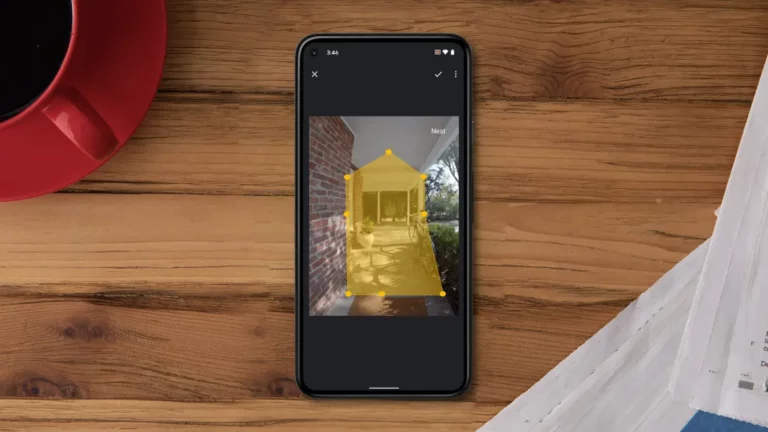
Also, ensure your doorbell is getting a strong signal. If it’s too far from your router or has a wall made of solid lead between them, it might struggle to communicate effectively. Consider a Wi-Fi extender if the signal strength looks weak in the app.
The App Itself: Is the Messenger Dropping the Ball?
Sometimes, the issue isn't with your doorbell, but with the very app you use to communicate with it. Think of it like trying to order a pizza, but the phone line is crackly. The pizza place is fine, but you can’t get through!
First, force close the Google Home or Nest app on your phone or tablet. Seriously, swipe it away, make sure it’s completely shut down. Then reopen it. A fresh start for the app can work wonders, much like a good night's sleep for us humans.
Next, check for app updates. Head to your device’s app store and see if there’s a newer version waiting. Developers are constantly squashing bugs and improving performance, so an outdated app might be the silent saboteur. Update it, and restart your phone for good measure.
If all else fails with the app, consider clearing its cache or even reinstalling it entirely. This can resolve persistent issues by giving the app a truly clean slate. Just remember your login details!
When the Obvious Isn't So Obvious (Deeper Dives)
Okay, if you've done all the digital stretches and your doorbell is still just flexing that green light without any action, it's time to dig a little deeper. These next steps might feel a touch more involved, but they're often the culprits behind these peculiar silent performances.

The Chime Connector: A Tiny But Mighty Link
Your Nest Doorbell usually comes with a little component called a chime connector. This tiny device ensures your traditional indoor chime can play nice with your smart doorbell. If this connector isn't snugly fitted or has decided to take a holiday, your doorbell might work, but your chime won't ring.
Carefully open up your indoor chime box (usually a beige or white box on a wall near your front door). Double-check that the chime connector is firmly attached to the chime's terminals, exactly as the installation guide suggested.
Sometimes, these wires can wiggle loose or the connector itself can go rogue. Re-seating everything firmly can work wonders. Ensure the wires are making good contact and nothing looks frayed or bent.
Transformer Troubles: Is There Enough Juice?
Your Nest Doorbell is hungry for power, and it gets it from a low-voltage transformer, usually tucked away near your main electrical panel or within your chime box. If this transformer is old, weak, or faulty, it might not be providing enough consistent power, leading to weird behavior like a silent green light.
The green light might stay on because it's getting some power, but not enough to fully operate the camera, transmit data, or activate your chime. This one can be trickier to diagnose without a multimeter, but if your house is older, it's worth considering.
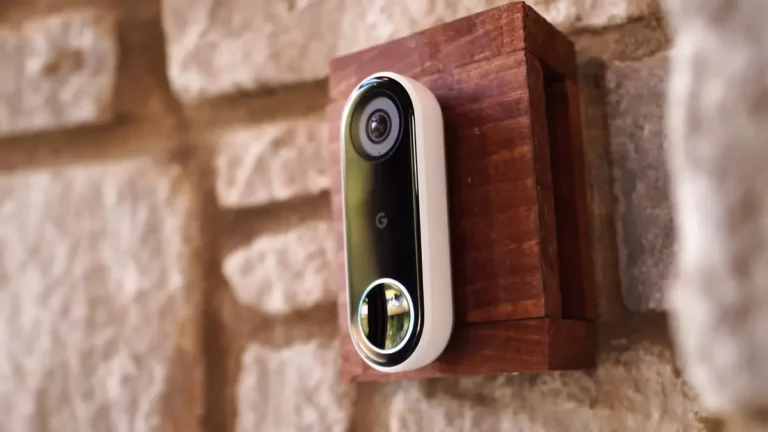
If you suspect a transformer issue, it might be time to call in a qualified electrician. They can safely test the voltage and replace the transformer if needed, ensuring your doorbell gets the robust power supply it craves. Safety first, always!
Physical Button Check: Is It Stuck?
This might seem almost too simple, but sometimes the most elegant solutions are right under our noses. Give the actual button on your Nest Doorbell a few gentle presses. Does it feel normal? Does it click satisfyingly, or does it feel stiff, stuck, or unresponsive?
It's rare, but sometimes environmental factors or even a tiny bit of debris can affect the physical button mechanism. If it feels off, gently try to dislodge any visible grit. You might be surprised how a little physical obstruction can cause a lot of digital drama!
Don't Panic – You're a Tech Whisperer!
Remember, you are not alone in this tech tango! Every smart home owner eventually faces a moment when their trusty gadgets decide to go on a silent strike. That steady green light on your Nest Doorbell, stubbornly glowing while refusing to work, is just a temporary puzzle.
Most often, one of these little troubleshooting dances will bring your doorbell back to its chirpy, notification-sending self. You've got this! A little patience, a dash of digital detective work, and you'll have your home's digital greeter back in tip-top shape.
If, after all your heroic efforts, your Nest Doorbell still prefers its silent meditation, it’s absolutely okay to reach out to Google Nest Support. Sometimes, a professional eye or a replacement part is just what the digital doctor ordered. But usually, a simple reboot or Wi-Fi tweak is all it takes to turn that mocking green light into a beacon of useful functionality once more!