How To Use A Power Bank Charger
Alright, friend! Let's talk about one of life's greatest modern conveniences: the power bank charger. You know, that magical little brick that swoops in to save your phone from the dreaded 1% battery panic? Yes, that one! If you've ever felt the sheer terror of your map app dying in an unknown city, or your perfect selfie moment interrupted by a sudden "battery critically low" warning, then this little guide is for you. Think of me as your friendly tech guru, here to demystify this awesome gadget with zero jargon and maximum laughs.
What Even IS a Power Bank?
Simply put, a power bank is a portable battery pack. It's like having a little emergency pit stop for all your thirsty gadgets – phones, tablets, earbuds, smartwatches, you name it! Instead of searching desperately for an outlet (the modern-day equivalent of hunting for water in a desert), you just whip out your power bank, plug in, and voilà! Power restored. It's your personal, on-the-go energy espresso shot for your tech.
First Things First: Charge Your Power Bank!
This might sound obvious, but it's the most common "oopsie" people make! A power bank isn't born fully charged, sadly. It needs a good drink of electricity itself before it can share. Think of it like a superhero needing to fuel up before saving the day.
Must Read
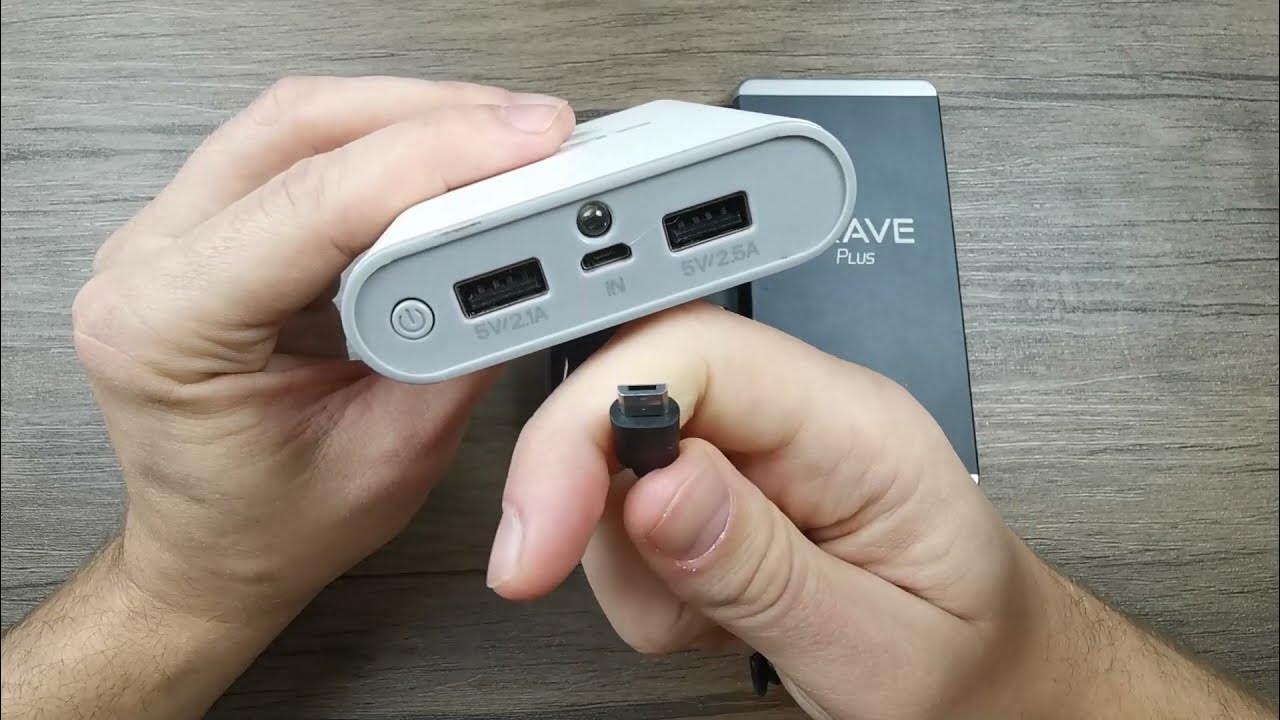
Look at your power bank. You'll usually see two types of ports: an input port and an output port. Sometimes they're helpfully labeled, sometimes you have to guess (fun game!). The input port is where the power bank itself gets its energy. This is usually a micro-USB, USB-C, or sometimes a Lightning port.
To charge it:

- Grab the cable that came with your power bank (or a compatible one).
- Plug one end into the input port on your power bank.
- Plug the other end into a wall adapter (like the one for your phone) or a computer's USB port.
- You'll usually see some indicator lights start blinking or showing a percentage – that means it's happily guzzling power!
Let it charge until all the lights are solid or it shows 100%. This can take a few hours, especially for bigger power banks. Be patient! Good things come to those who wait for a full charge.
Now, Let's Charge Your Devices!
Okay, your power bank is fully juiced, ready to rumble. Time to bring your dying devices back to life!
This is where the output port comes into play. This is where the power leaves the power bank to go into your phone. Most power banks have standard USB-A output ports, but many newer ones also feature USB-C for faster charging and compatibility with modern gadgets.

Here's the super simple drill:
- Grab your device's charging cable (the one you usually use to plug into a wall).
- Plug the USB-A or USB-C end of that cable into the output port on your power bank.
- Plug the other end (Lightning, USB-C, Micro-USB – whatever your device uses) into your phone, tablet, or whatever needs a boost.
- Boom! You should see your device spring to life, showing that glorious charging icon.
Some power banks have multiple output ports. This means you can charge more than one device at a time! Imagine the power! Just remember, sharing is caring, but it might slow down the charging speed for each device a tiny bit. Still, better than two dead phones, right?

Tips, Tricks, and "Don't Do This!" Moments
Want to be a power bank pro? Here are a few extra nuggets of wisdom:
- Capacity Matters: Power banks are measured in mAh (milliampere-hours). A higher mAh means more charges for your devices. A 10,000 mAh power bank can usually charge a standard smartphone 2-3 times.
- Don't Be a Hoarder: For best battery health, store your power bank between 50-80% charge. Don't leave it completely drained or at 100% for ages.
- Check Your Cables: Always use good quality cables. Flimsy, frayed cables are not only inefficient but can also be a fire hazard (yikes!).
- Read the Manual (Gasp!): Okay, maybe just skim it. But seriously, your specific power bank might have unique features or charging quirks. A quick glance can save you a headache.
- Not for Toasters: As tempting as it might be, don't try to charge appliances or things that clearly draw too much power. Stick to your personal electronics. Your toaster will thank you (by not exploding).
A Little Word on Safety (The Fun Kind!)
Power banks are generally super safe, but like any electronic gadget, treat them with a little respect. Avoid extreme temperatures (don't leave it in a scorching hot car or freezing cold tundra), don't drop it off a cliff, and if it starts smelling funny or puffing up like a stressed-out pufferfish, stop using it immediately and dispose of it responsibly. Common sense, really!
Go Forth and Be Powered!
And there you have it, my friend! You are now officially a power bank master. No more "low battery anxiety" for you! With this trusty device by your side, you're ready to conquer long commutes, epic trips, or just a lazy day on the couch when the nearest outlet feels like a marathon away. So go ahead, plug in, power up, and enjoy the freedom of never being tethered to a wall again. Keep those devices charged, keep those good times rolling, and keep that smile on your face!