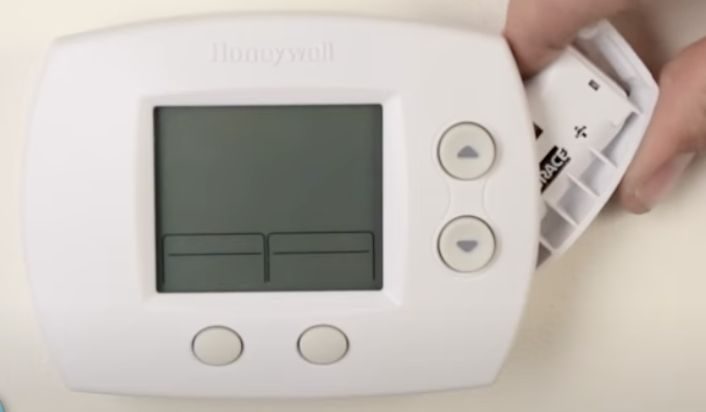
How To Replace Battery Honeywell Thermostat

There's an unsung hero in many of our homes, a quiet commander orchestrating the very atmosphere we breathe indoors. It's the thermostat. And for countless households, that hero proudly wears the Honeywell badge. We love our Honeywell thermostats because they offer us a beautiful symphony of comfort and control. Imagine waking up on a chilly morning to a perfectly pre-warmed house, or stepping into a refreshingly cool sanctuary after a sweltering day. This isn't magic; it's the seamless operation of a well-maintained thermostat, giving us the power to sculpt our ideal indoor climate with just a few taps.
The core benefit of this trusty device is undeniable: it ensures our living spaces are always just right, comfortably and efficiently. It’s not merely about temperature; it’s about peace of mind, knowing your family is cozy in winter and cool in summer. For everyday life, it translates into fewer arguments about the ideal room temperature, potential savings on energy bills by preventing wasted heating or cooling, and even integration with smart home systems for remote control. From setting schedules that adapt to your daily routine to simply nudging the temperature up or down from the couch, the Honeywell thermostat is the digital brain of your home's climate control.
But even heroes need a little sustenance to keep fighting the good fight. And for many Honeywell models, that sustenance comes in the form of humble batteries. You'll know it's time for this small act of maintenance when your thermostat screen goes blank, or perhaps an ominous "low battery" icon appears, or even worse, your system simply stops responding to commands. These are common indicators that the heart of your home's comfort system needs a fresh jolt of power. Ignoring it can lead to uncomfortable extremes or even system malfunctions, turning your silent hero into a silent saboteur of comfort.
Must Read
Fear not, for replacing the battery in your Honeywell thermostat is a surprisingly empowering and utterly simple task that anyone can master. Here's how to enjoy this small but significant victory more effectively:
- Identify the Battery Type and Location: Most Honeywell thermostats use standard AA or AAA alkaline batteries. The battery compartment is often located by gently pulling the front cover of the thermostat towards you, or sometimes there's a small slot on the side. Don't be afraid to give a firm but gentle tug.
- Power Down (Optional, but Smart): While usually not strictly necessary for battery replacement, for peace of mind, you can switch your HVAC system off at the main breaker before you begin.
- Remove Old Batteries: Once you've opened the compartment, carefully pop out the old batteries. Note their orientation (+/-) for when you put the new ones in.
- Insert Fresh Batteries: This is crucial – use brand new, high-quality alkaline batteries. Don't try to reuse old ones from a remote control. Insert them correctly according to the polarity markings.
- Close and Test: Snap the cover back into place firmly. Your thermostat should spring back to life, often displaying the current time and temperature. Give it a quick test by adjusting the temperature up or down to ensure your HVAC system responds.
To truly enjoy this ritual, make it a proactive measure. Set a reminder to check or replace your thermostat batteries annually, perhaps when you change your smoke detector batteries. Keeping a spare set of batteries in a handy drawer means you’ll never be caught off guard. This small act of preparedness ensures your home remains a haven of comfort, and you, the unsung hero of your household's climate control, can bask in the glory of a job well done.