
How Many Amps Does A Laptop Use
Hey there, coffee buddy! Pull up a chair. Ever looked at your laptop charger, seen all those tiny numbers, and thought, "What in the world does that even mean?" Specifically, the whole amp thing. It sounds super techy, right? Like something only engineers in white lab coats would care about. But honestly, it's pretty simple once you break it down. And trust me, it’s kinda useful to know!
So, you're wondering, "How many amps does a laptop use?" Ah, the million-dollar question! Or, well, maybe the five-dollar coffee question. The short, slightly annoying answer is: it depends! (I know, I know, classic tech answer. Bear with me.)
What Even Are Amps, Anyway?
Before we dive into your laptop's specific thirst for power, let's do a super quick, super chill explanation of amps. Think of electricity like water flowing through a pipe. The voltage (V) is like the water pressure – how hard it's pushing. The amps (A) are like the flow rate – how much water is actually moving through the pipe at any given moment. Simple, right?
Must Read
So, when we talk about amps a laptop uses, we're really asking: how much electrical current is flowing into it to make all those little circuits whir, the screen glow, and your cat videos play smoothly. It’s the juice, the oomph, the get-up-and-go!
Why "It Depends" Isn't Just Me Being Annoying
Okay, back to the "it depends" part. Your laptop isn't just one static thing, like a toaster (though even toasters vary!). It's a whole universe of components working hard. And how hard they're working directly impacts how many amps it sips or gulps. Imagine your car: it uses more fuel going uphill with the AC blasting and all your friends packed in, right? Same idea.
Here are the big players:
- What you're doing: Just browsing social media and checking emails? That's a tiny sip. Edit a 4K video, play an intense AAA game, or compile some code? That’s a big gulp! Your graphics card and processor (the brain and the artist of your laptop) will be working overtime, demanding more current.
- Your laptop's specs: A sleek, ultra-light MacBook Air isn't going to draw as much power as a beastly gaming rig with a massive screen and dedicated graphics card. The bigger the engine, the more fuel it needs. Makes sense, right?
- Screen brightness: Crank that brightness all the way up? Those pixels need more power to shine!
- Peripherals: Got a bunch of external hard drives, a fancy mechanical keyboard, or a drawing tablet plugged in? Each one is politely asking for a little bit of that precious current.
- Is it charging?: This is a big one! When your laptop's battery is low and it's trying to juice up, it's pulling extra current. Think of it like a thirsty runner chugging water after a marathon.
Finding the Magic Number: Your Charger is Your Friend!
Alright, so you want a more concrete answer, not just a philosophy lesson on electricity. Good news! The easiest way to get a solid ballpark figure for your specific laptop is to look at its power adapter. You know, that brick thingy that plugs into the wall?
Flip it over. Somewhere on there, in tiny print (grab your reading glasses, seriously!), you'll see "Output." It'll usually list two key numbers:
Example: Output: 19.5V -- 3.33A
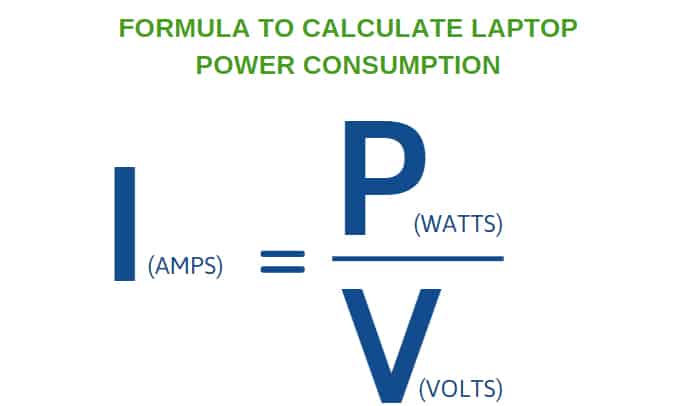
See that "A" with a number next to it? That's your amps! In this example, 3.33 Amps. This number represents the maximum current your charger is designed to deliver to your laptop. Your laptop won't always pull this much, but it's the most it can pull from that specific adapter.
Sometimes you might also see Watts (W). Watts are just Volts multiplied by Amps (V x A = W), which gives you the total power. But for "amps," just look for the "A"!
Typical Laptop Amp Ranges (Ballpark Figures, Of Course!)
So, what kind of numbers are we generally talking about? Just for fun, here's a rough idea:

- Lightweight Ultrabooks/Chromebooks: These little sippers might pull anywhere from 1.5 to 3 Amps when in active use, maybe 4-5 Amps when charging and working hard.
- Standard Everyday Laptops: Your average workhorse machine? Think more in the range of 3 to 5 Amps, potentially hitting 6-7 Amps under heavy load or while fast charging.
- Gaming Laptops/Workstations: Oh boy, these are the power guzzlers! They can easily demand 6 to 10 Amps, and some high-end beasts might even push 12-15 Amps. They've got powerful graphics cards and processors that are seriously hungry!
Remember, these are just rough estimates! Your laptop will dynamically adjust its current draw based on what it's doing. It's not a fixed amount like a lightbulb.
Why Should You Even Care About Amps?
Beyond satisfying your curiosity, knowing a little about laptop amps can actually be pretty handy:
1. Choosing the Right Charger: If you ever need to replace your charger, always make sure the new one matches or exceeds the output amps of your original. Too few amps, and your laptop might charge slowly, not charge at all, or even worse, stress out your components. Too many amps? No worries, your laptop will only draw what it needs, so overkill is fine!

2. Power Banks and Car Chargers: Ever tried charging your laptop with a portable power bank or a car adapter and it just won't cut it? Chances are, the power bank or adapter isn't supplying enough amps to meet your laptop's demands. Now you know!
3. General Tech Savvy: It just makes you sound smart at parties. "Oh, my gaming rig? Yeah, that thing's pulling like 9 amps when I'm raiding." Instant respect. (Okay, maybe not, but you'll feel smart!)
Bottom Line, My Friend
So, how many amps does a laptop use? It's not a single number etched in stone, but rather a dynamic dance between what your laptop is doing and what its hardware needs. The best place to start is always your charger's "Output" rating – that tells you the maximum current it's designed to handle.
You're not expected to be an electrical engineer, but understanding these little numbers can make you a more informed and empowered tech user. Now, pass the sugar for that coffee, will ya? And maybe let's talk about processor speeds next time?