
How Do You Read Smart Meters

Remember when your energy bill used to feel like a mysterious message from a distant land? A cryptic sum appearing on your doorstep, leaving you wondering what exactly happened behind your walls? Well, good news! Those days are becoming a charming, albeit slightly bewildering, relic of the past. Thanks to smart meters, you're no longer just a passive observer in your home's energy story. You're the director, the star, and the savvy accountant all rolled into one.
Reading your smart meter isn't a chore; it's a superpower. It's about gaining clarity, taking control, and perhaps even unlocking some surprising savings. Think of it as your home's personal fitness tracker, but instead of steps, it’s tracking kilowatt-hours and cubic meters. Ready to become an energy-savvy guru? Let's dive in!
Your New Energy BFF: Understanding What It Is
First things first, what exactly is a smart meter? Simply put, it's a next-generation gas or electricity meter (or both!) that digitally records your energy use and sends it directly to your energy supplier. No more manual readings, no more estimated bills. It’s pretty brilliant, right? Most homes will have two: one for electricity and one for gas, though they often look quite similar.
Must Read
Your smart meter typically sits where your old meter used to be – likely under the stairs, in a cupboard, or outside your home. The real magic, however, often happens via its little sidekick: the In-Home Display (IHD). More on that wonder-device in a moment.
Waking Up Your Meter: The Buttons and Bleeps
Don’t be intimidated by the sleek, often grey or white box. Most smart meters are designed to be user-friendly. To get started, you'll usually find one or two buttons on the meter itself. These are often labelled ‘A’ and ‘B’, or sometimes 'Display' or 'Enter'.

Give the primary button a gentle press. You might need to press it a few times to cycle through the display options. Think of it like navigating a simple menu on an old mobile phone. The goal is to find your current meter reading.
Decoding the Digits: What Do Those Numbers Mean?
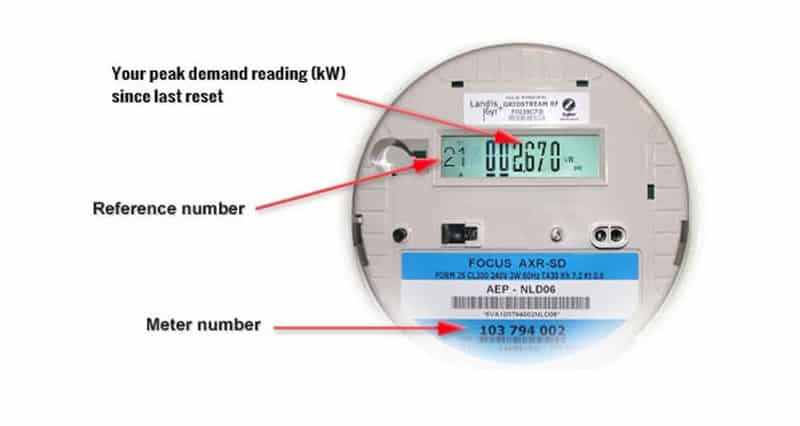
Once you've got the display lit up, you'll see a series of numbers, sometimes followed by letters. Here's what to look for:
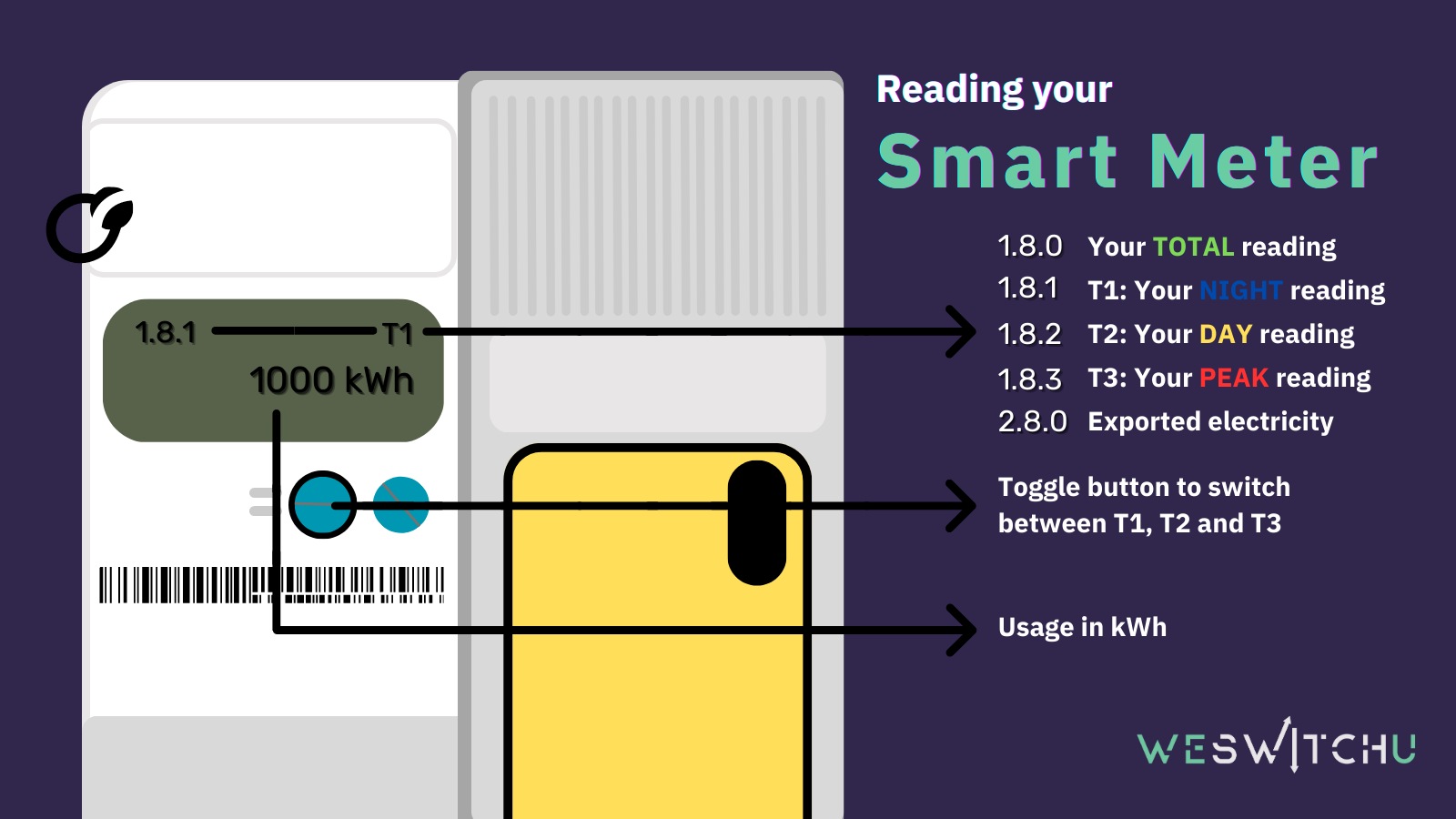
Electricity Meter: You're looking for a number followed by kWh. This stands for kilowatt-hours, and it's how your electricity usage is measured. If you see 'Rate 1' or 'Peak' and 'Off-Peak', your meter might be tracking different rates for different times of the day – a clever way to encourage off-peak usage!
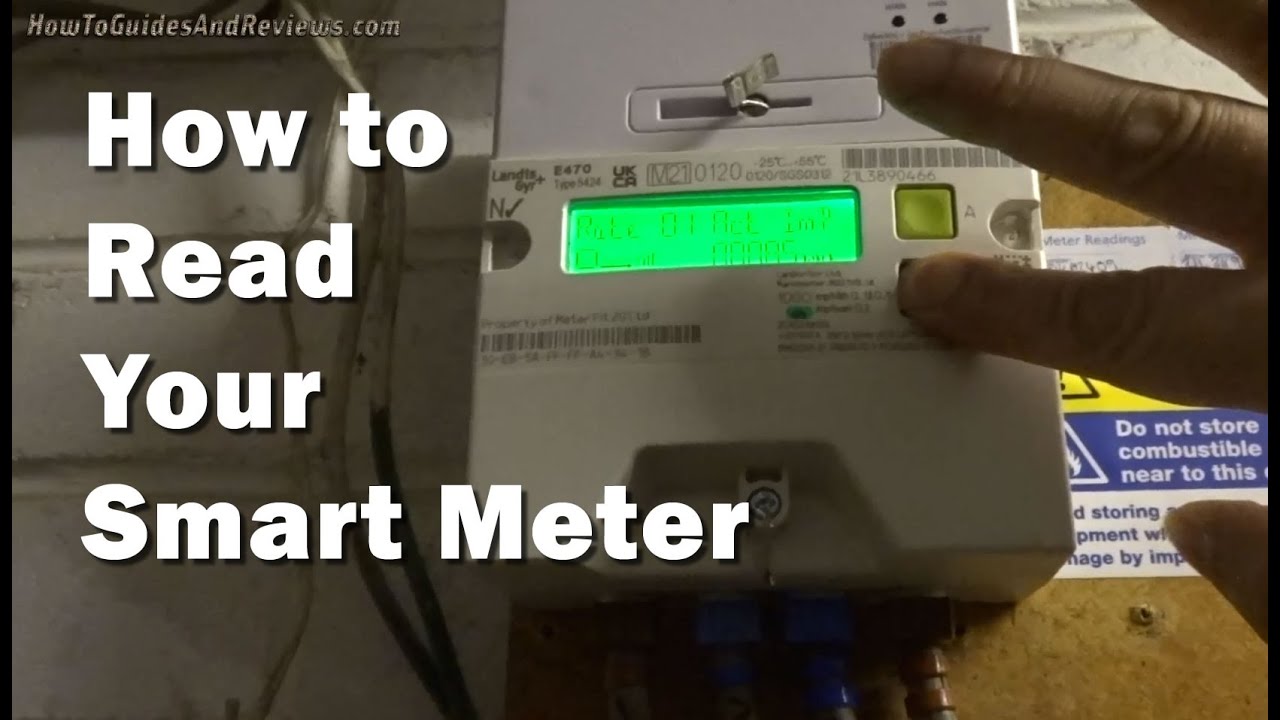
What Does Smart Meter Reading Mean at Adam Lewis blog Gas Meter: For gas, you'll usually see a number followed by m³ (cubic metres) or sometimes ft³ (cubic feet). Your supplier converts this volume into kilowatt-hours for billing, but the meter itself will show the raw volume.
The numbers you see are your total usage since the meter was installed. Think of it like the odometer in your car – it keeps adding up. To understand your usage over a specific period, you'd compare two readings taken at different times.
Practical Tips for Your Energy Detective Work
Becoming an energy reading pro is all about observation and consistency. Here are a few insider tips:
1. Get Friendly with Your IHD: This is where the real fun begins! Your In-Home Display shows your energy usage in real-time, often in pounds and pence, or just kWh/m³. You can literally watch the numbers climb as you boil the kettle or switch on the dishwasher. This instant feedback is incredibly powerful for understanding which appliances are your biggest energy guzzlers.
2. Check Regularly: Make it a habit. Glance at your IHD daily, perhaps over your morning coffee. See how your usage changes from day to day, or even hour to hour. Notice spikes? What were you doing then? Running the dryer? Having a long shower? It’s like putting together a puzzle!
3. Use Your Energy Provider's App: Many energy suppliers have fantastic apps that sync with your smart meter data. These apps often provide graphs, breakdowns of daily, weekly, and monthly usage, and even projections for your next bill. It’s like having a personal energy coach in your pocket.
4. The "Big Switch Off" Test: Want to know your home's baseline energy drain? Try switching off everything you possibly can (safely, of course!) for 10-15 minutes, then observe your IHD. The reading should drop to almost zero. Then, switch one appliance back on at a time to see its individual impact. It's a fascinating experiment!
The Bigger Picture: Smart Living, Smarter Choices
Reading your smart meter isn't just about spotting a high bill before it arrives; it's about mindful living. It empowers you to make informed decisions – like opting for an energy-efficient appliance, timing your laundry for off-peak hours, or simply remembering to turn off lights when you leave a room. It’s a tiny step towards a more sustainable footprint and a more comfortable budget.
So, next time you pass your meter or glance at your IHD, remember you’re not just looking at numbers. You’re looking at your choices, your habits, and your potential for smarter, more efficient living. Go forth, energy detective, and unravel the delightful mysteries of your home's power usage!