
How Do You Charge A Gopro Hero 4
So, you've got your trusty GoPro Hero 4, ready to capture those epic moments – whether it's shredding waves, hiking a majestic trail, or just documenting a hilarious family picnic. This little powerhouse remains a favorite for adventurers worldwide. But here's the thing about capturing all that awesomeness: your camera needs juice! A dead battery is the ultimate buzzkill, turning your potential masterpiece into a mere memory. That's why knowing how to properly charge your GoPro Hero 4 isn't just useful; it's absolutely essential for keeping your adventures alive and kicking!
The core purpose of charging your GoPro is simple: to provide it with the energy it needs to function. The benefits, however, are huge! Imagine never missing that perfect shot because your battery died, or having peace of mind that your camera is always ready when inspiration strikes. A fully charged GoPro means uninterrupted creativity and the assurance that every incredible moment you want to capture will be stored safely. It's about maximizing your camera's potential and making sure those memories are made, not just dreamt about.
Good news! Charging your GoPro Hero 4 is super straightforward. There are two primary ways to do it, depending on your needs:
Must Read
Method 1: Charging Directly via USB
This is the most common and simplest method, perfect for daily use or topping up your battery. Here's what you'll need and how to do it:
- Your GoPro Hero 4 Camera: Obviously!
- A USB Cable: Your GoPro likely came with one (a mini-USB to USB-A cable). If not, any standard mini-USB cable will do.
- A Power Source: This could be a wall adapter (like the one for your phone), your computer's USB port, or a portable power bank.
Steps:
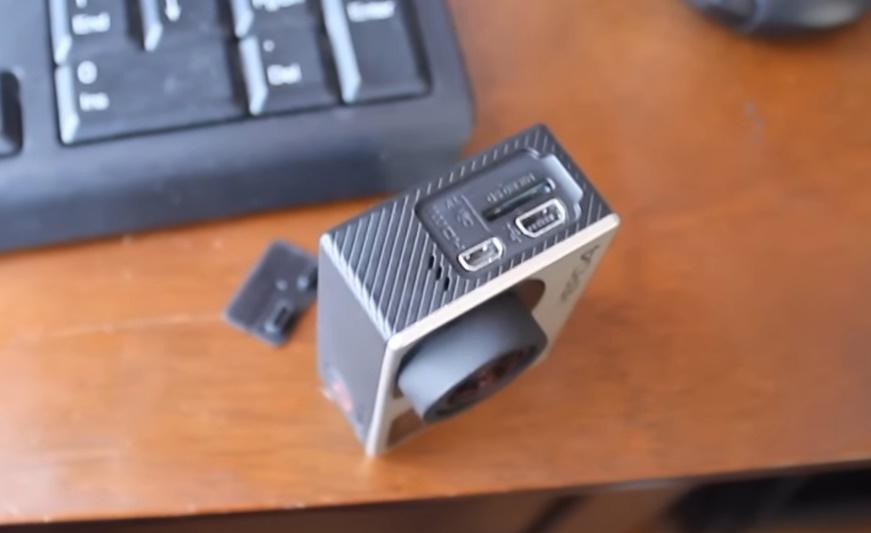
- Locate the USB port on your GoPro Hero 4. Depending on the model (Black or Silver), it's usually on the side, tucked neatly under a protective flap.
- Gently open the flap and plug the small end of the USB cable into the GoPro's port.
- Plug the larger end of the USB cable into your chosen power source (wall adapter, computer, power bank).
- Once connected, look for a red LED light on the front or top of your GoPro. This bright little glow indicates that your camera is happily charging away!
- When the red LED light turns off, it means your GoPro Hero 4 battery is fully charged and ready for action. Unplug it, close the flap, and you're good to go!
Pro Tip: For the fastest charging, use a dedicated wall adapter rather than a computer's USB port, as wall adapters typically provide more power.
Method 2: Using an External Battery Charger (for removable batteries)
This method is a game-changer for serious adventurers who need to charge multiple batteries quickly or want to use their camera while another battery is charging. Most Hero 4 models (especially the Black Edition) have removable batteries.
![How to Charge GoPro Hero 4 [2 Charging Procedure] - Hollyland](https://www.hollyland.com/wp-content/uploads/2024/01/image-16.png)
- GoPro Hero 4 Removable Battery: You'll need the battery itself.
- External Dual Battery Charger: GoPro offers its own, or you can find reliable third-party options.
- USB Cable and Power Source: Just like Method 1, to power the charger.
Steps:
- Remove the battery from your GoPro Hero 4.
- Insert the battery (or batteries, if it's a dual charger) into the external charger.
- Plug the charger into a power source using its USB cable.
- The charger will have its own LED indicators (often red for charging, green for full).
This method is incredibly useful if you have spare batteries, allowing you to keep shooting while others are juicing up. Never miss a moment!
So there you have it! Charging your GoPro Hero 4 is a breeze, ensuring you're always ready to capture life's wildest rides and most precious memories. Remember to always use reliable cables and power sources, and maybe grab a spare battery or two for those extra-long adventures. Happy shooting!
![How to Charge GoPro Hero 4 [2 Charging Procedure] - Hollyland](https://cdn.hollyland.com/wp-content/uploads/2024/01/30153556/image-15.png)
