
How Do I Cool Down My Iphone

We've all been there. That moment when your trusty iPhone, usually a cool companion, suddenly feels like it's been sunbathing on a desert island without you. It's hot. Really hot. And while a warm phone might feel a bit like a tiny personal heater on a chilly day, a blazing one is a definite red flag.
Fear not, fellow digital adventurers! Cooling down your iPhone isn't a complex ritual involving ancient tech sorcery; it’s more about a little common sense and a dash of digital TLC.
Why Your iPhone is Feeling the Heat
So, why does your sleek device decide to mimic a baked potato? Well, iPhones are tiny powerhouses, constantly crunching numbers, loading dazzling graphics, and keeping you connected to the world. All that hard work generates heat. Think of it like a mini-supercomputer in your pocket.
Must Read
Add a demanding app, a long gaming session, fast charging, or a scorching summer day, and you’ve got the perfect recipe for a warm-to-hot hand warmer. Apple officially recommends using your iPhone in ambient temperatures between 0º and 35º C (32º to 95º F). Go beyond that, or push its processor too hard, and it will quite literally start to feel the burn.
The Absolute Don'ts: Step Away From the Freezer!
First things first, let's talk about the absolute no-nos. When panic strikes, our instincts can sometimes lead us astray. Please, for the love of all things technological, do not put your iPhone in the freezer or refrigerator.
While the idea of a quick chill might seem appealing, rapid temperature changes can cause condensation inside the device, leading to irreversible water damage. That's a one-way ticket to a very expensive repair! And definitely, definitely, do not submerge it in water – unless it's designed for that and you're fully aware of its IP rating limits, but even then, for cooling, it’s a hard pass.
How to Give Your iPhone a Chill Pill: Practical Tips
Right, now that we’ve avoided disaster, let's get proactive. Cooling your iPhone down is surprisingly straightforward once you know the tricks.
1. Strip it Down
Your phone case, while a fantastic protector, can also be an excellent insulator. When your iPhone is running hot, the case traps that heat. Think of it like wearing a winter coat on a summer day. So, pop that case off and let your phone breathe! It’s the quickest, easiest first step.

2. Give it a Break (From Demanding Apps)
Are you running a graphics-intensive game, editing a video, or navigating with GPS while streaming music? All at once? Your iPhone is working overtime! Close demanding apps, especially those running in the background. If you're multitasking like a pro, give your phone a moment to catch its breath. Sometimes, a simple restart can also work wonders, clearing out any lingering processes that might be chewing up CPU cycles.
3. Seek the Shade (or a Cooler Spot)
Just like us, iPhones aren't big fans of direct sunlight. Leaving your phone on a car dashboard, by a sunny window, or on a hot beach towel is a surefire way to overheat it. Move your phone to a cooler, shadier spot. The ambient temperature makes a huge difference.

4. Embrace Low Power or Airplane Mode
If your phone is struggling, enabling Low Power Mode (Settings > Battery) or even Airplane Mode (swipe down from the top-right corner to access Control Center) can significantly reduce its workload. Low Power Mode throttles background activity and visual effects, while Airplane Mode cuts off all wireless communication, giving your phone a much-needed break from constantly searching for signals.
5. Unplug and Relax
Charging, especially fast charging, generates heat. If your phone is hot while plugged in, it’s a good idea to unplug it and let it cool down naturally before continuing to charge. Also, make sure you're using MFi (Made For iPhone) certified chargers and cables. Off-brand accessories can sometimes be inefficient and cause more heat.
6. Fan Power (If You Have It)
A little airflow can go a long way. If you’re near a desk fan, or even the AC vent in your car, directing some cool air towards your phone can help dissipate heat much faster. You can even find small, clip-on phone coolers designed specifically for this purpose, though for most everyday overheating, the above steps are usually sufficient.

A Little Fun Fact
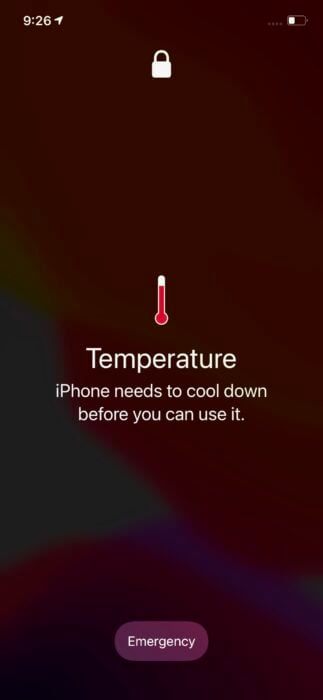
Did you know that your iPhone actually has built-in thermal protection? If it gets too hot, it will display a temperature warning and shut down to prevent internal damage. It’s like a tiny, smart bouncer refusing entry to the heat-stroke party. This isn't a bug; it's a feature designed to protect your valuable tech investment!
When to Really Worry
While occasional overheating is normal, if your iPhone is consistently getting hot without any obvious reason (like intense gaming or charging), or if it's accompanied by severe battery drain or performance issues, it might be time to contact Apple Support. There could be an underlying hardware or software issue that needs professional attention.
A Gentle Reminder for All of Us
Just like us, our devices sometimes need a moment to chill out. In our always-on world, it’s easy to push our tech (and ourselves!) to the limit. Taking a few moments to cool down your iPhone isn't just about preserving its lifespan; it's a gentle reminder to be mindful of the tools that connect us to our world, and to give them (and ourselves) the care they deserve. So, next time your iPhone is feeling a bit fiery, remember these tips, give it a breather, and perhaps take one yourself too.