
Honeywell Thermostat Registered To Another Account
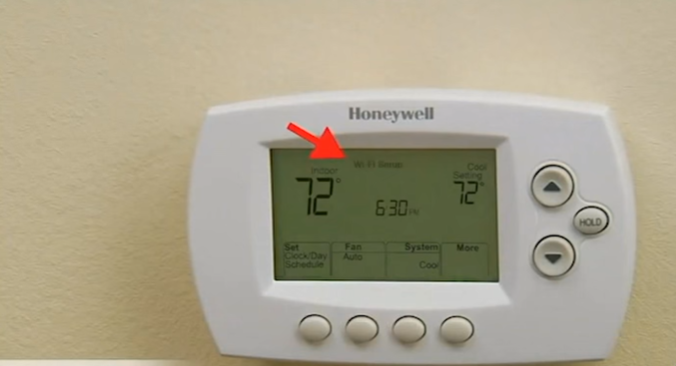
Picture this: You’ve just moved into your dream home. The boxes are piling up, the scent of fresh paint (or at least, not the previous owner’s questionable cooking) is in the air. You’re ready to conquer the world, or at the very least, regulate your living room temperature with the glorious smart thermostat already on the wall. It’s a Honeywell, sleek and modern, promising a future of effortless comfort.
You tap the screen, eager to set it to a delightful 72 degrees. But then, a message appears. A cold, unfeeling message that chills you more than any draft ever could: “This Thermostat is Registered to Another Account.”
Gasp!
Must Read
Suddenly, your dream home feels less like yours and more like a high-tech squat for a digital ghost. Who is this other account? Is it the previous owner, still remotely adjusting your AC from their new condo in Florida? Are they cackling maniacally, bumping your heat up to a balmy 85 degrees while you’re out, just to mess with you?
The Digital Intruder: Who’s Pulling Your Strings?
It’s a bizarrely common modern dilemma, isn't it? That little smart gadget, designed to bring convenience, has become a stubborn, unyielding sentinel of someone else's digital domain. It's like finding out your new car still has the previous owner's Spotify playlist, but instead of just listening to bad pop, they can actually drive your car a tiny bit.
The core issue is that smart thermostats, like many smart home devices, are tied to a cloud account. When the previous owner packed their bags, they often forgot to "unlink" their thermostat from their Honeywell Home or Total Connect Comfort account. So, while the physical device is now yours, its digital soul is still shackled to its past life. It’s less a thermostat, more a tiny, climate-controlling zombie.

And let me tell you, trying to wrestle control from this invisible overlord can feel like a quest of epic proportions. You'll tap. You'll prod. You'll try every combination of "reset" buttons you can find. You might even whisper sweet nothings to it, promising a life of stable temperatures and clean air filters, if only it would just obey.
The Quest for Ownership: Your Three Paths to Thermostat Freedom
Fear not, brave homeowner! There are ways to sever these digital ties and reclaim your rightful warmth (or coolness). Just be prepared for a journey that might involve a bit of detective work and possibly a mild existential crisis.
Path 1: The Diplomatic Approach (If You Dare)
Your absolute best bet, if you're lucky enough to have it, is to contact the previous owner. A quick text or call, explaining the situation politely, can often resolve it fastest. They simply need to log into their Honeywell account and remove the thermostat. Easy peasy! Unless, of course, they’ve moved to a remote off-grid cabin in Montana with no internet and have since sworn off all technology. Then you’re out of luck there.

Just imagine the conversation: "Hey, remember that Honeywell thermostat? Yeah, it's still linked to your account. Could you, uh, mind letting go of my temperature settings? It's getting a little chilly in here, and I'm pretty sure you're still getting alerts about my pollen count."
Path 2: The Direct Confrontation (Hello, Honeywell Support!)
If the previous owner has vanished into the ether (or is stubbornly clinging to their digital warmth), your next step is to contact Honeywell customer support. Now, before you groan, this is usually where the magic happens. But you won't walk away victorious without your secret weapon:
Proof of ownership.

That’s right. Get ready to dig out those closing documents, the bill of sale, or even a utility bill showing your address. Honeywell needs to verify that you are the rightful occupant and owner of the device. They're not just being difficult; they're trying to prevent mischievous ex-partners or digital pranksters from hijacking your home's climate. Think of them as the bouncers of the digital thermostat club.
You’ll likely need to provide the MAC ID and CRC number of the thermostat (usually found on the back of the device, or sometimes in the settings menu). These are like the thermostat's social security numbers. Once you provide these, along with your proof of purchase, they can unregister it from the old account and allow you to link it to your own shiny new one. It might take a phone call, a chat, or an email, but persistence pays off.
Path 3: The "Factory Reset" (Often a Red Herring)
You might be tempted to just hit the factory reset button and assume all your troubles will melt away. Unfortunately, while a factory reset will wipe local settings, it often doesn't unlink the device from the cloud account. It's like changing the locks on your house but forgetting to tell the old tenant their name is still on the lease. The thermostat still thinks it belongs to someone else, even if it's forgotten your preferred temperature for "Netflix and Chill."
So, while it’s a good first troubleshooting step for other issues, don't expect it to magically free your thermostat from its past. It's often a dead end in the "registered to another account" saga.
The Takeaway: Your HVAC, Your Rules!
The "Honeywell Thermostat Registered to Another Account" message is a rite of passage for many smart-home-savvy new homeowners. It's a reminder that while technology promises effortless living, it sometimes throws up quirky, digital roadblocks that require a bit of human ingenuity (and paperwork) to overcome.
But armed with patience, your proof of purchase, and perhaps a good cup of coffee, you will prevail. Soon, your Honeywell will be humming along, listening only to your commands, and your home will be perfectly, wonderfully, unequivocally yours. No digital ghosts required. And who knows, maybe you'll even uncover a fascinating fact: did you know the first true thermostat was invented in 1883 by Albert Butz, who wanted to regulate the temperature of his furnace? Now that's some historical temperature control!