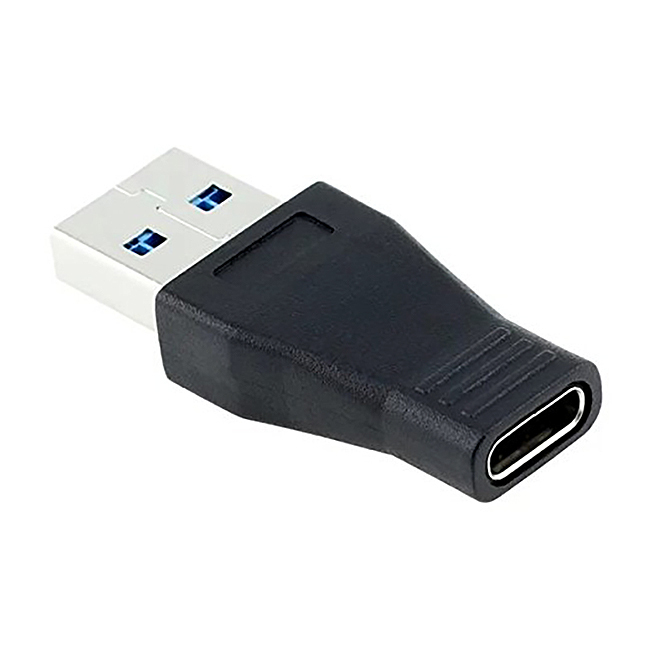
Ever unboxed a sleek new laptop, tablet, or smartphone, feeling all modern and high-tech, only to realize your favorite old flash drive, sturdy keyboard, or trusty mouse suddenly doesn't fit? It's a common "oops" moment, like having a brand new car but needing a special adapter for your old garage remote! That's where the unassuming, yet incredibly powerful, USB Type-C to USB 3 adapter steps in. This little gadget isn't just useful; it's a lifesaver for making your new tech play nice with your existing gear, saving you money and a whole lot of head-scratching.
Think of this adapter as the ultimate bridge builder between different generations of tech. For beginners and general everyday users, its purpose is brilliantly simple: it lets you connect anything with a standard, older USB (often called USB-A, or USB 3 for speed) connector to a device that only has the newer, reversible USB-C ports. No more rummaging for specific flash drives or needing to buy all new accessories! You can easily plug in your external hard drive to transfer photos, connect your gaming mouse for a better experience, or even link up an old printer if you need to. It's about maximizing what you already own and enjoying seamless connectivity.
For families, this adapter becomes a secret weapon against gadget incompatibility chaos. Imagine connecting a USB-A game controller to a modern tablet for family gaming sessions, or easily transferring vacation photos from an older digital camera (via its USB-A cable) to the family's new USB-C laptop. It ensures everyone can share peripherals and access data without constantly asking, "Which cable fits this one?" Even hobbyists find them invaluable for connecting various microcontrollers, sensors, or specialized gadgets that still rely on the widespread USB-A standard to their modern development machines or hubs. It expands their creative possibilities without forcing a complete hardware overhaul.
While the core idea is simple, these adapters come in a few handy variations. The most common are the small, solid block adapters that are essentially a male USB-C on one end and a female USB-A on the other. Then there are dongle-style adapters, which have a short cable between the two connectors, offering a bit more flexibility. You might also see multi-port hubs that take one USB-C port and give you several USB-A ports, plus possibly other connections like HDMI or an SD card reader – but for simply connecting a single USB-A device, the basic adapter is usually all you need. Some are even designed with On-The-Go (OTG) capabilities, meaning they can turn your smartphone or tablet into a host for peripherals like keyboards or gamepads.
Ready to make your tech life simpler? Here are a few simple tips for getting started: First, identify your ports. USB-C is usually smaller and reversible (you can plug it in either way), while USB-A is the larger, rectangular port that only goes in one way. Second, keep one handy! They're small enough to tuck into your laptop bag, purse, or even a wallet, so you're always prepared. Third, while most are plug-and-play, if you're connecting a power-hungry device like an external hard drive, ensure your USB-C port (or the adapter) supports sufficient power delivery. Finally, a little common sense goes a long way: don't force connections, and consider investing in a moderately priced adapter from a reputable brand for better reliability.
In essence, the USB Type-C to USB 3 adapter is a tiny hero in the world of technology. It might not be the flashiest gadget, but its ability to connect the old with the new makes it an indispensable tool for anyone navigating our constantly evolving digital landscape. Embrace the convenience, save some cash, and enjoy the seamless freedom it brings to your everyday tech experience!