Have you ever stopped to think about the unsung hero that powers so much of our digital world? The humble, rectangular, and utterly dependable USB Type-A connector! It’s been faithfully serving us for what feels like eons, a true workhorse of convenience and connectivity.
You plug it in, and *poof!* Magic happens. Files transfer, phones charge, keyboards spring to life. But what if we told you there’s a special, sometimes even a little bit mysterious, member of the Type-A family?
Enter the fabulous, often misunderstood, USB Type-A to Type-A cable! It's like finding a secret handshake for your gadgets, designed for those unique, specific connections that make life just a little bit easier.
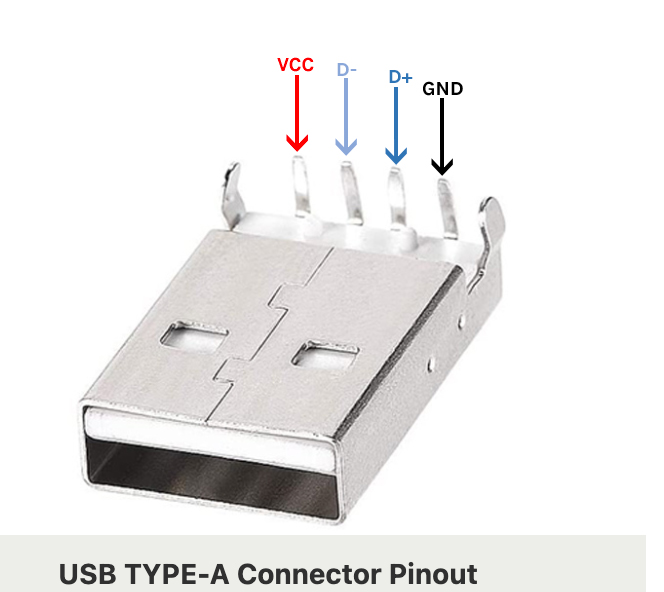
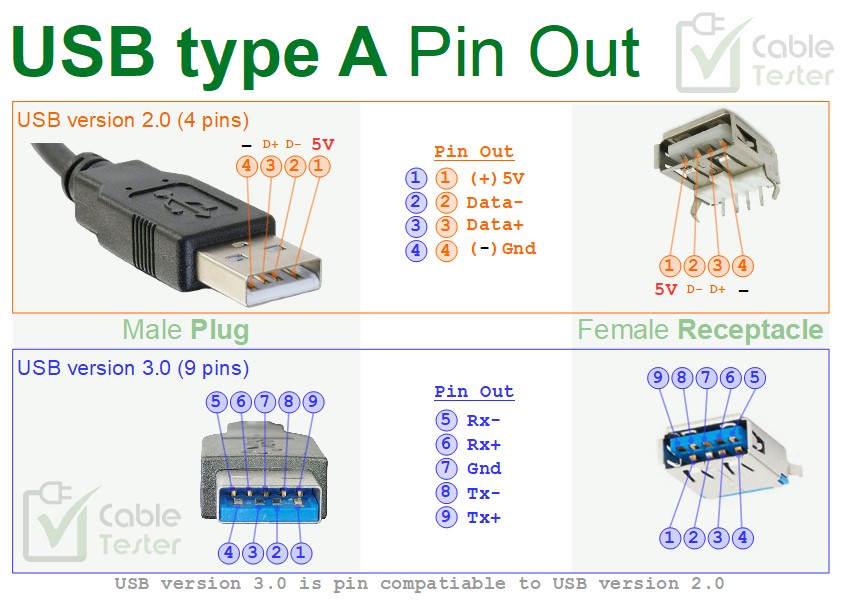
The Mighty Four: A USB-A's Inner Circle
Deep inside every standard USB Type-A connector, whether it’s at the end of your charging cable or part of that intriguing A-to-A link, there's a tiny, bustling city of four very important pins. These aren't just random bits of metal; oh no, they are the vital arteries of digital life!
Imagine them as four tiny superheroes, each with a distinct and crucial role, working together in perfect harmony to make your gadgets sing. It's a miniature electrical symphony happening right under your nose!
Let’s pull back the curtain and meet these miniature marvels, especially as they relate to the sometimes-specialized world of the Type-A to Type-A connection.
Pin 1: The Powerhouse (VBUS)
First up, we have Pin 1: VBUS. Think of VBUS as the main power line, the mighty river of electricity flowing into your device. It’s the lifeline!
This pin carries a steady +5 volts, ready to energize anything from a tiny LED light to that external hard drive humming away. It's the reason your phone wakes up with a cheerful "ding!" when you plug it in.
In an A-to-A scenario, VBUS can become the dedicated power delivery channel, ensuring that energy flows exactly where it's needed for specific setups. It's truly the spark of life for your electronics.
VBUS is the electrifying heartbeat of your USB world!
Pin 2: The Data Whisperer (D-)
Next, we have Pin 2: D-, part of the dynamic duo responsible for all the information zipping back and forth. This isn't just a simple on/off switch; it’s a sophisticated messenger.
D- works in tandem with its partner to create a differential data pair. Imagine two tiny digital dancers, moving in sync but slightly out of phase, allowing for incredibly fast and reliable communication.
It helps shuttle all those vacation photos, important documents, and your favorite cat videos from one place to another. Without D-, your files would be stuck in digital limbo!
Pin 3: The Other Data Whisperer (D+)
And here’s its inseparable companion, Pin 3: D+! Together with D-, this pin forms the backbone of all USB data transfer. They are the ultimate tag team!
These two pins are like a highly efficient, super-fast postal service for all your digital bits. They send information as tiny electrical pulses, ensuring accuracy even amidst electrical noise. It’s ingenious!
Whether you’re updating firmware on a specialized device via an A-to-A cable or simply syncing your music library, D+ and D- are tirelessly making it happen, behind the scenes.
D- and D+: The dynamic duo that makes data fly!
Pin 4: The Silent Achiever (GND)
Last, but certainly not least, we salute Pin 4: GND, or Ground. This often-overlooked hero provides the essential return path for all the electrical currents.
Think of Ground as the sturdy foundation of a skyscraper, or the calm river that brings everything back to its source. It ensures stability and a common reference point for all the other signals.
Without a solid Ground, power would get confused, data signals would get muddled, and your beloved gadgets simply wouldn't work. It’s the quiet anchor that makes everything else possible.
In a world of flashy connections, GND is the steadfast, reliable friend you can always count on.
The A-to-A Symphony: When All Four Pins Connect
So, what happens when you have a Type-A to Type-A cable, with these four vital pins connecting two Type-A ports? It's a very specific kind of digital handshake!
While typical USB connections are usually between a "host" (like your computer) and a "device" (like a printer), an A-to-A cable often connects two hosts or two devices that are specifically designed to talk to each other this way. It's like setting up a private, high-speed telegraph line between two important offices.
These cables are the secret sauce for direct computer-to-computer file transfers (in certain legacy setups), connecting specialized networking equipment, or even powering certain peripherals from a different kind of source. They bridge gaps in a very deliberate, purposeful way.
Each VBUS, D-, D+, and GND pin from one end connects perfectly to its counterpart on the other end, creating a mirrored, robust link. It's a direct, symmetrical pathway for power and information.
This precise pin-to-pin mapping is what ensures that when you plug in an A-to-A cable, the intended magic happens. No crossed wires, no digital confusion, just clear communication and power delivery.
More Than Just Wires: It's Connection!
The world of USB Type-A connectors, especially the unique A-to-A variant, isn't just about technical specifications and electrical currents. It's about empowerment!
It’s about the sheer joy of plugging something in and watching it just *work*. It's about the confidence that your devices can communicate, share, and energize each other with perfect precision.
These four humble pins, working together in their meticulously designed symphony, are truly the unsung architects of our connected lives. So next time you grab a USB cable, spare a thought for the tiny heroes within!
They are the silent, steadfast guardians of your digital adventures, always ready to connect, power, and transfer, making our tech-filled world a little bit easier and a whole lot more fun!