

Alright, so picture this: you've got this sleek, gorgeous rectangle of pure entertainment sitting in your living room. It's not just a TV anymore, is it? Oh no, my friend, it's a smart TV. And like any smart gadget worth its salt, it comes packed with a secret stash of awesome: apps. But how do you actually, you know, get to them? It's less like cracking a safe and more like finding the secret snack drawer in your fridge – surprisingly easy once you know the trick!
Remember when TVs just showed… well, TV? Like, channels? Wild times! Now, your TV is basically a giant smartphone that doesn't fit in your pocket. It's got its own little brain, its own internet connection, and a whole universe of apps waiting to be explored. From binge-watching your favorite shows on Netflix (duh!) to discovering quirky documentaries on Mubi, or even just chilling with some ambient fireplace videos, the possibilities are endless. And trust me, getting there is half the fun!
Your Remote: The Magic Wand of Apps
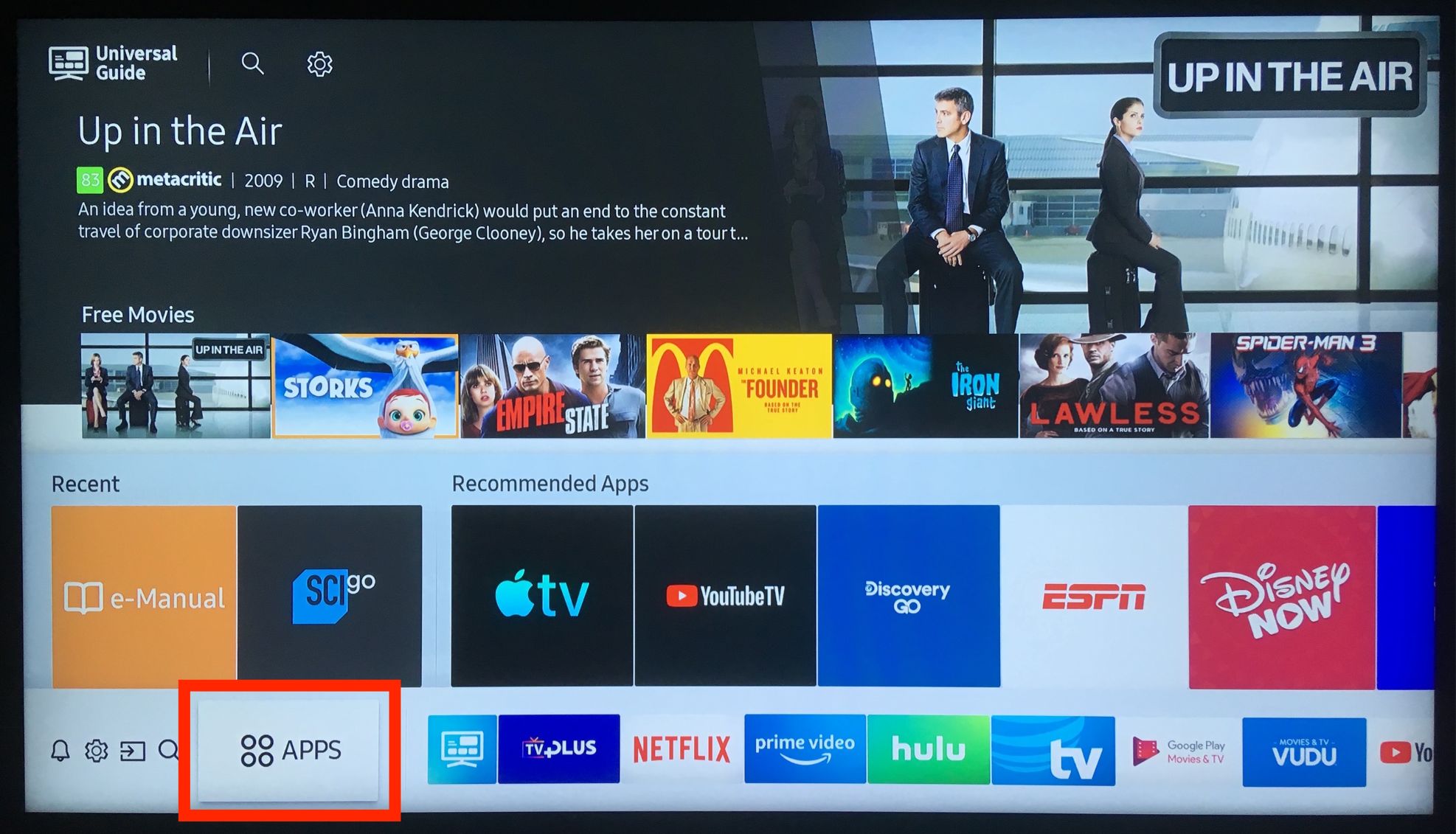
Let's be real, your TV remote is probably the most used, yet most ignored, gadget in your house. It's seen more couch cushion lint than a Hoover. But this little plastic rectangle? It’s your ticket to app-land. Look for the button that screams "Hey, I'm important!" It usually says "Home," "Smart Hub," "Apps," or has a little house icon. This is your gateway. Press it. Go on, I dare you!
Once you hit that magic button, *poof*! You'll likely see a grid or a scrolling bar of icons. These are your already-installed apps. Think of it as your TV's personal app locker. Want Disney+? Find the Mickey Mouse ears. Craving some YouTube cat videos? Look for the red play button. It’s usually pretty intuitive. Each smart TV brand has its own flavor – Samsung's Tizen, LG's WebOS, Roku TVs, Fire TVs, Google TVs – but the core idea is the same: point and click.
Talk to Me, TV! Voice Commands Are Your New Best Friend
Okay, this is where things get a little futuristic and ridiculously cool. Many modern smart TVs are basically eavesdropping on you (in a good way, mostly!). They come with voice assistants built right in. Imagine this: your remote is lost (again) or you're just feeling a bit lazy. Simply say, "Hey Google, open Hulu!" or "Alexa, launch Prime Video!" and *BAM!* Your TV obeys. It feels a bit like having a tiny, very obedient robot butler living inside your screen. It's incredibly handy and, let's be honest, makes you feel like you're living in a sci-fi movie. Try it, even if just to impress your cat!
Your Phone: The Remote's Understudy (and Sometimes the Star!)
Ever had that moment of panic when the remote vanishes into the abyss of the sofa cushions, never to be seen again until cleaning day? Fear not! Your smartphone is here to save the day. Most major smart TV brands, and even specific streaming devices like Roku and Fire TV, have companion apps for your phone. Download the appropriate app, link it to your TV (usually a quick Wi-Fi pairing), and suddenly your phone becomes a super-remote. You can navigate menus, type in search terms (a million times faster than pecking with a remote!), and yes, launch all those glorious apps directly from your phone screen. It's a lifesaver, and honestly, sometimes it's even better than the physical remote.
Discovering New Worlds: The App Store Adventure
So, you've mastered getting to your current apps. But what if you want *more*? That's where the TV's built-in app store comes in. On your "Home" screen, look for an icon that says "App Store," "LG Content Store," "Samsung Apps," "Roku Channel Store," or something similar. This is your portal to an even wider universe of digital delights. You can browse by category, search for specific apps, and download new ones. Most are free, some require subscriptions, but the sheer joy of finding that niche streaming service for retro cartoons? Priceless. It’s like window shopping, but for digital entertainment.
A Quick Nudge for Smooth Sailing (No Stress, Just Fun!)
Just a couple of friendly pointers to keep your app journey smooth:
- Internet, Please! Your smart TV needs to be connected to Wi-Fi (or wired Ethernet) to access apps. No internet, no app party!
- Updates Are Your Friend: Sometimes, apps act funky. A quick software update for your TV or the app itself can often fix things. Your TV usually prompts you, but it's worth checking occasionally.
- Power Cycle Magic: The old "turn it off and on again" trick isn't just for computers. If an app freezes, try unplugging your TV for a minute, then plugging it back in. It often works wonders!
Getting to your smart TV apps isn't rocket science; it's more like finding the cheat codes to endless entertainment. It's about pressing a button, uttering a phrase, or tapping your phone, and suddenly, you're transported to a world of stories, music, and pure fun. So go on, explore! Dive into those menus, chat with your TV, and uncover all the cool stuff your smart screen has been hiding. It’s an adventure waiting to happen, right there in your living room!


:max_bytes(150000):strip_icc()/samsung-tv-add-apps-rob-l-step-1--f8adcec7a36f469dbaa6508a8406bbd8.jpg)