
Average Power Consumption Of A Desktop Computer

Okay, let's talk about desktop computers. You know, those beige (or maybe black, or rainbow-colored, no judgement) boxes humming away on your desk. The question? How much power are they really sucking down?
The "Official" Answer (Yawn)
If you Google it (and who doesn't Google everything?), you'll get a range. Probably something like "an average desktop computer uses between 60 and 300 watts." Helpful, right? That's like saying the average car gets "between 10 and 50 miles per gallon." Sure, technically true, but about as useful as a screen door on a submarine.
They factor in everything from grandma's ancient solitaire machine to a tricked-out gaming rig that looks like it was stolen from NASA. And honestly, who are these mythical “average” users anyway? Do they even exist?
Must Read
My Unpopular Opinion (Prepare Yourself)
Here it comes. Buckle up. Most desktop computers use WAY more power than you think. I'm talking closer to the 200-400 watt range on average. Hear me out!
Think about it. Even if you're "just" browsing the web or writing emails, that processor is still working. That graphics card is still… graphing. And those spinning hard drives? They're hungry little gremlins.
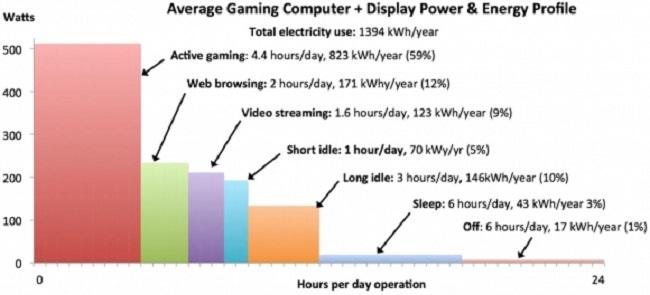
Plus, who really just uses their computer for basic stuff? We're all watching YouTube videos, streaming Spotify, and probably have at least ten browser tabs open at any given moment. That all adds up!
Remember the last time you only had one tab open? Yeah, me neither.
And don’t even get me started on gamers. Those RTX 4090 cards? They're not exactly energy-sipping daisies. More like power-guzzling black holes. If you're rocking a serious gaming setup, you're probably pulling more watts than your refrigerator. Seriously.
The Silent Vampires: Peripherals
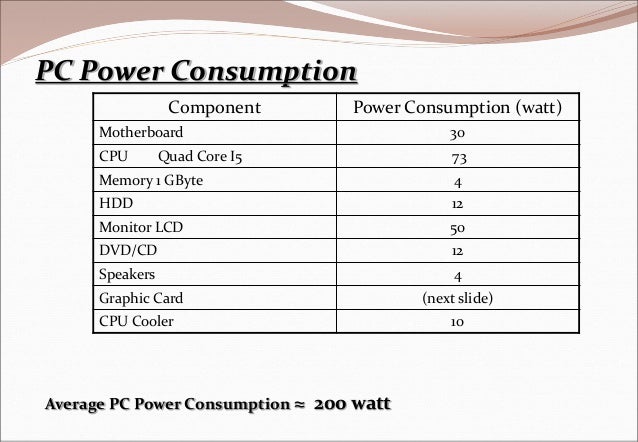
We also need to talk about peripherals. That fancy RGB keyboard? The glowing mouse? The external hard drives that are always plugged in? They're all little power vampires, slowly draining your electricity. Individually, they might not seem like much. But collectively? They can make a dent.
And what about the monitor? That big, beautiful screen isn't powered by rainbows and sunshine. It's another energy hog hiding in plain sight. Especially those ultra-wide, high-resolution beasts. They’re gorgeous, sure, but they come at a price.

"But My Power Supply Is Rated For 800 Watts!"
Yes, yes. We know. But just because your power supply can deliver 800 watts doesn't mean it is delivering 800 watts all the time. It’s like saying your car can go 150 mph. Sure, maybe. But you're probably not doing that on your daily commute (and if you are, please don't tell me).
The power supply is just the maximum amount it could provide. The actual power consumption is determined by the components and what they're doing.
So, What's the Point?
Am I saying you need to sell your computer and live in a cave? Of course not! But it's good to be aware of how much power your machine is using. Especially if you're trying to save money on your electricity bill, or just want to be a little more eco-conscious.

Maybe consider turning off your computer when you're not using it. Unplug those peripherals when you're done for the day. And maybe, just maybe, resist the urge to buy that third monitor (okay, maybe not. I understand the temptation).
At the end of the day, it's your computer. Use it, enjoy it, and don't feel too guilty about the power consumption. Just remember, that little box on your desk is doing a lot more than you think. And it's probably costing you more than you realize.
Now, if you'll excuse me, I'm going to go unplug my RGB mouse pad. Just kidding (mostly).