
Adt Battery Replacement Motion Sensor
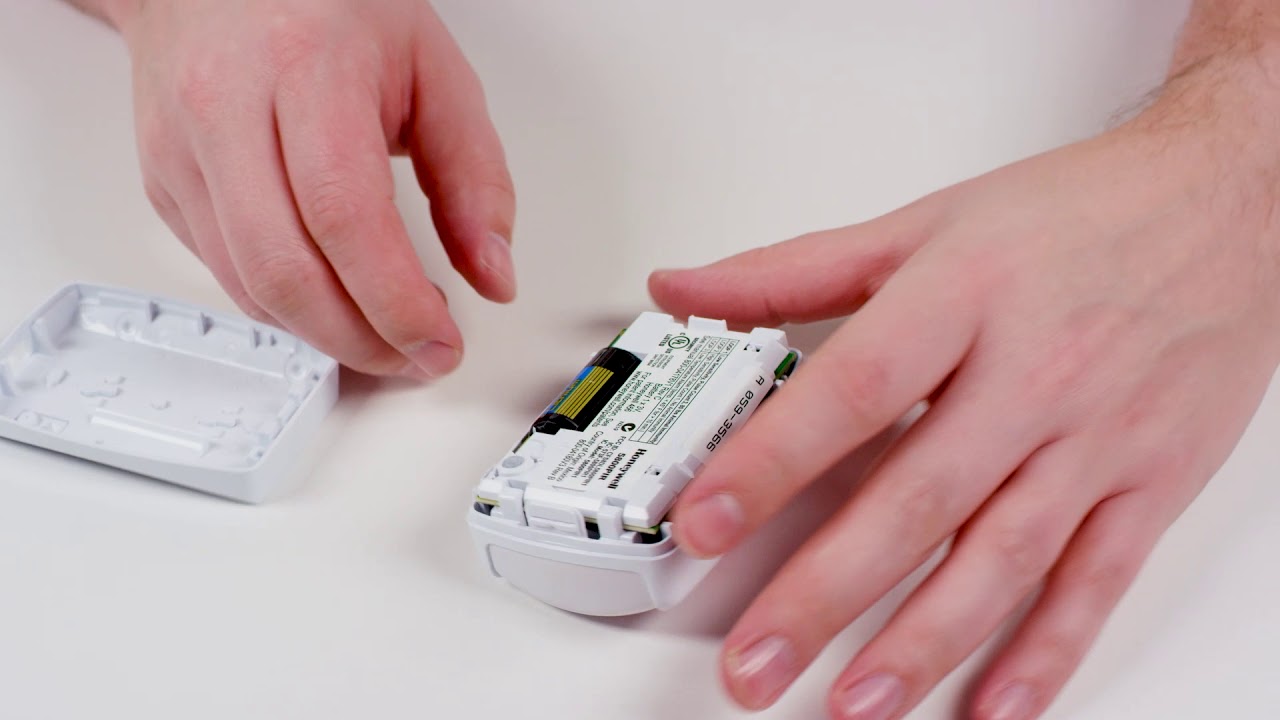
Alright, friend, let's chat about that little red light or cryptic message on your ADT panel. You know the one. It's whispering (or sometimes loudly yelling) "Low Battery!" from one of your motion sensors. Don't panic! This isn't a job for a superhero, or even a highly paid technician. It's a job for you, and trust me, it’s easier than assembling IKEA furniture blindfolded. Probably.
Think of your ADT motion sensor as a tiny guardian, always on the lookout. But even guardians need a snack, or in this case, a fresh battery to keep their energy up. When that low battery alert pops up, it’s basically your sensor saying, "Hey, I'm feeling a little sluggish. Could use a power-up, please!"
Why Bother, You Ask?
Well, besides silencing that annoying notification (which, let's be honest, is reason enough!), a fully juiced sensor means your home is actually protected. A dead battery means a dead sensor, and nobody wants a blind spot in their home security. Plus, it saves you a service call fee, and who doesn't love saving a few bucks?
Must Read
So, let's dive into this super simple ADT battery replacement for your motion sensor. You’re about to become a certified home security DIY pro. (Okay, maybe just "competent homeowner," but still, pretty cool!)
First Things First: Gather Your Tools (All Two of Them!)
You won't need a whole toolbox for this mission. In fact, you'll likely only need:

- A small Philips head screwdriver (or a flathead, depending on your sensor model).
- Your shiny, new replacement battery (we'll talk about types in a sec).
That's it! No special gadgets, no secret decoder rings. Just basic household stuff.
Operation: Battery Swap!
Alright, soldier, follow these easy steps. We’re going to get that motion sensor feeling spry again.

Step 1: Identify the Culprit (and the Battery Type!)
The ADT panel usually tells you exactly which sensor is feeling poorly. Once you've located it, the fun begins. Most ADT motion sensors are designed to be user-friendly. Look for a small screw at the bottom or a little latch on the side. Some even have a subtle push-tab. Your mission, should you choose to accept it, is to gently open the sensor casing. Don't Hulk smash it open, it's not a piñata.
Once you’ve got it open, take a peek at the old battery. This is super important. Most ADT motion sensors use common battery types like CR123A lithium batteries. Some might use AA or AAA, but CR123A is the superstar of motion sensors. Make a note of the type and voltage (e.g., 3V) so you can get an exact match. Don’t try to put a AAA where a CR123A should be; it just won't work, and the sensor might judge you silently.
Step 2: The Grand Removal
Carefully pop out the old battery. It might be snug, but a little nudge should do it. Remember which way it was oriented – positive (+) and negative (-) ends. Some sensors are kind enough to have little diagrams, but it's always good to be observant.

Step 3: Insert the New Power Source
Slide your fresh, new battery into place, making sure the positive and negative ends match how the old one was in there. It should fit snugly. Give it a gentle press to ensure good contact. Feel that? That's the feeling of power flowing back into your little guardian!
Step 4: Close 'Er Up!
Snap the sensor cover back on, ensuring it clicks firmly into place. If there was a screw, put it back in. Give it a gentle wiggle to make sure it's secure. You don't want it falling off the wall like a clumsy ninja.

The Grand Finale: Testing and Clearing the Fault
Now for the satisfying part! Head back to your ADT control panel. You might see the low battery fault immediately clear itself. If not, don't fret! Some panels need a little nudge. You might need to clear the fault manually (check your ADT user manual for specific steps, but often it involves disarming and re-arming or entering a code).
Once the fault is cleared, walk in front of the sensor a few times. Does it trigger? Does your panel register motion? Hooray! Your ADT motion sensor is back in business, watching over your home with renewed vigor. You've conquered the dreaded low battery alert!
You Did It!
See? I told you it was easy! You just saved yourself time and money, and gave your home security system a little TLC. You're not just a homeowner; you're a tech-savvy, problem-solving, home-protecting wizard! Take a bow, pat yourself on the back, and enjoy the peace of mind knowing your motion sensor is fully charged and ready for action. Now, go forth and enjoy your day, knowing you’ve successfully vanquished the blinking red light! You're awesome!