
Why Does My Screen Brightness Keep Going Down
Hey there! Ever feel like your screen's playing a cruel joke on you? Like it's got a mind of its own, dimming at the most inconvenient moments? You're not alone! Let's dive into the mystery of the disappearing brightness. It's more common (and less sinister) than you think!
The Usual Suspects
First, let's talk about the obvious culprits. Think of them as the usual suspects in this brightness whodunit.
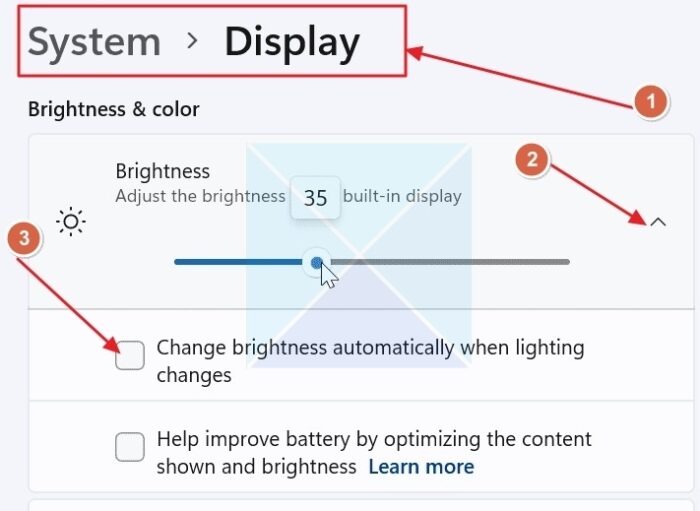
Auto-Brightness: This is the big one! It's usually on by default. Your device is trying to be helpful. It senses the ambient light. Dark room? Dim screen. Sunny day? Bright screen. Sounds good, right? Except when it's wrong! It can be overly sensitive. Like a drama queen, overreacting to every shadow.
Must Read
Is auto-brightness actually smart? Sometimes. Is it perfect? Nope! It's like that well-meaning friend who gives terrible advice.
Battery Saver: Another helpful feature gone rogue! When your battery dips low, your device kicks into battery-saving mode. One of the first things it does? Dim the screen. Energy conservation, baby! But what if you need that brightness? Tough luck (unless you turn it off!).
It’s like rationing snacks on a road trip. Necessary, but nobody's happy about it.
Adaptive Brightness/Content Adaptive Brightness Control (CABC): These sound fancy, right? They are! They adjust brightness based on what's on your screen. Watching a dark scene in a movie? Dim the screen. Reading a bright webpage? Keep it bright. The idea is to save power and improve viewing. But sometimes, the adjustments are jarring. Like a light switch party!

The Less Obvious Culprits
Okay, we've covered the easy stuff. But what if the usual suspects are innocent? Time to dig deeper!
Driver Issues: Yes, even your screen has drivers! (Software that allows your operating system to communicate with your hardware). Outdated or corrupt drivers can cause all sorts of weirdness. Including brightness issues. Think of it like this: your screen and your computer are having a communication breakdown. "I need more brightness!" "Huh? What was that? Lower brightness it is!"
It's like trying to translate a complex sentence using a broken dictionary.
Overheating: Is your device getting hot? Like, "I could fry an egg on this" hot? Overheating can trigger automatic dimming. It's a safety mechanism. Your device is trying to protect itself. Imagine it's screaming, "Cool me down! I'm too hot to handle!"

Software Bugs: Sometimes, it's just a plain old bug. A glitch in the system. A gremlin in the machine. These bugs can cause all sorts of unpredictable behavior. And yes, that includes your screen brightness fluctuating wildly.
Why Is This So Annoying?
Let's be honest. This isn't just a technical issue. It's a quality-of-life issue! Imagine you're trying to edit a photo. Or watch a video. Or even just read an email. Constant brightness changes are distracting. Frustrating. And just plain annoying!
It's like someone constantly fiddling with the volume on your headphones.
How to Fight Back!
Don't despair! You can take control! Here are a few tips to tame the brightness beast:

Disable Auto-Brightness: This is often the easiest fix. Dig into your settings. Look for "Display" or "Brightness." Turn off that pesky auto-brightness switch!
Check Battery Saver Settings: Make sure battery saver isn't kicking in prematurely. Adjust the settings to your liking.
Update Your Drivers: Keep those drivers up to date! Visit your device manufacturer's website. Download the latest drivers for your graphics card or display adapter.
Keep Your Device Cool: Avoid overheating! Don't leave your device in direct sunlight. Use a cooling pad if necessary.

Restart Your Device: The classic solution! Sometimes, a simple restart can fix those software glitches.
Check Accessibility Settings: On some devices, accessibility settings can affect brightness. Make sure nothing is inadvertently turned on.
Consider a Third-Party App: There are apps designed to control brightness more precisely. Explore your options!
The Joy of Controlling Your Screen
Ultimately, the goal is to have a screen that works for you. Not against you. So, embrace your inner tech detective. Experiment with different settings. And reclaim control of your screen brightness! You deserve a screen that shines (or dims) exactly when and how you want it to.
Go forth and conquer those flickering screens! The power is in your hands!