
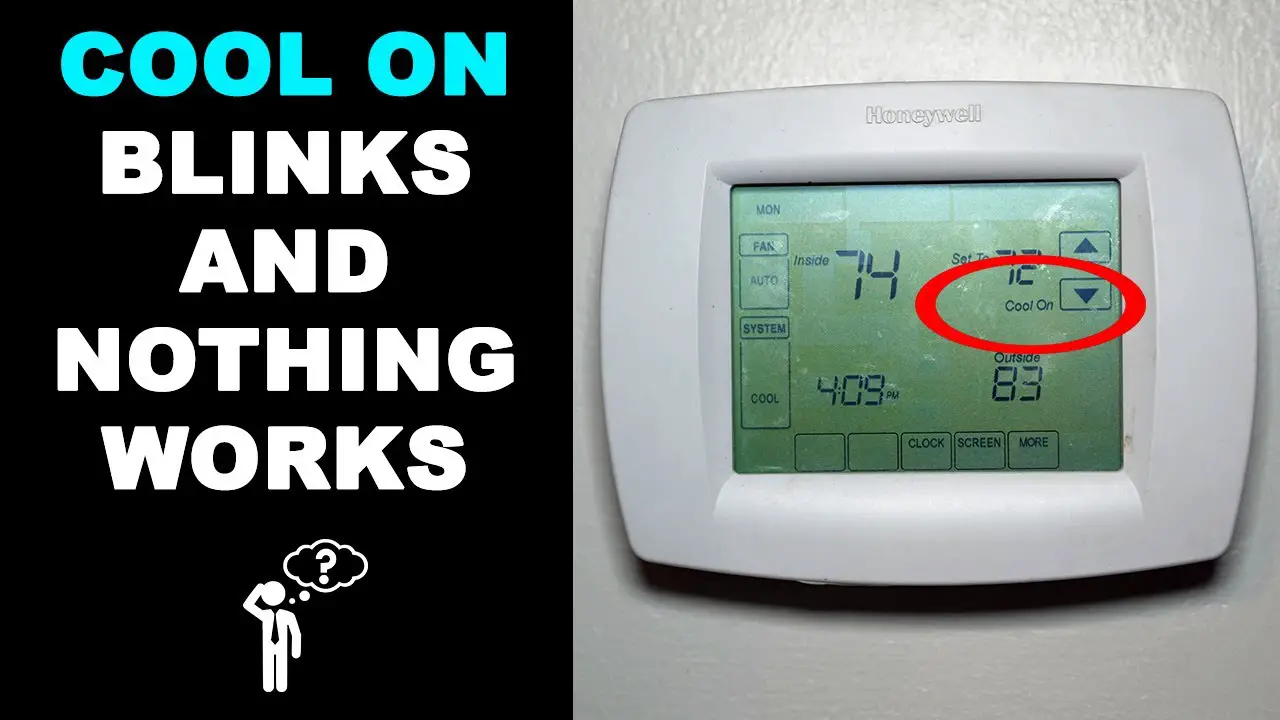
Okay, let's talk about that moment. You're just living your best life, maybe scrolling through TikTok or contemplating whether to finally clean out the fridge. You glance at your thermostat, perhaps expecting a comforting, steady glow, and BAM! There it is. That little "Cool On" light. But it's not just on. Oh no. It’s doing a frantic, tiny little rave. It’s blinking. And instantly, your internal alarm bells go off. Is it broken? Is the AC dead? Am I about to melt into a human puddle?
Deep breaths, my friend. While a blinking "Cool On" light can feel like your thermostat is staging a silent, passive-aggressive protest, it's usually just trying to tell you something very specific, and often, not that scary at all. It’s like your house is giving you a little wink and a nudge, saying, "Hey, pay attention!"
Reason #1: The Chill-Out Zone (aka the Time Delay)
This is, hands down, the most common reason for the blinking light. Your AC compressor is a hardworking hero, but it's also a bit delicate. Imagine asking a super-fast runner to stop dead and then immediately sprint again. Not good for the muscles, right? The same goes for your AC.
Your thermostat has a built-in safety feature, often called a compressor short-cycle delay. If you turn the AC off and then back on too quickly, or if the power flickers, the thermostat will deliberately wait a few minutes (usually 3 to 5, sometimes even 10) before kicking the compressor back on. This blinking light is its way of saying, "Hold your horses, chief. I'm waiting for the all-clear."
It’s like your thermostat is a bouncer at an exclusive club, making sure everything's just right before letting the compressor back inside. This delay protects your system from wear and tear, and trust me, a few minutes of waiting is way better than a hefty repair bill because you burned out the compressor.

Reason #2: The Power Play (aka a Tiny Existential Crisis)
Ever had your computer suddenly decide it needed to restart for no apparent reason? Or your phone freeze mid-scroll? Your thermostat can experience a similar hiccup. A brief power outage, a brownout (when the power dips briefly), or even a tripped breaker can cause your thermostat to lose its mind for a split second.
When the power comes back, it might need a moment to re-evaluate its life choices and remember what it was doing. The blinking "Cool On" light could be indicating it's just rebooting or that it's in the middle of its time delay sequence after losing power. It’s basically saying, "Whoa, what just happened? Give me a sec to get my bearings!"
![Why is My Honeywell Thermostat Flashing “Cool On”? [7 Easy Fixes] - www](https://www.mechstudies.com/wp-content/uploads/2023/09/honeywell-thermostat-flashing-cool-on-how-fix-troubleshoot.jpg)
This usually resolves itself once the system completes its startup sequence or the time delay passes. It’s the digital equivalent of shaking its head and trying to remember where it put its keys.
Reason #3: The Battery Brouhaha (aka "I'm Dying Inside!")
Some thermostats, especially older or battery-powered models, might blink the "Cool On" light to signal that their batteries are running dangerously low. This isn't always the case for all blinking lights, but if you notice other strange behavior (like the display flickering, or it's just generally unresponsive), dead batteries could be the culprit.
It's like your thermostat is trying to send you a Morse code message for help before it completely conks out. You know, that desperate blink before your remote finally gives up the ghost while you're trying to fast-forward through commercials.

So, check your thermostat's display for a low battery icon, or just pop in some fresh AAs if you're feeling adventurous. It’s a cheap fix that often cures a multitude of mysterious thermostat woes.
Reason #4: The SOS Signal (aka "Houston, We Have a Problem!")
While less common, a persistent, non-resolving blinking "Cool On" light can sometimes indicate a more serious underlying issue. If the blinking doesn't stop after 10-15 minutes, or if your AC isn't blowing cold air at all, your thermostat might finally be snitching on a bigger problem.
This could be anything from a clogged air filter (your AC literally can't breathe) to a frozen evaporator coil, a refrigerant leak, or even a problem with the outdoor unit itself. In these cases, the blinking is less of a friendly reminder and more of a "Hey! I'm doing my best, but something's really wrong here!"
Think of it as the difference between a little cough (time delay) and a full-blown hacking fit (actual system failure). If you've waited, checked for power issues, changed batteries, and still no dice, it might be time to call in the HVAC cavalry.
What Should You Do When It Blinks?
- Wait it Out: Seriously, this solves about 90% of blinking light mysteries. Give it 5-10 minutes. Go get that snack, fold some laundry, or ponder the meaning of life. Often, it'll stop blinking and your AC will kick right on.
- Check Your Power: Did the power flicker recently? Has a breaker tripped? If so, wait a few minutes after power returns, or reset the breaker.
- Change Batteries: If your thermostat takes batteries, replace them. It's a quick, cheap diagnostic step.
- Check Your Filter: Is it clogged with dust bunnies the size of small pets? A dirty filter can restrict airflow and cause all sorts of issues. A clean filter is a happy AC.
- Still Blinking? If it persists and your AC isn't cooling, it's time to call a professional. Don't try to be an HVAC hero unless you actually are one.
So, the next time your thermostat decides to put on a little light show, don't panic. It's probably just being a responsible little gadget, protecting its precious compressor, or recovering from a mild case of amnesia. Give it a moment, and chances are, you'll be back to blissfully cool comfort in no time. And maybe, just maybe, give it a tiny pat for being such a good communicator.