
Laptop Won T Charge Or Turn On
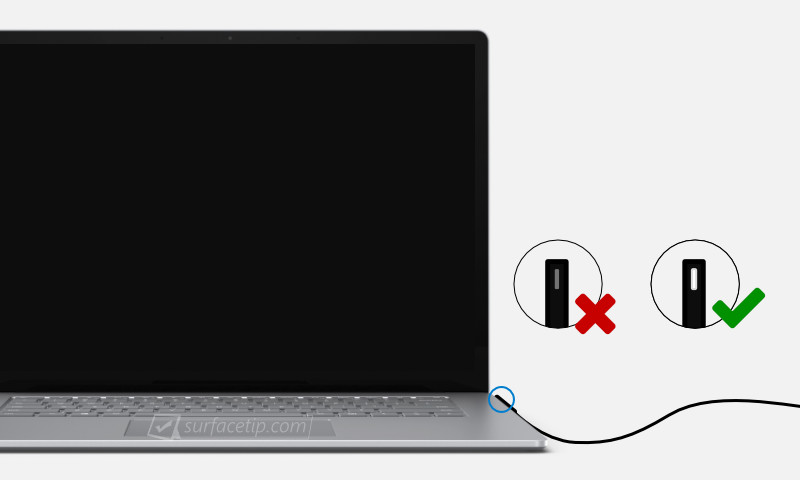
Ah, the dreaded moment. You open your laptop, eager to dive into that brilliant idea, catch up on your favorite show, or conquer your to-do list, and... nothing. The screen remains stubbornly black, the charging light a no-show, and a cold dread creeps in. Your laptop won't charge or turn on. It feels like a tiny, personal apocalypse, doesn't it?
But hold on a second! Before you spiral into visions of expensive repair bills or, worse, a life without your digital companion, let's hit pause. What if I told you this seemingly frustrating moment isn't a disaster, but actually a secret invitation to a mini-adventure? A chance to become a bona fide tech detective, unlock some digital mysteries, and maybe even discover a new sense of empowerment? Intriguing, right?
Embrace Your Inner Tech Detective
Think of your laptop as a friendly, but sometimes temperamental, robot sidekick. When it goes silent, it's not trying to vex you; it's simply giving you a puzzle to solve. And trust me, solving puzzles can be incredibly satisfying – and dare I say, fun!
Must Read
Let's start our investigation with the most common culprits, shall we?
Step 1: The "Is It Plugged In?" Masterclass.
We've all been there. Staring blankly at a dead device, heart sinking, only to realize... the plug wasn't even in the wall! Or the power strip was off! Or the outlet itself decided to take a nap. So, take a deep breath and give every single connection point a firm, friendly nudge. Is the adapter snug in the wall? Is the cable fully inserted into your laptop? What about the connection between the power brick and the wall cable? Yes, all of them! Try a different wall outlet, just to be sure. Sometimes, the simplest solution is the stealthiest.

Step 2: Meet Your Power Brick.
That little box on your charging cable? That's your power brick, and it's the unsung hero (or sometimes, the silent villain) of your laptop's life. Give it a good once-over. Are there any visible kinks, frays, or suspicious bends in the cable leading to it or from it? Does it smell burnt? (Hopefully not!) Sometimes, a charging cable can simply go bad. If you have a friend with a compatible charger, this is a great time to borrow it for a quick test. It's like trying on a new pair of shoes – sometimes, a different fit makes all the difference.
Step 3: The Hard Reset Hug.
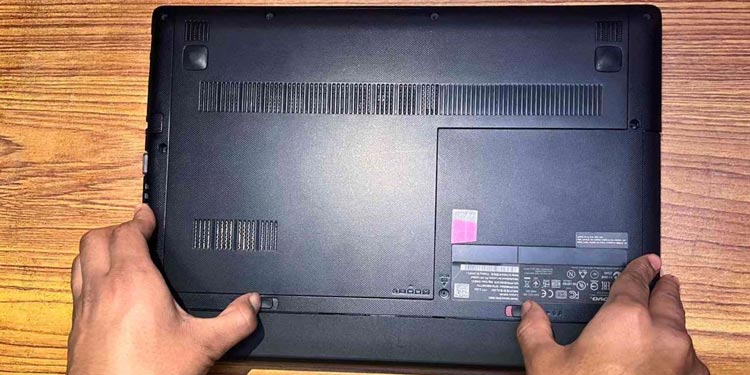
Computers, bless their digital hearts, sometimes just need a good old-fashioned reset to clear their temporary memory and wake up. This is usually harmless and often effective. Disconnect your laptop from the power adapter. If your battery is easily removable (many modern laptops don't have this feature, but if yours does, try it!), take it out. Then, press and hold down the power button for a solid 30-60 seconds. Release, plug the adapter back in (without the battery if you removed it), and try turning it on. It's like giving your laptop a firm, reassuring "wake up!" shout.
Step 4: Unplug Everything Else!
Sometimes, a rogue USB device, an external monitor, or even a fancy mouse can draw too much power or confuse your laptop's internal systems, preventing it from booting up. Unplug everything except the power adapter. Yes, even that cute little USB fan! Once everything else is detached, try turning it on again. It's like clearing the stage for the main act – your laptop!
![HP laptop won’t turn on or charge [Fix]](https://www.thewindowsclub.com/wp-content/uploads/2023/04/HP-laptop-wont-turn-on-or-charge.png)
Step 5: Listen, Look, and Connect.
Even if the screen is black, is there any sign of life? Do you hear fan noises? Beeps? Do any indicator lights flicker on for a second? These subtle clues are like whispers from your laptop, telling you it might be on, but the screen isn't working. If you have an external monitor, try plugging your laptop into it. If something appears on the external screen, then you know your laptop is technically working, and the issue lies with the internal display – a different, but often less dire, problem!
Why This Makes Life More Fun (Seriously!)
Okay, so your laptop is still playing hard to get, or maybe one of these steps brought it gloriously back to life. Either way, you've just engaged in a valuable exercise!

First, you've taken control. You didn't immediately surrender to panic or a tech support queue. You became an active participant in understanding your own tools, and that's incredibly empowering. Every little step you took, every connection you checked, taught you something new about how your device works.
Second, you've honed your problem-solving skills. These aren't just for laptops, folks! This methodical approach, this willingness to test theories and try different angles, is a superpower applicable to all areas of life. From a tricky recipe to a confusing instruction manual, your new "tech detective" mindset will serve you well.
And finally, there's the sheer joy of discovery. Whether you found the simple fix or narrowed down the problem significantly, you've engaged your curiosity and expanded your knowledge. You might have saved yourself time, money, or at the very least, a whole lot of stress.
So, the next time your laptop pulls a disappearing act, don't despair. See it as an invitation to a playful challenge. Embrace the mystery, trust your intuition, and remember that with a little patience and a dash of curiosity, you're more capable of troubleshooting than you think. This isn't just about fixing a laptop; it's about fostering a spirit of learning and self-reliance. And who knows what other amazing things you'll learn to figure out along the way? You've got this!