How To Tell If Someone Blocks You On Facebook

Let's face it, Facebook. It's that digital town square where we share baby pictures, rant about the latest season finale, and stay (loosely) connected with everyone from our kindergarten classmates to that one person we met at a conference five years ago. It's a window into the lives of others, and sometimes, we become a little too invested in what we see. Which brings us to the slightly awkward, sometimes anxiety-inducing, topic: have you been blocked?
Why would anyone want to know if they've been blocked? Well, beyond pure curiosity (admit it!), it's about understanding the dynamics of our online relationships. Knowing if someone has blocked you can save you from repeatedly trying to contact them and feeling ignored. It can also provide closure (or at least a hint of it) if there's been a falling out. Plus, understanding how blocking works can help you manage your own privacy settings more effectively.
We see blocking used in all sorts of scenarios. Maybe you had a heated debate with a family member about politics. Perhaps an ex decided they needed a clean break. Or maybe, just maybe, someone accidentally blocked you while fumbling with their phone (hey, it happens!). Whatever the reason, the result is the same: you're digitally ghosted.
Must Read
So, how do you Sherlock Holmes your way to the truth? Unfortunately, Facebook doesn't send out official "You've been blocked!" notifications. That would be far too dramatic. But fear not, intrepid investigator, there are telltale signs. Here are a few tips to consider, keeping in mind that none of these alone are definitive proof:
1. The Search Party Fails: Try searching for the person's name. If they don't appear in your search results at all, it's a potential red flag. However, it could also mean they've deactivated their account or significantly changed their privacy settings. This is where the other tips come in.

2. Mutual Friends, Assemble!: Ask a mutual friend to search for the person. If your friend can find their profile, but you can't, well, that's pretty strong evidence that you've been blocked.
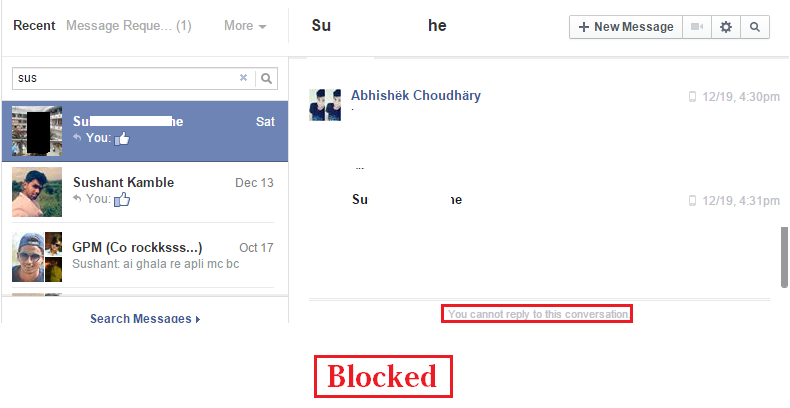
3. The Messenger Mystery: Try sending them a message through Facebook Messenger. If you can't even find their name to initiate a message, or if the message simply doesn't send (no delivered or seen notification), it's another indicator.
4. Tag, You're Not It: If you've been tagged in a post with them in the past, check that post. If their name is no longer a clickable link and just appears as plain text, that's suspicious.
5. The Group Goodbye: If you were both members of the same Facebook group, see if you can still see their posts or their name in the member list. If they've vanished, you might be blocked.
Important caveat: Remember, deactivated accounts and privacy settings can mimic the effects of being blocked. Before jumping to conclusions, consider all the possibilities. Sometimes, the kindest thing you can do is accept the digital silence and move on. And perhaps spend a little less time obsessing over Facebook drama. Your mental health will thank you!