
How To Set A Heat Thermostat

Hey there, cozy seeker! Ever stared at your thermostat like it was some kind of ancient alien artifact, wondering how to get it to just... work? You’re not alone! But guess what? Setting your heat thermostat isn't brain surgery, it's more like teaching a friendly robot to make your house feel like a giant, warm hug. And trust me, you've got this! No advanced degrees required, just a warm heart and a working thermostat.
Let’s peel back the layers of mystery, shall we?
Finding Your Comfort Command Center
First things first, locate your thermostat. It’s usually on an interior wall, often in a central living area. It might be a classic dial-and-slider (a retro cool kid!) or a sleek digital display. Either way, it’s the boss of your home’s temperature. Give it a friendly nod, it’s about to become your new best friend.
Must Read
The Holy Trinity: Off, Heat, Cool
Look for a switch or button that says something like "Mode" or "System." This is where you tell your thermostat what job it should be doing.
You’ll typically see:
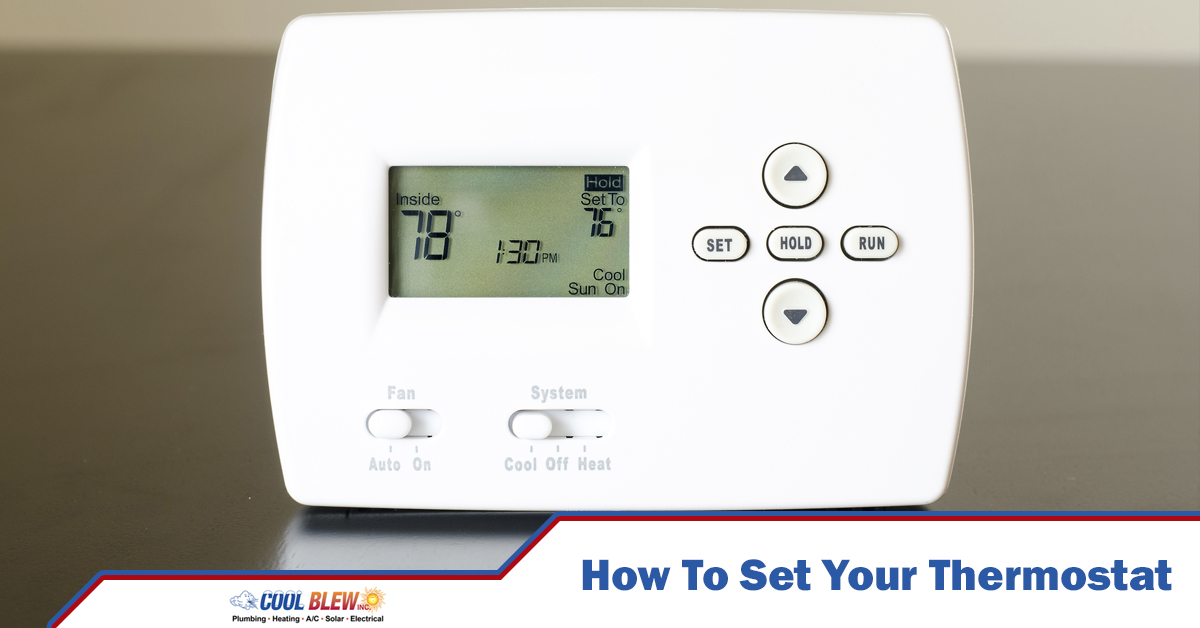
- Off: Pretty self-explanatory, right? The system is taking a nap. Good for when you’re away on a tropical vacation (lucky you!).
- Cool: This is for summer when you want your house to feel like an ice cream cone on a hot day. Not what we're after today!
- Heat: Bingo! This is your target. Toggle that switch to "Heat." Congratulations, you’ve just told your system, "Hey, it’s time to warm things up!"
Some thermostats might also have an "Auto" setting here, which lets the system switch between heating and cooling to maintain a set temperature. But for now, let's keep it simple: find Heat.
Setting the Temperature: Your Personal Weather Report
Now for the fun part: picking your perfect temperature!
If you have a digital thermostat, you’ll usually see up and down arrows (▲▼) to adjust the number. Each press changes the temperature by one degree.

If it’s a manual dial or slider, simply move it to your desired temperature. Easy peasy lemon squeezy!
So, what's the magic number?

- For most folks, a comfortable indoor temperature during the day in winter is somewhere between 68-72°F (20-22°C).
- At night, many people prefer a cooler house for sleeping, so dropping it to 60-65°F (16-18°C) can save energy and promote better sleep. Think of it as a little hibernation station!
Pro-tip: Resist the urge to crank the heat up to 80°F (27°C) hoping it will heat faster. Your furnace works at one speed (full blast!) no matter what temperature you set. All you’ll do is waste energy and end up with a sahara desert in your living room, followed by a shock when you see your energy bill. Slow and steady wins the cozy race!
Fan Settings: To Blow or Not To Blow?
You might see another switch for the fan with options like "Auto" and "On."
- Auto: This is your friend for most situations. The fan will only kick on when your heating system is actively heating, then turn off when it’s done. This is the most energy-efficient choice.
- On: This means your fan runs continuously, blowing air even when the heating system isn't actively working. It can help circulate air and even out temperatures, but it uses more electricity. Think of it as leaving a light on unnecessarily. Usually, Auto is the way to go!
The Smarty Pants Thermostats (A Quick Peek)
If you have a fancy-schmancy smart thermostat (like a Nest or Ecobee), you’re in for an even easier ride! These clever devices can learn your habits, be controlled from your phone (hello, warm house before you even step inside!), and even have "away" modes to save energy. They essentially do a lot of the thinking for you, which is pretty cool. But even with these, the core principles of "Heat" and "Temperature" still apply!

What If It's Not Working? (The Super Quick Checklist)
Okay, so you’ve set everything, but your house still feels like an igloo?
- Check the Mode: Is it definitely on Heat?
- Check the Temperature: Is your desired temp higher than the current room temp? The system won't kick on if it's already warm enough.
- Check Batteries: Many digital thermostats run on batteries. If the screen is blank or flashing, try replacing them!
- Give it a Minute: Systems don't always respond instantly. Give it a few minutes to spring into action.
If none of that works, it might be time to call in a pro – but usually, it's just one of these little hiccups!
You Did It!
See? Not so scary after all, right? You’re now officially a thermostat whisperer, capable of taming the elements (well, inside your house, at least!). Go forth and enjoy your perfectly toasty abode. May your socks always be warm and your hot cocoa always ready. Now go make yourself a cup of something delicious and bask in your newfound cozy-creating superpowers! You’ve earned it!